
Introduction
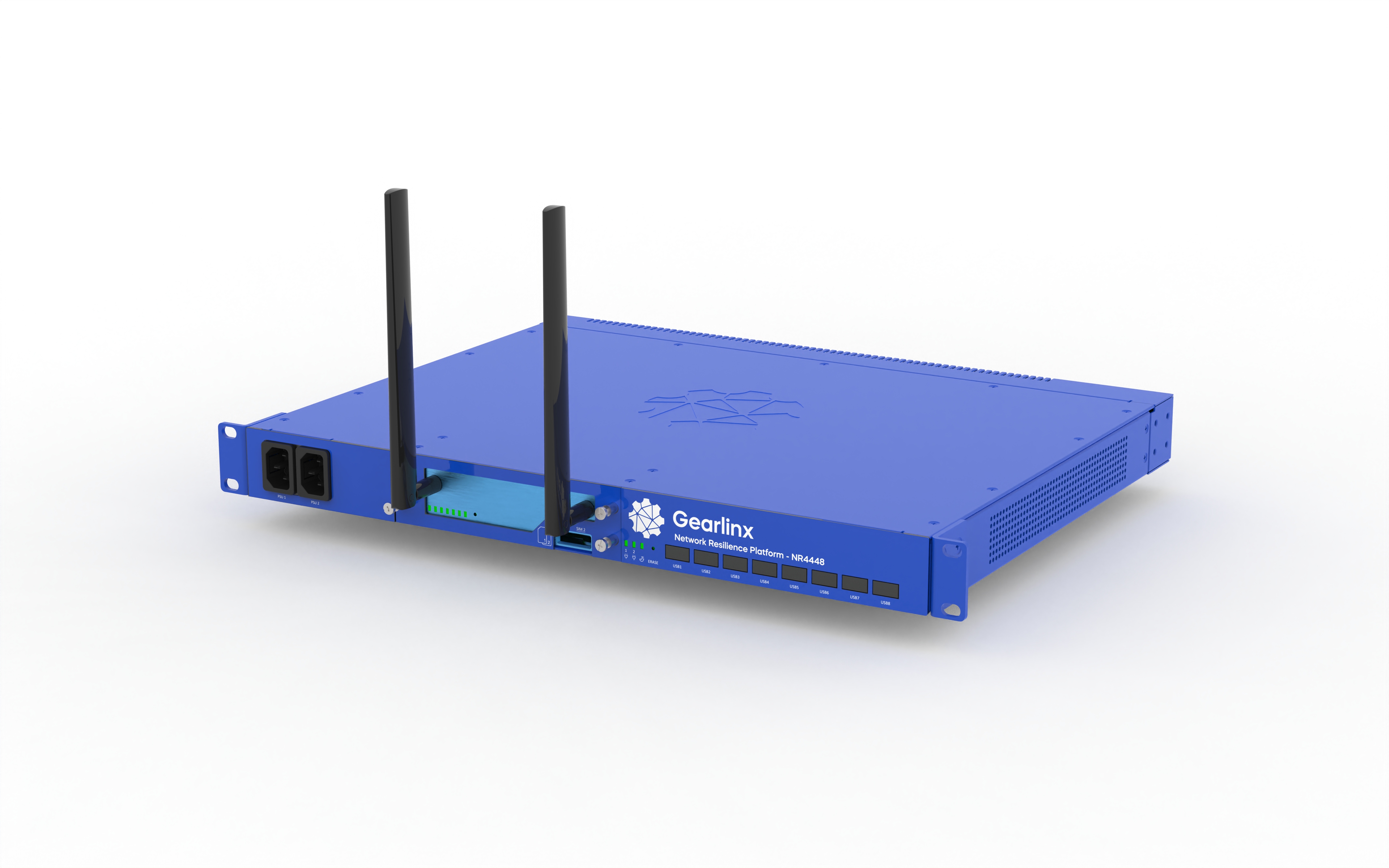
The Gearlinx NR4448 platform is an enterprise edge-compute and out-of-band management solution designed and optimized for deploying applications, virtual machines and compute while ensuring business continuity in high density, mission-critical data centers, colocations, and enterprise edge networks.
This manual documents administration of the device – the configuration, status, and commands – using the command line interface (CLI) and the web interface.
Hardware
- 48 × RJ45 serial ports with software selectable pinout
- 2 × 10/100/1000 Ethernet ports
- 2 × 1GbE/10GbE SFP+ multi-rate ports
- 8 × USB 2.0 ports
- 64GB SSD storage
- Dual AC power supplies with independent monitoring
- Secure boot, TPM 2.0 physical security for remote provisioning
Accessing the device
The device's default configuration allows logging in to the device with the following credentials:
- Username: admin
- Password: see unique password on device label
Additionally, if the device is connected to the internet and can access Gearlinx ZERO, a user permitted to access the device via ZERO can log in locally with their ZERO credentials.
Network services
Network services are accessible on the device's internal network interfaces.
The device's hostname is set as its serial number, and the device's IP address
can be resolved with mDNS. For example, NR4448-0000123456789.local.
The following network services are available:
- SSH to the device at
<serial>.local. - Enter
https://<serial>.localin your browser to access the web interface. - Access the device's web interface via Gearlinx ZERO.
Serial console
The device's serial port labelled Console runs a login. Connect to the serial port with settings 115200 / 8N1.
Resource menu
After logging in to the device over a terminal interface such as SSH or the serial console, you will be presented with the resource menu.
The resource menu shows the textual resources that the authenticated user is given access to, such as serial ports and system logs. The CLI is available to users with the Administration permission under the option System / CLI.
When accessing the web interface, the resource menu can be found under the Connect menu in the page header. Users with the Administration permission will find the Administration menu on the navigation bar on the left of the page. This menu provides access to the same configuration, status, and command functionality as the CLI.
CLI
The command line interface (CLI) is used to perform administration tasks when accessing the device over a terminal interface. Administration tasks include changing configuration, viewing status, and running commands.
The structure of the CLI commands and printed data is consistent with the structure of the web interface's administration pages. See the Administration reference section of this manual for documentation on the structure and content of this data.
Using the CLI
When the CLI starts, the main prompt is printed:
(cli)>
Typing ? shows contextual information and suggestions for autocompletion:
Gearlinux CLI

config  Enter configuration mode.
show    Enter show mode.
run     Run a command.
exit    Exit the CLI.
Pressing the TAB key also shows the suggestions list, and will autocomplete the word if the start of a word already entered prefixes one of the suggestions. The CLI supports line editing.
Configuration and status data is printed in YAML format.
Output text that exceeds the height of the terminal is paged. When paged,
pressing the space key shows the next page of text, pressing r prints the
remaining text, and q cancels the pager without printing.
Basic configuration command
The CLI can be used to inspect and change the device's configuration.
While at the main CLI prompt, the config command interacts with the device's
current configuration, and is updated automatically when the device's
configuration changes by automations or other administration sessions.
To print configuration, enter config keyword and the administration
path, then press enter.
(cli)> config <PATH>
For example, to print details of the device at path system info:
(cli)> config system info
name: null
location: null
contact: null
To make simple configuration changes to string, integer, boolean, selection, and reference data types, append a value to the print command.
(cli)> config <PATH> <VALUE>
For example, to set the device's name system info name to nr44-bay18
(cli)> config system info name nr44-bay18
Multiple values can be set in one command by adding another path (relative to the previous set field) and value.
(cli)> config system info name nr44-bay18 location "Data center 1"
The changes are applied and saved to disk if they pass validation.
Configuration mode
Configuration mode allows advanced configuration changes, including adding or deleting items of a list, reverting configuration to defaults, and applying configuration changes without saving them to disk, require using the configuration mode. In configuration mode, a copy of the device's current configuration is made available for editing so that multiple operations can be performed before saving.
Enter configuration mode by running config with no parameters.
(cli)> config
The syntax of the basic configuration command, without the leading config
keyword, is used to show and change the configuration.
(config)> system info name nr44-bay18

(config)> system info
name: nr44-bay18
location: null
contact: null
The following commands are available:
add       Add an item.
delete    Delete an item or value.
cd        Change data path.
validate  Validate the configuration.
apply     Apply the configuration.
save      Save the configuration to disk.
default   Revert to default.
discard   Discard the configuration changes.
changes   Show unapplied changes.
exit      Leave configuration mode without saving.
Enter the command keyword followed by ? to view help for the command.
When the configuration has been edited as required, run the save command
to apply the configuration changes and save them to disk.
The save command will fail if any configuration fields are invalid.
(config)> save
Run the exit command to return to the main CLI prompt.
(config)> exit
(cli)>
Show state command (configuration and status)
The CLI can be used to inspect the device's state.
While at the main CLI prompt, the show command prints the device's
current configuration and status, and is updated automatically.
To print state, enter the show keyword and the administration path, then
press enter.
(cli)> show <PATH>
For example, to print details of the device at path system info:
(cli)> show system info
name: null
hostname: NR4416-0110923000657
mac: d4:c3:b0:01:03:b0
serial: NR4416-0110923000657
location: null
contact: null
Running commands
The CLI can be used to run administrative operation commands.
To run a command, enter the run keyword and the administration path, then
parameters using the configuration set path/value syntax.
For example, backing up the configuration to the local configuration store
with the name backup 2023-06-15:
(cli)> run system config save-to-store name "backup 2023-06-15"

Command succeeded.
To run a command with no parameters, or default parameters (if available), omit the parameters. For example, restart the device by running the command:
(cli)> run system operations restart

System restarting.
Serial ports
The device's serial ports, and additional USB serial ports.
Default Serial port items cannot be deleted. New Serial port items can be added.
Serial port
- USB - Settings for USB serial port adapters.
- TCP - Settings for serial over TCP.
- Communications settings - The communications settings used for serial data and signaling.
- Signals
- Statistics
- Direct access
- Logging
- Connected users
Properties
Enable
Enable the serial port for use.
- Data type: boolean
- Default:
true - Configuration
CLI: (cli)> config serial <key> enable
Label
The label used to describe and locate this serial port.
Whenever this serial port is displayed the label will be used in preference, or addition to, the serial port number. The Label is also added as a tag allowing it to be located easily is searching and configuration.
- Data type: string
- Configuration
- Optional
CLI: (cli)> config serial <key> label
Device type
| Option | Label |
|---|---|
tty | Serial port |
tcp | TCP port |
- Data type: string select
- Default:
tty - Configuration
- Required
CLI: (cli)> config serial <key> type
Resource tags
Apply these tags to resources associated with this serial port.
Tagging provides a convenient method for finding single and group resources. The serial port label is automatically added to the ports tags.
- Data type: string list
- Configuration
CLI: (cli)> config serial <key> tags
Mode
The mode of operation for this serial port.
The serial port mode determines how serial port is accessed and what options are allowed when connected.
| Option | Label | Description |
|---|---|---|
remote | Remote access | Access an external serial appliance remotely. Suitable for remotely accessing a serial console on servers or other appliances, and if required, interacting with those appliances via their serial interface. |
login | System login | Provide a traditional login service. A login service will allow remote CLI access to this device. A console server, modem or other appliance can be used to access the CLI on this device via the serial port. |
- Data type: string select
- Default:
remote - Configuration
- Required
CLI: (cli)> config serial <key> mode
Escape character (ASCII character code)
The escape character to enter for menu and command access.
Enter the escape character followed by a command character while connected to a serial port in order to access the menu or serial port commands. The following sequences are possible:
 Escape-Char 'q' : quit
 Escape-Char 'b' : send serial break
 Escape-Char 'd' : list or disconnect other sessions
 Escape-Char 's' : port history (graphical terminal only)
 Escape-Char '?' : help
The table below lists the decimal values for the escape character, control characters are prefixed with '^'.
| 00 | 10 | 20 | 30 | 40 | 50 | 60 | 70 | 80 | 90 | 100 | 110 | 120 | |
|---|---|---|---|---|---|---|---|---|---|---|---|---|---|
| 0 | ^J | ^T | ^^ | ( | 2 | < | F | P | Z | d | n | x | |
| 1 | ^A | ^K | ^U | ^ | ) | 3 | = | G | Q | [ | e | o | y |
| 2 | ^B | ^L | ^V | ^? | * | 4 | > | H | R | \ | f | p | z |
| 3 | ^C | ^M | ^W | ! | + | 5 | ? | I | S | ] | g | q | { |
| 4 | ^D | ^N | ^X | " | , | 6 | @ | J | T | ^ | h | r | |
| 5 | ^E | ^O | ^Y | # | - | 7 | A | K | U | _ | i | s | } |
| 6 | ^F | ^P | ^Z | $ | . | 8 | B | L | V | ` | j | t | ~ |
| 7 | ^G | ^Q | ^[ | % | / | 9 | C | M | W | a | k | u | DEL |
| 8 | ^H | ^R | ^\ | & | 0 | : | D | N | X | b | l | v | |
| 9 | ^I | ^S | ^] | ' | 1 | ; | E | O | Y | c | m | w |
- Data type: integer
- Default:
30 - Minimum: 1
- Maximum: 255
- Configuration
- Required
CLI: (cli)> config serial <key> escape-character
Single user mode
Allow only one user at a time.
The port will allow a single user to connect. While a user is connected, all other connection requests will be rejected and logged.
- Data type: boolean
- Default:
false - Configuration
CLI: (cli)> config serial <key> single-user
USB
Settings for USB serial port adapters.
Properties
USB port
The USB port the serial adaptor is connected to
- Data type: reference path
- References instances of: USB ports
- Configuration
- Required
CLI: (cli)> config serial <key> usb port
USB interface number
The interface number of the USB device that provides the serial port.
Setting the interface number is required to distinguish between multiple serial ports on a single USB serial adaptor.
- Data type: integer
- Minimum: 0
- Configuration
- Optional
CLI: (cli)> config serial <key> usb interface-number
Serial port available
The serial port is available when the USB adaptor is present and the serial port is detected.
| Option | Label |
|---|---|
true | Serial port available |
false | Serial port unavailable |
- Data type: boolean
- Status
CLI: (cli)> show serial <key> usb available
TCP
Settings for serial over TCP.
Properties
Hostname
| Format | Description |
|---|---|
| IPv4 host address | An IPv4 host address in dotted-quad notation. |
| IPv6 host address | An IPv6 host address. |
| Hostname | A hostname containing letters, digits, and hyphens (-). The hostname must start and end with a letter or digit. |
| Domain name | A domain or subdomain name containing letters, digits, hyphens (-), and periods (.). The domain name must start and end with a letter or digit. |
- Data type: string
- Configuration
- Required
CLI: (cli)> config serial <key> tcp hostname
Port
- Data type: integer
- Minimum: 1
- Maximum: 65535
- Configuration
- Required
CLI: (cli)> config serial <key> tcp port
Communications settings
The communications settings used for serial data and signaling.
Properties
Baud
The serial baud rate for this port.
The Baud rate determines the speed of the serial port. It is expressed in bits-per-second (bps). Communicating devices must be set to the same baud rate. The higher the baud rate the faster the connection. 9600 or 115200 are commonly used settings.
| Option | Label |
|---|---|
50 | 50 |
75 | 75 |
110 | 110 |
134 | 134 |
150 | 150 |
200 | 200 |
300 | 300 |
600 | 600 |
1200 | 1200 |
1800 | 1800 |
2400 | 2400 |
4800 | 4800 |
9600 | 9600 |
19200 | 19200 |
38400 | 38400 |
57600 | 57600 |
115200 | 115200 |
- Data type: string select
- Default:
115200 - Configuration
- Required
CLI: (cli)> config serial <key> comms baud
Data bits
The number of data bits in each character transmitted or received.
8 data bits is by far the most common setting, only choose 7 data bits if it is required by the connected device.
| Option | Label |
|---|---|
7 | 7 |
8 | 8 |
- Data type: string select
- Default:
8 - Configuration
- Required
CLI: (cli)> config serial <key> comms data-bits
Stop bits
The number of bits signifying the end of data.
1 stop bit is most commonly used with 8 data bits, other options should only be chosen when the communicating equipment is known to required specific settings.
| Option | Label |
|---|---|
1 | 1 |
2 | 2 |
1.5 | 1.5 |
- Data type: string select
- Default:
1 - Configuration
- Required
CLI: (cli)> config serial <key> comms stop-bits
Parity
Parity checking is used to detect errors in the communication.
No parity checking is commonly used, only on specific use cases will another parity setting be required.
| Option | Label | Description |
|---|---|---|
none | None | |
even | Even | Even parity checking bits. The number of bits in each each transmission, including the parity bit, is even. |
odd | Odd | Odd parity checking bits. The number of bits in each each transmission, including the parity bit, is odd. |
- Data type: string select
- Default:
none - Configuration
- Required
CLI: (cli)> config serial <key> comms parity
Flow control
Flow control is used to pause communications when required.
No flow control is often used for low bandwidth interactive connections. A suitable flow control option should be chosen for higher throughput communications or when it is desirable to tell the peer to pause transmission to prevent overflows while the currently received data is processed.
| Option | Label | Description |
|---|---|---|
none | None | No flow control. It is not possible to inform the peer that transmission should be paused, if either device is unable to receive incoming data it will be lost. |
rts-cts | RTS/CTS | RTS and CTS are used to set/check flow control status. RTS is asserted when it is ready for the peer to transmit, data is only transmitted to the peer when CTS asserted. |
dtr-dsr | DTR/DSR | DTR and DSR are used to set/check flow control status. DTR is asserted when it is ready for the peer to transmit, data is only transmitted to the peer when DSR asserted. |
sw | Software (XON/XOFF) | In-band data characters are used to stop/start communications. IXOFF (^S) is transmitted to request the peer to pause sending, an IXOFF (^Q) is transmitted when it is ready for the peer to resume communications. |
- Data type: string select
- Default:
none - Configuration
- Required
CLI: (cli)> config serial <key> comms flow-control
Pinout
Select the Pinout of the serial connector.
This port has the ability to change the pinout it uses to help with communications to different devices.
| Option | Label | Description |
|---|---|---|
straight | Straight | Cisco straight pinout. |
| RJ45 Female Pin | Signal | |
| --------------- | ------ | |
| 1 | CTS | |
| 2 | DSR | |
| 3 | RXD | |
| 4 | GND | |
| 5 | Not Connected | |
| 6 | TXD | |
| 7 | DTR | |
| 8 | RTS | |
rolled | Rolled | Avocent/Cyclades pinout. |
| RJ45 Female Pin | Signal | |
| --------------- | ------ | |
| 1 | RTS | |
| 2 | DTR | |
| 3 | TXD | |
| 4 | GND | |
| 5 | CTS | |
| 6 | RXD | |
| 7 | DCD | |
| 8 | DSR | |
- Data type: string select
- Default:
straight - Configuration
- Required
CLI: (cli)> config serial <key> comms pinout
Signals
Properties
CTS
CTS pin state.
- Data type: boolean
- Status
CLI: (cli)> show serial <key> signal cts
RTS
RTS pin state.
- Data type: boolean
- Status
CLI: (cli)> show serial <key> signal rts
DTR
DTR pin state.
- Data type: boolean
- Status
CLI: (cli)> show serial <key> signal dtr
DSR
DSR pin state.
- Data type: boolean
- Status
CLI: (cli)> show serial <key> signal dsr
DCD
DCD pin state.
- Data type: boolean
- Status
CLI: (cli)> show serial <key> signal dcd
Statistics
Properties
Received bytes
Total number of bytes received on the serial port.
- Data type: integer
- Units: bytes
- Status
CLI: (cli)> show serial <key> statistics rx-bytes
Transmitted bytes
Total number of bytes transmitted on the serial port.
- Data type: integer
- Units: bytes
- Status
CLI: (cli)> show serial <key> statistics tx-bytes
Framing errors
Total number of framing errors detected on the serial port.
A framing error occurs when the receiver does not see a clean start bit/stop bit data frame. It can be caused by incorrect settings or corruption.
- Data type: integer
- Status
CLI: (cli)> show serial <key> statistics framing-errors
Parity errors
Total number of parity errors detect on the serial port.
A parity error occurs when a bit in a data frame is corrupted.It can be caused by incorrect settings or corruption. Parity checking is a very rudimentary form of error checking and only detects some simple errors.
- Data type: integer
- Status
CLI: (cli)> show serial <key> statistics parity-errors
FIFO overruns
Total number of fifo overruns.
Fifo overruns occur when to much data is received for the serial port hardware to process and some data is discarded. This can caused by incorrect or no flow control settings.
- Data type: integer
- Status
CLI: (cli)> show serial <key> statistics fifo-overruns
Buffer overruns
Total number of buffer overruns.
Buffer overruns occur when to much data is received for the receiving application to process and the systems buffers have filled and extra data is discarded. This can caused by incorrect or no flow control settings preventing the receiving system from informing the transmitting system to pause transmission.
- Data type: integer
- Status
CLI: (cli)> show serial <key> statistics buffer-overruns
Serial breaks
Total number breaks.
A break on a serial port means a special 'non-data' bit sequence was received. Breaks are often used to send a special event or notification outside of the normal serial communications.
- Data type: integer
- Status
CLI: (cli)> show serial <key> statistics serial-breaks
Direct access
- SSH - Allow direct connection to the serial port using SSH.
- Telnet - Allow direct connection to the serial port using telnet.
SSH
Allow direct connection to the serial port using SSH.
Access the serial port with an encrypted SSH session using a command similar to:
ssh -p <port> <username>@<ip address of device>
Use the SSH escape character to control the SSH session.
Properties
Enable
Enable the network service.
- Data type: boolean
- Default:
false - Configuration
CLI: (cli)> config serial <key> access ssh enable
Port
The IP port the service operates on.
- Data type: integer
- Minimum: 1
- Maximum: 65535
- Configuration
- Optional
CLI: (cli)> config serial <key> access ssh port
Access control list
The set of interfaces that the service is accessible from.
Set both Interfaces and Zones to empty to remove interface restrictions.
Properties
Interfaces
Allow the service to be accessed over interfaces in this list.
- Data type: reference list
- Configuration
CLI: (cli)> config serial <key> access ssh acl interface
Zones
Allow the service to be accessed over interfaces in the zones in this list.
- Data type: reference list
- Configuration
CLI: (cli)> config serial <key> access ssh acl zone
Telnet
Allow direct connection to the serial port using telnet.
Access the serial port with telnet using a command similar to:
telnet <ip address of device> <port>
Use the telnet escape character to control the session (traditionally ^[).
Properties
Enable
Enable the network service.
- Data type: boolean
- Default:
false - Configuration
CLI: (cli)> config serial <key> access telnet enable
Port
The IP port the service operates on.
- Data type: integer
- Minimum: 1
- Maximum: 65535
- Configuration
- Optional
CLI: (cli)> config serial <key> access telnet port
Access control list
The set of interfaces that the service is accessible from.
Set both Interfaces and Zones to empty to remove interface restrictions.
Properties
Interfaces
Allow the service to be accessed over interfaces in this list.
- Data type: reference list
- Configuration
CLI: (cli)> config serial <key> access telnet acl interface
Zones
Allow the service to be accessed over interfaces in the zones in this list.
- Data type: reference list
- Configuration
CLI: (cli)> config serial <key> access telnet acl zone
Logging
- File based log settings - Control how serial information is logged to a file.
- Syslog - Configure how serial port logs are distinguished within log files.
Properties
Mode
Customize the serial information that is logged.
Choose the level of detail that is logged for this serial port. The more types of information that are logged the larger the quantity of data logged.
| Option | Label |
|---|---|
none | No logging |
events | Events (Login/Logout/Signals) |
events+rx | Events + RXed characters |
events+rx+tx | Events RXed/TXed characters (Warning: will echo passwords) |
- Data type: string select
- Default:
events+rx - Configuration
- Required
CLI: (cli)> config serial <key> logging log-mode
Destination
Direct serial logs to different log stores.
| Option | Label |
|---|---|
file | Filesystem |
syslog | System log |
- Data type: string select
- Default:
file - Configuration
- Required
CLI: (cli)> config serial <key> logging log-destination
File based log settings
Control how serial information is logged to a file.
Properties
Store logs on File System
- Data type: reference path
- References instances of: Storage / Filesystems
- Default:
/storage/volume/serial-logs - Configuration
- Required
CLI: (cli)> config serial <key> logging file-settings file-system
Maximum log file size (kB)
- Data type: integer
- Default:
256 - Minimum: 1
- Configuration
- Required
CLI: (cli)> config serial <key> logging file-settings log-file-size
Number of allowed rotations
- Data type: integer
- Default:
3 - Minimum: 0
- Configuration
- Required
CLI: (cli)> config serial <key> logging file-settings num-rotations
Syslog
Configure how serial port logs are distinguished within log files.
Properties
Log facility
The syslog 'log' facility used in serial port logs.
| Option | Label |
|---|---|
0 | kernel |
1 | user-level |
2 | mail system |
3 | system daemons |
4 | security/auth |
5 | internal syslog |
6 | line printer |
7 | news |
8 | uucp |
9 | clock |
10 | security/authpriv |
11 | ftp |
12 | ntp |
13 | log audit |
14 | log alert |
15 | clock daemon |
16 | local0 |
17 | local1 |
18 | local2 |
19 | local3 |
20 | local4 |
21 | local5 |
22 | local6 |
23 | local7 |
- Data type: string select
- Default:
16 - Configuration
- Required
CLI: (cli)> config serial <key> logging syslog-settings log-facility
Log severity
The syslog 'log' severity used in serial port logs.
| Option | Label |
|---|---|
0 | Emergency |
1 | Alert |
2 | Critical |
3 | Error |
4 | Warning |
5 | Notice |
6 | Info |
7 | Debug |
- Data type: string select
- Default:
6 - Configuration
- Required
CLI: (cli)> config serial <key> logging syslog-settings log-severity
Connected users
Session details
Active session details for connections to this port.
Properties
Username
The username used to authenticate when connecting to this port.
- Data type: string
- Status
CLI: (cli)> show serial <key> connected-user <index> username
Session start time
The time at which this user session started.
- Data type: integer
- Units: seconds since epoch
- Status
CLI: (cli)> show serial <key> connected-user <index> session-start
Source address
The address the user is connecting from.
- Data type: string
- Status
CLI: (cli)> show serial <key> connected-user <index> src-address
Access method
Method used by user to access the serial port.
A serial port may be accessed by many methods. The method used by each connected user will be shown
| Option | Label |
|---|---|
ssh | SSH |
web | Web administration |
telnet | Telnet |
serial | Serial port |
- Data type: string select
- Status
CLI: (cli)> show serial <key> connected-user <index> access-method
User has locked port
Access to the port is locked by this user.
A port that is set to single user mode will be locked while this user is connected and other users will be prevented from accessing the port.
- Data type: boolean
- Status
CLI: (cli)> show serial <key> connected-user <index> user-locked-port
USB ports
The device's USB ports and connected USB devices.
Default USB port items cannot be deleted.
USB port
- Device - Details of the device connected to the USB port.
Properties
Label
The label used to describe and locate this USB port.
- Data type: string
- Configuration
- Optional
CLI: (cli)> config usb <key> label
USB speed
The negotiated speed for this USB port.
- Data type: integer
- Units: Mbps
- Status
CLI: (cli)> show usb <key> speed
USB version
The USB version of the device connected on this USB port.
- Data type: string
- Status
CLI: (cli)> show usb <key> version
Device present
A USB device is connected and working on this USB port.
| Option | Label |
|---|---|
true | Device is available |
false | Device is not available |
- Data type: boolean
- Status
CLI: (cli)> show usb <key> available
Device
Details of the device connected to the USB port.
Properties
Manufacturer
Connected device manufacturer.
- Data type: string
- Status
CLI: (cli)> show usb <key> device manufacturer
Product
Connected device product name.
- Data type: string
- Status
CLI: (cli)> show usb <key> device product
Vendor ID
Connected device vendor ID.
- Data type: string
- Status
CLI: (cli)> show usb <key> device vid
Product ID
Connected device product ID.
- Data type: string
- Status
CLI: (cli)> show usb <key> device pid
Serial number
Connected device serial number.
- Data type: string
- Status
CLI: (cli)> show usb <key> device serial
Compute
Use the device's processing power, memory, networking, and storage for edge compute.
- Virtual machines - Run custom operating systems on virtual machines.
- Containers - OCI-compatible containers for running custom applications.
- Image registries - Registries to fetch OCI-compatible container image from during the container build step.
Virtual machines
Run custom operating systems on virtual machines.
New Virtual machine items can be added.
Virtual machine
Configuration for this virtual machine.
- Disks - The virtual machine's disks.
- Serial console - Connect a serial console to the virtual machine.
- Video display - Connect a video display to the virtual machine.
- Network interfaces - The network interfaces assigned to the virtual machine.
- Cloud-init - Initialize the virtual machine with cloud-init.
Properties
Enable
Enable the virtual machine.
- Data type: boolean
- Default:
true - Configuration
CLI: (cli)> config compute vm <key> enable
Label
The label used to describe and locate the virtual machine.
- Data type: string
- Configuration
- Optional
CLI: (cli)> config compute vm <key> label
Resource tags
Apply these tags to resources associated with the virtual machine.
Tagging provides a convenient method for finding single and group resources. The virtual machine label is automatically added to resource tags.
- Data type: string list
- Configuration
CLI: (cli)> config compute vm <key> tags
Running
The running status of the virtual machine.
| Option | Label |
|---|---|
true | Running |
false | Not running |
- Data type: boolean
- Status
CLI: (cli)> show compute vm <key> running
Status
The current status of the virtual machine.
- Data type: string
- Status
CLI: (cli)> show compute vm <key> status
Number of CPUs
The number of virtual CPUs available to the virtual machine.
- Data type: integer
- Default:
1 - Minimum: 1
- Configuration
- Required
CLI: (cli)> config compute vm <key> num-cpus
RAM size
The amount of RAM available to the virtual machine.
- Data type: integer
- Units: bytes
- Default:
128000000 - Minimum: 1000000
- Configuration
- Required
CLI: (cli)> config compute vm <key> ram
Disks
The virtual machine's disks.
Disk
A disk attached to the virtual machine.
- Download disk image file
- Disk image file - Specify the file that contains the disk image.
Properties
Disk type
| Option | Label | Description |
|---|---|---|
download | Download disk image | Download and use a disk image. |
file | Disk image file | A disk image file to use. |
filesystem | Filesystem | Use an existing filesystem. |
- Data type: string select
- Default:
download - Configuration
- Required
CLI: (cli)> config compute vm <key> disk <index> type
Disk bus
The emulated bus to attach the virtual machine's disk.
| Option | Label | Description |
|---|---|---|
virtio | Virtio | Connect the disk using the virtio disk driver. |
ide | IDE | COnnect the disk as an IDE interface. |
- Data type: string select
- Default:
virtio - Configuration
- Required
CLI: (cli)> config compute vm <key> disk <index> bus
Media type
The media type for this disk.
| Option | Label | Description |
|---|---|---|
disk | Hard disk | Disk is a hard disk device. |
cdrom | CD-ROM | Disk is a CD-ROM device. |
- Data type: string select
- Default:
disk - Configuration
- Required
CLI: (cli)> config compute vm <key> disk <index> media
Disk tag
A name that the guest operating system must use when mounting the disk with the virtiofs driver.
- Data type: string
- Configuration
- Required
CLI: (cli)> config compute vm <key> disk <index> tag
Filesystem
- Data type: reference path
- References instances of: Storage / Filesystems
- Configuration
- Required
CLI: (cli)> config compute vm <key> disk <index> filesystem
Download disk image file
A file to download to the device's storage.
- Download progress - Information showing the download progress.
Properties
File ready
Download is successful and complete.
- Data type: boolean
- Status
CLI: (cli)> show compute vm <key> disk <index> download ready
Status
Current download status.
- Data type: string
- Status
CLI: (cli)> show compute vm <key> disk <index> download status
URL
The URL to download.
- Data type: string
- Configuration
- Required
CLI: (cli)> config compute vm <key> disk <index> download url
Destination filesystem
Download the file to this filesystem.
- Data type: reference path
- References instances of: Storage / Filesystems
- Default:
/storage/disk/user-data - Configuration
- Required
CLI: (cli)> config compute vm <key> disk <index> download filesystem
Destination path
Path relative to the destination filesystem.
May contain "/" path separators to download to a subdirectory. Terminate with a path separator character to preserve the original filename.
- Data type: string
- Default:
/ - Configuration
- Required
CLI: (cli)> config compute vm <key> disk <index> download path
Hash method
Check the downloaded file's integrity with a hash.
Select the hashing method for checking the downloaded file.
| Option | Label | Description |
|---|---|---|
none | None | No hashing will be performed. |
md5 | MD5 | MD5 hashing will be performed. |
sha1 | SHA1 | SHA1 hashing will be performed. |
sha256 | SHA256 | No hashing will be performed. |
sha512 | SHA512 | No hashing will be performed. |
- Data type: string select
- Default:
none - Configuration
- Required
CLI: (cli)> config compute vm <key> disk <index> download hash-method
Hash
The hash used to check the downloaded file's integrity.
- Data type: string
- Configuration
- Required
CLI: (cli)> config compute vm <key> disk <index> download hash
Download progress
Information showing the download progress.
Properties
Downloaded
The percentage of the download completed.
- Data type: integer
- Units: %
- Minimum: 0
- Maximum: 100
- Status
CLI: (cli)> show compute vm <key> disk <index> download progress percent
Elapsed time
The elapse time since the download started.
- Data type: integer
- Units: seconds
- Minimum: 0
- Status
CLI: (cli)> show compute vm <key> disk <index> download progress time-elapsed
Estimated time remaining
The estimated time until the download completes.
- Data type: integer
- Units: seconds
- Minimum: 0
- Status
CLI: (cli)> show compute vm <key> disk <index> download progress time-remaining
Downloaded size
The number of bytes downloads so far.
- Data type: integer
- Units: bytes
- Minimum: 0
- Status
CLI: (cli)> show compute vm <key> disk <index> download progress downloaded-size
File size
The full size of the download in progress.
- Data type: integer
- Units: bytes
- Minimum: 0
- Status
CLI: (cli)> show compute vm <key> disk <index> download progress file-size
Average speed
The average download speed this download is achieving.
- Data type: integer
- Units: bytes/second
- Minimum: 0
- Status
CLI: (cli)> show compute vm <key> disk <index> download progress average-speed
Disk image file
Specify the file that contains the disk image.
Properties
Filesystem
The filesystem containing the image file.
- Data type: reference path
- References instances of: Storage / Filesystems
- Default:
/storage/disk/user-data - Configuration
- Required
CLI: (cli)> config compute vm <key> disk <index> file filesystem
File path
Path to disk image file in filesystem.
- Data type: string
- Configuration
- Required
CLI: (cli)> config compute vm <key> disk <index> file path
Serial console
Connect a serial console to the virtual machine.
If enabled, a Console resource is associated with the virtual machine and tagged with the virtual machine's resource tags.
Properties
Enable
Enable the virtual machine's serial console.
- Data type: boolean
- Default:
true - Configuration
CLI: (cli)> config compute vm <key> console enable
Mode
The mode of operation for this serial port.
The serial port mode determines how serial port is accessed and what options are allowed when connected.
| Option | Label | Description |
|---|---|---|
remote | Remote access | Access an external serial appliance remotely. Suitable for remotely accessing a serial console on servers or other appliances, and if required, interacting with those appliances via their serial interface. |
login | System login | Provide a traditional login service. A login service will allow remote CLI access to this device. A console server, modem or other appliance can be used to access the CLI on this device via the serial port. |
- Data type: string select
- Default:
remote - Configuration
- Required
CLI: (cli)> config compute vm <key> console mode
Escape character (ASCII character code)
The escape character to enter for menu and command access.
Enter the escape character followed by a command character while connected to a serial port in order to access the menu or serial port commands. The following sequences are possible:
 Escape-Char 'q' : quit
 Escape-Char 'b' : send serial break
 Escape-Char 'd' : list or disconnect other sessions
 Escape-Char 's' : port history (graphical terminal only)
 Escape-Char '?' : help
The table below lists the decimal values for the escape character, control characters are prefixed with '^'.
| 00 | 10 | 20 | 30 | 40 | 50 | 60 | 70 | 80 | 90 | 100 | 110 | 120 | |
|---|---|---|---|---|---|---|---|---|---|---|---|---|---|
| 0 | ^J | ^T | ^^ | ( | 2 | < | F | P | Z | d | n | x | |
| 1 | ^A | ^K | ^U | ^ | ) | 3 | = | G | Q | [ | e | o | y |
| 2 | ^B | ^L | ^V | ^? | * | 4 | > | H | R | \ | f | p | z |
| 3 | ^C | ^M | ^W | ! | + | 5 | ? | I | S | ] | g | q | { |
| 4 | ^D | ^N | ^X | " | , | 6 | @ | J | T | ^ | h | r | |
| 5 | ^E | ^O | ^Y | # | - | 7 | A | K | U | _ | i | s | } |
| 6 | ^F | ^P | ^Z | $ | . | 8 | B | L | V | ` | j | t | ~ |
| 7 | ^G | ^Q | ^[ | % | / | 9 | C | M | W | a | k | u | DEL |
| 8 | ^H | ^R | ^\ | & | 0 | : | D | N | X | b | l | v | |
| 9 | ^I | ^S | ^] | ' | 1 | ; | E | O | Y | c | m | w |
- Data type: integer
- Default:
30 - Minimum: 1
- Maximum: 255
- Configuration
- Required
CLI: (cli)> config compute vm <key> console escape-character
Single user mode
Allow only one user at a time.
The port will allow a single user to connect. While a user is connected, all other connection requests will be rejected and logged.
- Data type: boolean
- Default:
false - Configuration
CLI: (cli)> config compute vm <key> console single-user
Statistics
Properties
Received bytes
Total number of bytes received on the serial port.
- Data type: integer
- Units: bytes
- Status
CLI: (cli)> show compute vm <key> console statistics rx-bytes
Transmitted bytes
Total number of bytes transmitted on the serial port.
- Data type: integer
- Units: bytes
- Status
CLI: (cli)> show compute vm <key> console statistics tx-bytes
Framing errors
Total number of framing errors detected on the serial port.
A framing error occurs when the receiver does not see a clean start bit/stop bit data frame. It can be caused by incorrect settings or corruption.
- Data type: integer
- Status
CLI: (cli)> show compute vm <key> console statistics framing-errors
Parity errors
Total number of parity errors detect on the serial port.
A parity error occurs when a bit in a data frame is corrupted.It can be caused by incorrect settings or corruption. Parity checking is a very rudimentary form of error checking and only detects some simple errors.
- Data type: integer
- Status
CLI: (cli)> show compute vm <key> console statistics parity-errors
FIFO overruns
Total number of fifo overruns.
Fifo overruns occur when to much data is received for the serial port hardware to process and some data is discarded. This can caused by incorrect or no flow control settings.
- Data type: integer
- Status
CLI: (cli)> show compute vm <key> console statistics fifo-overruns
Buffer overruns
Total number of buffer overruns.
Buffer overruns occur when to much data is received for the receiving application to process and the systems buffers have filled and extra data is discarded. This can caused by incorrect or no flow control settings preventing the receiving system from informing the transmitting system to pause transmission.
- Data type: integer
- Status
CLI: (cli)> show compute vm <key> console statistics buffer-overruns
Serial breaks
Total number breaks.
A break on a serial port means a special 'non-data' bit sequence was received. Breaks are often used to send a special event or notification outside of the normal serial communications.
- Data type: integer
- Status
CLI: (cli)> show compute vm <key> console statistics serial-breaks
Direct access
- SSH - Allow direct connection to the serial port using SSH.
- Telnet - Allow direct connection to the serial port using telnet.
SSH
Allow direct connection to the serial port using SSH.
Access the serial port with an encrypted SSH session using a command similar to:
ssh -p <port> <username>@<ip address of device>
Use the SSH escape character to control the SSH session.
Properties
Enable
Enable the network service.
- Data type: boolean
- Default:
false - Configuration
CLI: (cli)> config compute vm <key> console access ssh enable
Port
The IP port the service operates on.
- Data type: integer
- Minimum: 1
- Maximum: 65535
- Configuration
- Optional
CLI: (cli)> config compute vm <key> console access ssh port
Access control list
The set of interfaces that the service is accessible from.
Set both Interfaces and Zones to empty to remove interface restrictions.
Properties
Interfaces
Allow the service to be accessed over interfaces in this list.
- Data type: reference list
- Configuration
CLI: (cli)> config compute vm <key> console access ssh acl interface
Zones
Allow the service to be accessed over interfaces in the zones in this list.
- Data type: reference list
- Configuration
CLI: (cli)> config compute vm <key> console access ssh acl zone
Telnet
Allow direct connection to the serial port using telnet.
Access the serial port with telnet using a command similar to:
telnet <ip address of device> <port>
Use the telnet escape character to control the session (traditionally ^[).
Properties
Enable
Enable the network service.
- Data type: boolean
- Default:
false - Configuration
CLI: (cli)> config compute vm <key> console access telnet enable
Port
The IP port the service operates on.
- Data type: integer
- Minimum: 1
- Maximum: 65535
- Configuration
- Optional
CLI: (cli)> config compute vm <key> console access telnet port
Access control list
The set of interfaces that the service is accessible from.
Set both Interfaces and Zones to empty to remove interface restrictions.
Properties
Interfaces
Allow the service to be accessed over interfaces in this list.
- Data type: reference list
- Configuration
CLI: (cli)> config compute vm <key> console access telnet acl interface
Zones
Allow the service to be accessed over interfaces in the zones in this list.
- Data type: reference list
- Configuration
CLI: (cli)> config compute vm <key> console access telnet acl zone
Logging
- File based log settings - Control how serial information is logged to a file.
- Syslog - Configure how serial port logs are distinguished within log files.
Properties
Mode
Customize the serial information that is logged.
Choose the level of detail that is logged for this serial port. The more types of information that are logged the larger the quantity of data logged.
| Option | Label |
|---|---|
none | No logging |
events | Events (Login/Logout/Signals) |
events+rx | Events + RXed characters |
events+rx+tx | Events RXed/TXed characters (Warning: will echo passwords) |
- Data type: string select
- Default:
events+rx - Configuration
- Required
CLI: (cli)> config compute vm <key> console logging log-mode
Destination
Direct serial logs to different log stores.
| Option | Label |
|---|---|
file | Filesystem |
syslog | System log |
- Data type: string select
- Default:
file - Configuration
- Required
CLI: (cli)> config compute vm <key> console logging log-destination
File based log settings
Control how serial information is logged to a file.
Properties
Store logs on File System
- Data type: reference path
- References instances of: Storage / Filesystems
- Default:
/storage/volume/serial-logs - Configuration
- Required
CLI: (cli)> config compute vm <key> console logging file-settings file-system
Maximum log file size (kB)
- Data type: integer
- Default:
256 - Minimum: 1
- Configuration
- Required
CLI: (cli)> config compute vm <key> console logging file-settings log-file-size
Number of allowed rotations
- Data type: integer
- Default:
3 - Minimum: 0
- Configuration
- Required
CLI: (cli)> config compute vm <key> console logging file-settings num-rotations
Syslog
Configure how serial port logs are distinguished within log files.
Properties
Log facility
The syslog 'log' facility used in serial port logs.
| Option | Label |
|---|---|
0 | kernel |
1 | user-level |
2 | mail system |
3 | system daemons |
4 | security/auth |
5 | internal syslog |
6 | line printer |
7 | news |
8 | uucp |
9 | clock |
10 | security/authpriv |
11 | ftp |
12 | ntp |
13 | log audit |
14 | log alert |
15 | clock daemon |
16 | local0 |
17 | local1 |
18 | local2 |
19 | local3 |
20 | local4 |
21 | local5 |
22 | local6 |
23 | local7 |
- Data type: string select
- Default:
16 - Configuration
- Required
CLI: (cli)> config compute vm <key> console logging syslog-settings log-facility
Log severity
The syslog 'log' severity used in serial port logs.
| Option | Label |
|---|---|
0 | Emergency |
1 | Alert |
2 | Critical |
3 | Error |
4 | Warning |
5 | Notice |
6 | Info |
7 | Debug |
- Data type: string select
- Default:
6 - Configuration
- Required
CLI: (cli)> config compute vm <key> console logging syslog-settings log-severity
Connected users
Session details
Active session details for connections to this port.
Properties
Username
The username used to authenticate when connecting to this port.
- Data type: string
- Status
CLI: (cli)> show compute vm <key> console connected-user <index> username
Session start time
The time at which this user session started.
- Data type: integer
- Units: seconds since epoch
- Status
CLI: (cli)> show compute vm <key> console connected-user <index> session-start
Source address
The address the user is connecting from.
- Data type: string
- Status
CLI: (cli)> show compute vm <key> console connected-user <index> src-address
Access method
Method used by user to access the serial port.
A serial port may be accessed by many methods. The method used by each connected user will be shown
| Option | Label |
|---|---|
ssh | SSH |
web | Web administration |
telnet | Telnet |
serial | Serial port |
- Data type: string select
- Status
CLI: (cli)> show compute vm <key> console connected-user <index> access-method
User has locked port
Access to the port is locked by this user.
A port that is set to single user mode will be locked while this user is connected and other users will be prevented from accessing the port.
- Data type: boolean
- Status
CLI: (cli)> show compute vm <key> console connected-user <index> user-locked-port
Video display
Connect a video display to the virtual machine.
If enabled, a Video display resource is associated with the virtual machine and tagged with the virtual machine's resource tags.
- VNC server - Access the video display with a VNC client.
Properties
Enable
Enable video display.
- Data type: boolean
- Default:
false - Configuration
CLI: (cli)> config compute vm <key> video enable
VNC server
Access the video display with a VNC client.
The VNC connection does not require authentication, and should be made accessible only on trusted interfaces.
Properties
Enable
Enable the VNC server.
- Data type: boolean
- Default:
false - Configuration
CLI: (cli)> config compute vm <key> video server enable
Port
Connect a VNC client to this TCP port to access the virtual machine's video display.
- Data type: integer
- Default:
5900 - Minimum: 5900
- Maximum: 65535
- Configuration
- Required
CLI: (cli)> config compute vm <key> video server port
Access control list
The set of interfaces that the service is accessible from.
Set both Interfaces and Zones to empty to remove interface restrictions.
Properties
Interfaces
Allow the service to be accessed over interfaces in this list.
- Data type: reference list
- Configuration
CLI: (cli)> config compute vm <key> video server acl interface
Zones
Allow the service to be accessed over interfaces in the zones in this list.
- Data type: reference list
- Configuration
CLI: (cli)> config compute vm <key> video server acl zone
Network interfaces
The network interfaces assigned to the virtual machine.
Network interface
Define a network interface for the virtual machine.
Properties
Model
The model of the emulated network interface as seen by the virtual machine.
| Option | Label | Description |
|---|---|---|
virtio | Virtio | Use the virtio driver. |
e1000 | Intel e1000 | Use the Intel e1000 driver. |
e1000e | Intel e1000e | Use the Intel e1000e driver. |
rtl8139 | RTL8139 | Use the Realtek RTL8139 driver. |
- Data type: string select
- Default:
virtio - Configuration
- Required
CLI: (cli)> config compute vm <key> network <index> model
MAC address
The MAC address of the network interface as seen by the virtual machine.
- Data type: string
- Configuration
- Optional
CLI: (cli)> config compute vm <key> network <index> mac
Interface
- Statistics - Network interface statistics
- Connectivity testing - Check interface connectivity to ensure its status is a true reflection of its operational capacity.
Properties
Source NAT
Replace the source address of packets leaving this interface.
- Data type: boolean
- Default:
false - Configuration
CLI: (cli)> config compute vm <key> network <index> interface snat
Weight
The weight for this interface when part of a multipath route reflecting its relative bandwidth or quality.
The weight should reflect the relative bandwidth or quality of this interface. The larger the weight, the better bandwidth or quality an interface provides. For example if interface A has twice the bandwidth of interface B, respectively using the weights 2 and 1 would reflect this.
- Data type: integer
- Default:
100 - Minimum: 0
- Maximum: 10000
- Configuration
- Required
CLI: (cli)> config compute vm <key> network <index> interface weight
State
| Option | Label | Description |
|---|---|---|
up | Up | The interface is up and usable. An UP status does not ensure the interface is fully operational. Connectivity tests need to be performed on an interface that is UP. |
down | Down | The interface is down and is not usable. |
unavailable | Unavailable | The interface status is currently unavailable. |
- Data type: string select
- Status
CLI: (cli)> show compute vm <key> network <index> interface state
MAC address
Media Access Control address.
The MAC address is a unique identifier assigned to this interface for use as a network address in communications with a network segment.
- Data type: string
- Status
CLI: (cli)> show compute vm <key> network <index> interface mac
MTU
Maximum Transmission Unit.
- Data type: integer
- Units: bytes
- Status
CLI: (cli)> show compute vm <key> network <index> interface mtu
Statistics
Network interface statistics
Properties
Received bytes
The total number of received bytes.
- Data type: integer
- Units: bytes
- Status
CLI: (cli)> show compute vm <key> network <index> interface statistics rx-bytes
Transmitted bytes
The total number of transmitted bytes.
- Data type: integer
- Units: bytes
- Status
CLI: (cli)> show compute vm <key> network <index> interface statistics tx-bytes
Received packets
The total number of received packets.
- Data type: integer
- Units: packets
- Status
CLI: (cli)> show compute vm <key> network <index> interface statistics rx-packets
Transmitted packets
The total number of transmitted packets.
- Data type: integer
- Units: packets
- Status
CLI: (cli)> show compute vm <key> network <index> interface statistics tx-packets
Connectivity testing
Check interface connectivity to ensure its status is a true reflection of its operational capacity.
- Tests - Tests to run in order to determine if interface is ready.
Commands
- Run tests - Run the configured tests now.
Properties
Enable
Enable connectivity testing.
- Data type: boolean
- Default:
false - Configuration
CLI: (cli)> config compute vm <key> network <index> interface connectivity enable
Interface ready
The interface is ready when it is passing its connectivity tests.
| Option | Label |
|---|---|
true | Interface ready |
false | Interface not ready |
- Data type: boolean
- Status
CLI: (cli)> show compute vm <key> network <index> interface connectivity ready
Last pass at
The last time this connectivity test passed.
- Data type: integer
- Units: seconds since epoch
- Status
CLI: (cli)> show compute vm <key> network <index> interface connectivity last-pass
Last fail at
The last time this connectivity test failed.
- Data type: integer
- Units: seconds since epoch
- Status
CLI: (cli)> show compute vm <key> network <index> interface connectivity last-fail
Status
A Description of the current connectivity testing status.
- Data type: string
- Status
CLI: (cli)> show compute vm <key> network <index> interface connectivity status
Test interval
The time to wait between connectivity tests.
- Data type: integer
- Units: seconds
- Default:
60 - Configuration
- Required
CLI: (cli)> config compute vm <key> network <index> interface connectivity interval
Tests
Tests to run in order to determine if interface is ready.
Tests are executed in order until a test result determines the state of the interface, or, all tests have run and at least one passed.
Test
A single interface test.
- Ping test - Check the interface with an ICMP echo request/reply.
- HTTP/HTTPS/FTP file fetch test - Check the interface by downloading a file over HTTP, HTTPS, or FTP.
- DNS test - Check the interface by performing a DNS lookup.
Properties
Condition
| Option | Label | Description |
|---|---|---|
required | Required | If this test fails, the interface is considered not ready and testing stops. |
| If this test passes, testing continue with the next test. | ||
sufficient | Sufficient | If this test passes, the interface is considered ready and testing stops. |
| If this test fails, testing continue with the next test. |
- Data type: string select
- Default:
required - Configuration
- Required
CLI: (cli)> config compute vm <key> network <index> interface connectivity test <index> condition
Number of runs
The number of times in a row that this test must run succesfully to pass. If a run fails the test fails immediately.
- Data type: integer
- Default:
3 - Minimum: 1
- Configuration
- Required
CLI: (cli)> config compute vm <key> network <index> interface connectivity test <index> runs
Run interval
The time to wait between test runs.
- Data type: integer
- Units: seconds
- Default:
1 - Minimum: 0
- Configuration
- Required
CLI: (cli)> config compute vm <key> network <index> interface connectivity test <index> interval
Timeout period
Consider the run failed if it does not receive a successful response within a set period of time.
- Data type: integer
- Units: seconds
- Default:
3 - Minimum: 1
- Configuration
- Required
CLI: (cli)> config compute vm <key> network <index> interface connectivity test <index> timeout
Test type
| Option | Label | Description |
|---|---|---|
ping | Ping | Perform an ICMP ping/response sequence. |
fetch | Fetch (HTTP/HTTPS/FTP) | Connection to a network host. |
dns | DNS | Perform a DNS lookup. |
- Data type: string select
- Default:
ping - Configuration
- Required
CLI: (cli)> config compute vm <key> network <index> interface connectivity test <index> type
Ping test
Check the interface with an ICMP echo request/reply.
Properties
Host
Host to ping during testing.
An ICMP echo-request will be sent to the provided host and the the coresponding ICMP echo-reply checked. A hostname or IP may be provided to test against.
| Format | Description |
|---|---|
| IPv4 host address | An IPv4 host address in dotted-quad notation. |
| IPv6 host address | An IPv6 host address. |
| Domain name | A domain or subdomain name containing letters, digits, hyphens (-), and periods (.). The domain name must start and end with a letter or digit. |
| Hostname | A hostname containing letters, digits, and hyphens (-). The hostname must start and end with a letter or digit. |
- Data type: string
- Configuration
- Required
CLI: (cli)> config compute vm <key> network <index> interface connectivity test <index> ping host
Payload size
The size of the packets used for testing.
Tuning the payload size of ping tests can be important for bandwidth sensitive applications.i The test interval in combination with the payload size allows the bandwidth consumption of the tests to be calculated and adjusted if required.
- Data type: integer
- Units: bytes
- Default:
20 - Minimum: 1
- Configuration
- Required
CLI: (cli)> config compute vm <key> network <index> interface connectivity test <index> ping payload-size
HTTP/HTTPS/FTP file fetch test
Check the interface by downloading a file over HTTP, HTTPS, or FTP.
Properties
URL
The URL of the file to fetch.
Connectivity testing will check that it can download the file at the provided URL and receive a successful response. The URL may use the HTTP, HTTPS, or FTP protocol.
- http://www.not-a-real-site.com/
- https://www.not-a-real-site.com/
- ftp://ftp.not-a-real-site.com/
| Format | Description |
|---|---|
| HTTP URL | An HTTP URL to a file. |
| HTTPS URL | An HTTPS URL to a file. |
| FTP URL | An FTP URL to a file. |
- Data type: string
- Configuration
- Required
CLI: (cli)> config compute vm <key> network <index> interface connectivity test <index> fetch url
DNS test
Check the interface by performing a DNS lookup.
Properties
DNS server address
The DNS server to test.
DNS testing will use the DNS server discovered on the interface if this is left blank. If a specific DNS server is required, its address or hostname should be entered here.
| Format | Description |
|---|---|
| IPv4 host address | An IPv4 host address in dotted-quad notation. |
| IPv6 host address | An IPv6 host address. |
- Data type: string
- Configuration
- Optional
CLI: (cli)> config compute vm <key> network <index> interface connectivity test <index> dns address
Run tests
Run the configured tests now.
The command takes no parameters.
Cloud-init
Initialize the virtual machine with cloud-init.
Properties
Enable cloud-init
Provide the virtual machine with a cloud-init NoCloud datasource.
- Data type: boolean
- Default:
false - Configuration
CLI: (cli)> config compute vm <key> cloud-init enable
Instance ID
The cloud-init instance identifier.
Omit to use the virtual machine's configuration path.
- Data type: string
- Default: ``
- Configuration
- Optional
CLI: (cli)> config compute vm <key> cloud-init instance-id
Hostname
The guest operating system's hostname.
Omit to use the virtual machine's name.
- Data type: string
- Default: ``
- Configuration
- Optional
CLI: (cli)> config compute vm <key> cloud-init hostname
User data
Text data provided to the virtual machine.
- Data type: string
- Default:
#cloud-config - Configuration
- Required
CLI: (cli)> config compute vm <key> cloud-init user-data
Containers
OCI-compatible containers for running custom applications.
New Container items can be added.
Container
A container instance.
- Image - The container image.
- Mounts - Mount storage inside the container.
- Files - Place configuration and script files inside the container.
- Network - The networks to provide to the container.
- Services - Define services that the container provides.
- Permissions - Control the container's system permissions.
- Environment variables - Pass these environment variables into the container.
Commands
- Restart - Restart this container now.
Properties
Enable
Enable this container.
- Data type: boolean
- Default:
true - Configuration
CLI: (cli)> config compute container <key> enable
Label
The label used to describe and locate this container.
- Data type: string
- Configuration
- Optional
CLI: (cli)> config compute container <key> label
Resource tags
Apply these tags to resources associated with the container.
Tagging provides a convenient method for finding single and group resources. The container label is automatically added to resource tags.
- Data type: string list
- Configuration
CLI: (cli)> config compute container <key> tags
Status
The current status of this container.
- Data type: string
- Status
CLI: (cli)> show compute container <key> status
Hostname
The hostname available inside the container.
Leave blank to have the hostname derived from the container name.
- Data type: string
- Configuration
- Optional
CLI: (cli)> config compute container <key> hostname
Entrypoint arguments
Arguments to be provided to the containers entry point.
- Data type: string list
- Configuration
CLI: (cli)> config compute container <key> args
Image
The container image.
Properties
Image source
The kind of image source to load.
| Option | Label | Description |
|---|---|---|
pull | Pull from image registry | Pull the image by name from a Docker-style image registry. |
file | Containerfile/Dockerfile | A Dockerfile containing instructions to build the container image. |
- Data type: string select
- Default:
pull - Configuration
- Required
CLI: (cli)> config compute container <key> image source
Image name
The name of the image to load from the registry.
If the image name is not a full URL including the registry domain, the name is searched for in the registries listed in Compute / Image registries.
- Data type: string
- Configuration
- Required
CLI: (cli)> config compute container <key> image name
Containerfile/Dockerfile
The source to build the docker container.
- Data type: string
- Configuration
- Required
CLI: (cli)> config compute container <key> image file
Mounts
Mount storage inside the container.
Mount
Properties
Enable
Enable this storage for use in the container.
- Data type: boolean
- Default:
true - Configuration
CLI: (cli)> config compute container <key> mount <index> enable
Filesystem path inside container
Mount the storage at the specified path inside the container's filesystem.
- Data type: string
- Configuration
- Required
CLI: (cli)> config compute container <key> mount <index> path
Filesystem
The filesystem to mount.
- Data type: reference path
- References instances of: Storage / Filesystems
- Configuration
- Required
CLI: (cli)> config compute container <key> mount <index> filesystem
Read only
Mount the filesystem read only.
- Data type: boolean
- Default:
false - Configuration
CLI: (cli)> config compute container <key> mount <index> read-only
Files
Place configuration and script files inside the container.
File
Properties
Enable
Add this file to the container.
- Data type: boolean
- Default:
true - Configuration
CLI: (cli)> config compute container <key> file <index> enable
Filesystem path inside container
Place the file at the specified path inside the container's filesystem.
- Data type: string
- Configuration
- Required
CLI: (cli)> config compute container <key> file <index> path
Executable
Set the executable bit on the mounted file.
- Data type: boolean
- Default:
false - Configuration
CLI: (cli)> config compute container <key> file <index> executable
Text
Place the text contents of this field into the file inside the container.
- Data type: string
- Configuration
- Required
CLI: (cli)> config compute container <key> file <index> text
Network
The networks to provide to the container.
- Static address - Static address assignment.
- DHCP address - Address assignment using DHCP.
- Virtual ethernet interface
Properties
Mode
The type of network connection to provide to the container.
| Option | Label | Description |
|---|---|---|
virtual-ethernet | Virtual ethernet interface | Configure a virtual interface direct to the device. The interface is a simple virtual ethernet pipe. One end is an interface in the container, and the other is a network interface on the host device. Packets sent on one is received on the other. |
container | Use another container's networking | Connect this container with a network used in another container. |
share-host-interface | Share host interface | Share a network interface on this device with the container. |
claim-host-interface | Claim host interface | Connect a network interface on this device with the container for its exclusive use. |
host | Use host networking | Transparently proxy through to the device's networking. |
- Data type: string select
- Default:
virtual-ethernet - Configuration
- Required
CLI: (cli)> config compute container <key> network mode
Host interface
The host host interface to claim/share.
- Data type: reference path
- References instances of: Network / interface
- Configuration
- Required
CLI: (cli)> config compute container <key> network host-interface
Container
Share networking interface with this container.
- Data type: reference path
- References instances of: Compute / Containers
- Configuration
- Required
CLI: (cli)> config compute container <key> network container
Address assignment
Define how the container will obtain and address.
| Option | Label | Description |
|---|---|---|
dhcp | DHCP | Use DHCP to obtain and address. |
static | Static address | Statically configure the containers address on this ionterface. |
none | None | Do not provide and address assignement. |
- Data type: string select
- Default:
dhcp - Configuration
- Required
CLI: (cli)> config compute container <key> network address-assignment
Static address
Static address assignment.
Properties
Address
The static IPv4 address.
| Format | Description |
|---|---|
| IPv4 network | An IPv4 network address and prefix length. |
- Data type: string
- Configuration
- Required
CLI: (cli)> config compute container <key> network static address
Gateway
The IPv4 gateway for default routing.
| Format | Description |
|---|---|
| IPv4 host address | An IPv4 host address in dotted-quad notation. |
- Data type: string
- Configuration
- Optional
CLI: (cli)> config compute container <key> network static gateway
DHCP address
Address assignment using DHCP.
The virtual interface or shared host interfaced must be connected to a host running a DHCP server that will assign the container an IP address. The container will not start until it receives an address.
Properties
Address
The address acquired from the DHCP server.
| Format | Description |
|---|---|
| IPv4 network | An IPv4 network address and prefix length. |
- Data type: string
- Status
CLI: (cli)> show compute container <key> network dhcp address
Gateway
The gateway acquired from the DHCP server.
| Format | Description |
|---|---|
| IPv4 host address | An IPv4 host address in dotted-quad notation. |
- Data type: string
- Status
CLI: (cli)> show compute container <key> network dhcp gateway
Virtual ethernet interface
- Statistics - Network interface statistics
- Connectivity testing - Check interface connectivity to ensure its status is a true reflection of its operational capacity.
Properties
Source NAT
Replace the source address of packets leaving this interface.
- Data type: boolean
- Default:
false - Configuration
CLI: (cli)> config compute container <key> network interface snat
Weight
The weight for this interface when part of a multipath route reflecting its relative bandwidth or quality.
The weight should reflect the relative bandwidth or quality of this interface. The larger the weight, the better bandwidth or quality an interface provides. For example if interface A has twice the bandwidth of interface B, respectively using the weights 2 and 1 would reflect this.
- Data type: integer
- Default:
100 - Minimum: 0
- Maximum: 10000
- Configuration
- Required
CLI: (cli)> config compute container <key> network interface weight
State
| Option | Label | Description |
|---|---|---|
up | Up | The interface is up and usable. An UP status does not ensure the interface is fully operational. Connectivity tests need to be performed on an interface that is UP. |
down | Down | The interface is down and is not usable. |
unavailable | Unavailable | The interface status is currently unavailable. |
- Data type: string select
- Status
CLI: (cli)> show compute container <key> network interface state
MAC address
Media Access Control address.
The MAC address is a unique identifier assigned to this interface for use as a network address in communications with a network segment.
- Data type: string
- Status
CLI: (cli)> show compute container <key> network interface mac
MTU
Maximum Transmission Unit.
- Data type: integer
- Units: bytes
- Status
CLI: (cli)> show compute container <key> network interface mtu
Statistics
Network interface statistics
Properties
Received bytes
The total number of received bytes.
- Data type: integer
- Units: bytes
- Status
CLI: (cli)> show compute container <key> network interface statistics rx-bytes
Transmitted bytes
The total number of transmitted bytes.
- Data type: integer
- Units: bytes
- Status
CLI: (cli)> show compute container <key> network interface statistics tx-bytes
Received packets
The total number of received packets.
- Data type: integer
- Units: packets
- Status
CLI: (cli)> show compute container <key> network interface statistics rx-packets
Transmitted packets
The total number of transmitted packets.
- Data type: integer
- Units: packets
- Status
CLI: (cli)> show compute container <key> network interface statistics tx-packets
Connectivity testing
Check interface connectivity to ensure its status is a true reflection of its operational capacity.
- Tests - Tests to run in order to determine if interface is ready.
Commands
- Run tests - Run the configured tests now.
Properties
Enable
Enable connectivity testing.
- Data type: boolean
- Default:
false - Configuration
CLI: (cli)> config compute container <key> network interface connectivity enable
Interface ready
The interface is ready when it is passing its connectivity tests.
| Option | Label |
|---|---|
true | Interface ready |
false | Interface not ready |
- Data type: boolean
- Status
CLI: (cli)> show compute container <key> network interface connectivity ready
Last pass at
The last time this connectivity test passed.
- Data type: integer
- Units: seconds since epoch
- Status
CLI: (cli)> show compute container <key> network interface connectivity last-pass
Last fail at
The last time this connectivity test failed.
- Data type: integer
- Units: seconds since epoch
- Status
CLI: (cli)> show compute container <key> network interface connectivity last-fail
Status
A Description of the current connectivity testing status.
- Data type: string
- Status
CLI: (cli)> show compute container <key> network interface connectivity status
Test interval
The time to wait between connectivity tests.
- Data type: integer
- Units: seconds
- Default:
60 - Configuration
- Required
CLI: (cli)> config compute container <key> network interface connectivity interval
Tests
Tests to run in order to determine if interface is ready.
Tests are executed in order until a test result determines the state of the interface, or, all tests have run and at least one passed.
Test
A single interface test.
- Ping test - Check the interface with an ICMP echo request/reply.
- HTTP/HTTPS/FTP file fetch test - Check the interface by downloading a file over HTTP, HTTPS, or FTP.
- DNS test - Check the interface by performing a DNS lookup.
Properties
Condition
| Option | Label | Description |
|---|---|---|
required | Required | If this test fails, the interface is considered not ready and testing stops. |
| If this test passes, testing continue with the next test. | ||
sufficient | Sufficient | If this test passes, the interface is considered ready and testing stops. |
| If this test fails, testing continue with the next test. |
- Data type: string select
- Default:
required - Configuration
- Required
CLI: (cli)> config compute container <key> network interface connectivity test <index> condition
Number of runs
The number of times in a row that this test must run succesfully to pass. If a run fails the test fails immediately.
- Data type: integer
- Default:
3 - Minimum: 1
- Configuration
- Required
CLI: (cli)> config compute container <key> network interface connectivity test <index> runs
Run interval
The time to wait between test runs.
- Data type: integer
- Units: seconds
- Default:
1 - Minimum: 0
- Configuration
- Required
CLI: (cli)> config compute container <key> network interface connectivity test <index> interval
Timeout period
Consider the run failed if it does not receive a successful response within a set period of time.
- Data type: integer
- Units: seconds
- Default:
3 - Minimum: 1
- Configuration
- Required
CLI: (cli)> config compute container <key> network interface connectivity test <index> timeout
Test type
| Option | Label | Description |
|---|---|---|
ping | Ping | Perform an ICMP ping/response sequence. |
fetch | Fetch (HTTP/HTTPS/FTP) | Connection to a network host. |
dns | DNS | Perform a DNS lookup. |
- Data type: string select
- Default:
ping - Configuration
- Required
CLI: (cli)> config compute container <key> network interface connectivity test <index> type
Ping test
Check the interface with an ICMP echo request/reply.
Properties
Host
Host to ping during testing.
An ICMP echo-request will be sent to the provided host and the the coresponding ICMP echo-reply checked. A hostname or IP may be provided to test against.
| Format | Description |
|---|---|
| IPv4 host address | An IPv4 host address in dotted-quad notation. |
| IPv6 host address | An IPv6 host address. |
| Domain name | A domain or subdomain name containing letters, digits, hyphens (-), and periods (.). The domain name must start and end with a letter or digit. |
| Hostname | A hostname containing letters, digits, and hyphens (-). The hostname must start and end with a letter or digit. |
- Data type: string
- Configuration
- Required
CLI: (cli)> config compute container <key> network interface connectivity test <index> ping host
Payload size
The size of the packets used for testing.
Tuning the payload size of ping tests can be important for bandwidth sensitive applications.i The test interval in combination with the payload size allows the bandwidth consumption of the tests to be calculated and adjusted if required.
- Data type: integer
- Units: bytes
- Default:
20 - Minimum: 1
- Configuration
- Required
CLI: (cli)> config compute container <key> network interface connectivity test <index> ping payload-size
HTTP/HTTPS/FTP file fetch test
Check the interface by downloading a file over HTTP, HTTPS, or FTP.
Properties
URL
The URL of the file to fetch.
Connectivity testing will check that it can download the file at the provided URL and receive a successful response. The URL may use the HTTP, HTTPS, or FTP protocol.
- http://www.not-a-real-site.com/
- https://www.not-a-real-site.com/
- ftp://ftp.not-a-real-site.com/
| Format | Description |
|---|---|
| HTTP URL | An HTTP URL to a file. |
| HTTPS URL | An HTTPS URL to a file. |
| FTP URL | An FTP URL to a file. |
- Data type: string
- Configuration
- Required
CLI: (cli)> config compute container <key> network interface connectivity test <index> fetch url
DNS test
Check the interface by performing a DNS lookup.
Properties
DNS server address
The DNS server to test.
DNS testing will use the DNS server discovered on the interface if this is left blank. If a specific DNS server is required, its address or hostname should be entered here.
| Format | Description |
|---|---|
| IPv4 host address | An IPv4 host address in dotted-quad notation. |
| IPv6 host address | An IPv6 host address. |
- Data type: string
- Configuration
- Optional
CLI: (cli)> config compute container <key> network interface connectivity test <index> dns address
Run tests
Run the configured tests now.
The command takes no parameters.
Services
Define services that the container provides.
The container's services are made available as access resources.
- Web service - Provide access to a web service running in the container via the device's web interface.
Properties
Shell program
The path to the shell inside the container image.
If a shell program is set, a Shell resource that runs the shell program is associated with the container and tagged with the container's resource tags.
- Data type: string
- Default:
/bin/sh - Configuration
- Optional
CLI: (cli)> config compute container <key> service shell
Video display
Provide access to Gearlinx graphical application containers via the device's web interface.
If enabled, a Video display resource is associated with the container and tagged with the container's resource tags.
- Data type: boolean
- Default:
false - Configuration
CLI: (cli)> config compute container <key> service video
Web service
Provide access to a web service running in the container via the device's web interface.
If enabled, a Web service resource is associated with the container and tagged with the container's resource tags.
Properties
Port
The TCP port that the container listens to web requests on.
- Data type: string
- Configuration
- Optional
CLI: (cli)> config compute container <key> service web port
Scheme
Define the protocol for this web access connection.
| Option | Label | Description |
|---|---|---|
https | HTTPS | A secure HTTPS connection. |
http | HTTP | An unencrypted HTTP connection. |
- Data type: string select
- Default:
http - Configuration
- Required
CLI: (cli)> config compute container <key> service web scheme
Permissions
Control the container's system permissions.
Properties
Extended privileges
Disables isolation from the host.
- Data type: boolean
- Default:
false - Configuration
CLI: (cli)> config compute container <key> permission privileged
Allow binding to privileged ports
Linux capability CAP_NET_BIND_SERVICE.
- Data type: boolean
- Default:
false - Configuration
CLI: (cli)> config compute container <key> permission net-bind-service
Allow network administration
Linux capability CAP_NET_ADMIN.
- Data type: boolean
- Default:
false - Configuration
CLI: (cli)> config compute container <key> permission net-admin
Allow raw network sockets
Linux capability CAP_NET_RAW.
- Data type: boolean
- Default:
false - Configuration
CLI: (cli)> config compute container <key> permission net-raw
Allow overriding file discretionary access control
Linux capability CAP_DAC_OVERRIDE.
- Data type: boolean
- Default:
false - Configuration
CLI: (cli)> config compute container <key> permission dac-override
Environment variables
Pass these environment variables into the container.
New Value items can be added.
Value
Value
- Data type: string
- Configuration
- Required
CLI: (cli)> config compute container <key> env <key>
Restart
Restart this container now.
The command takes no parameters.
Image registries
Registries to fetch OCI-compatible container image from during the container build step.
Image registry
An image registry.
- Authentication - The details to authenticate access to the registry.
Properties
Enable
Enable this image registry.
- Data type: boolean
- Default:
true - Configuration
CLI: (cli)> config compute image-registry <index> enable
Location
The image registry location.
- Data type: string
- Configuration
- Required
CLI: (cli)> config compute image-registry <index> location
Search registry
Container building will search this registry for packages.
- Data type: boolean
- Default:
false - Configuration
CLI: (cli)> config compute image-registry <index> search
Mirrors
A list of mirror registries that provide the same packages.
- Data type: string list
- Configuration
CLI: (cli)> config compute image-registry <index> mirror
Authentication
The details to authenticate access to the registry.
Properties
Username
Registry username.
- Data type: string
- Configuration
- Optional
CLI: (cli)> config compute image-registry <index> auth username
Password
Registry password.
- Data type: string
- Configuration
- Optional
CLI: (cli)> config compute image-registry <index> auth password
Storage
- Volumes
- Disks - The device's interal storage disks, and additional USB disks.
- S3 - Define an S3 object store (bucket) for the storage of files.
- CIFS (Windows File Sharing)
- NFS
- Downloads - Download files to the device's storage.
Volumes
New Volume items can be added.
Volume
An object for the storage of data.
- Volume size - Information on the capacity of the volume.
Properties
Label
The label used to describe and locate this filesystem.
- Data type: string
- Configuration
- Optional
CLI: (cli)> config storage volume <key> label
Resource tags
Apply these tags to resources associated with this filesystem.
- Data type: string list
- Configuration
CLI: (cli)> config storage volume <key> tags
Disk
The disk that the volume's contents will be stored on.
- Data type: reference path
- References instances of: Storage / Disks
- Default:
/storage/disk/user-data - Configuration
- Required
CLI: (cli)> config storage volume <key> disk
Volume size
Information on the capacity of the volume.
Properties
Space used
The disk space occupied by the files contained in the volume.
- Data type: integer
- Units: bytes
- Minimum: 0
- Status
CLI: (cli)> show storage volume <key> size used
Space available
The remaining space available on the disk.
- Data type: integer
- Units: bytes
- Minimum: 0
- Status
CLI: (cli)> show storage volume <key> size available
Disks
The device's interal storage disks, and additional USB disks.
Default Disk items cannot be deleted. New Disk items can be added.
Disk
Define a disk for use by the system.
- Match disk - Use the attached disk that matches the criteria.
- Match partition - Use the disk partition that matches the criteria.
- Disk size - Information on the size of the disk.
Properties
Enable
Enable this disk.
- Data type: boolean
- Default:
true - Configuration
CLI: (cli)> config storage disk <key> enable
Label
The label used to describe and locate this disk.
- Data type: string
- Configuration
- Optional
CLI: (cli)> config storage disk <key> label
Resource tags
Apply these tags to resources associated with this filesystem.
- Data type: string list
- Configuration
CLI: (cli)> config storage disk <key> tags
Status
The status of this disk.
- Data type: string
- Status
CLI: (cli)> show storage disk <key> status
Match disk
Use the attached disk that matches the criteria.
If no match criteria is configured, then any unused disk will match.
Properties
USB port
Match the disk attached to the USB port.
- Data type: reference path
- References instances of: USB ports
- Configuration
- Optional
CLI: (cli)> config storage disk <key> match-disk usb
Match partition
Use the disk partition that matches the criteria.
If no match criteria is configured, then any unused disk partition will match.
Properties
Match partition label
The partition on the matched disk with this label will be used.
- Data type: string
- Configuration
- Optional
CLI: (cli)> config storage disk <key> match-partition label
Match partition index
The partition on the matched disk with this index will be used.
- Data type: integer
- Minimum: 1
- Configuration
- Optional
CLI: (cli)> config storage disk <key> match-partition index
Disk size
Information on the size of the disk.
Properties
Partition size
The total size of the partition/disk
- Data type: integer
- Units: bytes
- Minimum: 0
- Status
CLI: (cli)> show storage disk <key> size total
Space used
The amount of storage space currently occupied on the partition/disk.
- Data type: integer
- Units: bytes
- Minimum: 0
- Status
CLI: (cli)> show storage disk <key> size used
Space available
The amount of storage space available for use on the partition/disk.
- Data type: integer
- Units: bytes
- Minimum: 0
- Status
CLI: (cli)> show storage disk <key> size available
S3
Define an S3 object store (bucket) for the storage of files.
Amazon's Simple Storage Service (S3) is an object storage system. Files and data can be stored in the buckets it provides. S3 is suitable for the storage of static files and files that do not change regularly. Some filesystem operations are very inefficient when mapped onto the S3 object store. For example, it is not suitable for log files due to the S3 storage system not supporting append operations.
New S3 Storage items can be added.
S3 Storage
The attributes of the S3 bucket.
- Authentication - The authentication required to connect to the S3 bucket.
- Compatibility - Options to ensure S3 API compatibility.
Properties
Enable
Enable this filesystem.
- Data type: boolean
- Default:
true - Configuration
CLI: (cli)> config storage s3 <key> enable
Label
The label used to describe and locate this filesystem.
- Data type: string
- Configuration
- Optional
CLI: (cli)> config storage s3 <key> label
Resource tags
Apply these tags to resources associated with this filesystem.
- Data type: string list
- Configuration
CLI: (cli)> config storage s3 <key> tags
Available
The availability of the S3 bucket.
- Data type: boolean
- Status
CLI: (cli)> show storage s3 <key> available
Server URL
The URL of the server for access this S3 bucket.
- Data type: string
- Default:
https://s3.amazonaws.com - Configuration
- Required
CLI: (cli)> config storage s3 <key> url
Bucket name
The name for this storage bucket.
- Data type: string
- Configuration
- Required
CLI: (cli)> config storage s3 <key> bucket
Access style
Define how the bucket name should be used when accessing the S# bucket.
| Option | Label | Description |
|---|---|---|
path | Path-style access | Requests are made to the S3 server with the bucket name inserted into the URL path. |
virtual-host | Virtual-hosted-style access | Requests are made to the S3 server with the bucket name inserted into the URL subdomain. |
- Data type: string select
- Default:
path - Configuration
- Required
CLI: (cli)> config storage s3 <key> access-style
Instance name
The instance name included in user agent headers sent to the S3 server.
- Data type: string
- Configuration
- Optional
CLI: (cli)> config storage s3 <key> instance-name
Public bucket
Is this bucket publicly visible.
- Data type: boolean
- Default:
false - Configuration
CLI: (cli)> config storage s3 <key> public
Authentication
The authentication required to connect to the S3 bucket.
Properties
Access key
The AWS access key ID for this S3 bucket.
- Data type: string
- Configuration
- Required
CLI: (cli)> config storage s3 <key> auth access-key
Secret key
The AWS secret access key for this S3 bucket.
- Data type: string
- Configuration
- Required
CLI: (cli)> config storage s3 <key> auth secret-key
Session token
Session token required when using temporary security credentials.
- Data type: string
- Configuration
- Optional
CLI: (cli)> config storage s3 <key> auth session-token
Compatibility
Options to ensure S3 API compatibility.
Properties
PUT API support
The type of PUT support available in the API.
| Option | Label | Description |
|---|---|---|
none | No support | The PUT operation is not supported by the API. |
copy-only | Copy only | The PUT API implementation only supports copy. |
full | Full support | The PUT API implementation supports copy and rename operations. |
- Data type: string select
- Default:
full - Configuration
- Required
CLI: (cli)> config storage s3 <key> compatibility put-api
ListObjects support
The type of list support available in the API.
| Option | Label | Description |
|---|---|---|
v1 | Issue ListObjects | The API supports version 1 list items. |
v2 | Issue ListObjectsV2 | The API supports version 2 list items. |
- Data type: string select
- Default:
v1 - Configuration
- Required
CLI: (cli)> config storage s3 <key> compatibility listobjects
CIFS (Windows File Sharing)
New CIFS filesystem items can be added.
CIFS filesystem
A CIFS network filesystem.
- Authentication - CIFS authentication details.
Properties
Enable
Enable this filesystem.
- Data type: boolean
- Default:
true - Configuration
CLI: (cli)> config storage cifs <key> enable
Label
The label used to describe and locate this filesystem.
- Data type: string
- Configuration
- Optional
CLI: (cli)> config storage cifs <key> label
Resource tags
Apply these tags to resources associated with this filesystem.
- Data type: string list
- Configuration
CLI: (cli)> config storage cifs <key> tags
Available
Is this filesystem available.
- Data type: boolean
- Status
CLI: (cli)> show storage cifs <key> available
Host
The host the CIFS server is located on.
- Data type: string
- Configuration
- Required
CLI: (cli)> config storage cifs <key> host
Share Name
The name of the CIFS share on the server.
- Data type: string
- Configuration
- Required
CLI: (cli)> config storage cifs <key> share-name
Mount type
The type of CIFS mount.
| Option | Label | Description |
|---|---|---|
ro | Read-Only | Only read requests are allowed on this volume. |
rw | Read-Write | Read/Write requests are allowed on this volume. |
- Data type: string select
- Default:
rw - Configuration
- Required
CLI: (cli)> config storage cifs <key> mount-type
CIFS Version
Select the CIFS version to use.
| Option | Label | Description |
|---|---|---|
none | Not Specified | Client will negotiate the highest possible version |
v1 | CIFS v1 | Use when connecting to older SMB servers |
v2 | CIFS v2 | Use when connecting to Windows Vista/Server 2008 |
v3 | CIFS v3 | Use when connecting to Windows 8/Server 2012 |
v3.0.2 | CIFS v3.0.2 | Use when connecting to Windows 8.1/Server 2012R2 |
v3.1.1 | CIFS v3.1.1 | Use when connecting to Windows 10/Server 2016 and newer |
- Data type: string select
- Default:
none - Configuration
- Required
CLI: (cli)> config storage cifs <key> cifs-version
Authentication
CIFS authentication details.
Properties
Authentication type
The type of authentication required.
| Option | Label | Description |
|---|---|---|
guest | Guest | This share accepts connections from Guest users |
user | User | This share requires a username and password to connect |
- Data type: string select
- Default:
guest - Configuration
- Required
CLI: (cli)> config storage cifs <key> auth auth-type
Username
The username for this connection.
- Data type: string
- Configuration
- Required
CLI: (cli)> config storage cifs <key> auth username
Password
The password for this connection.
- Data type: string
- Configuration
- Required
CLI: (cli)> config storage cifs <key> auth password
NFS
New NFS filesystem items can be added.
NFS filesystem
Network filesystem.
Properties
Enable
Enable this filesystem.
- Data type: boolean
- Default:
true - Configuration
CLI: (cli)> config storage nfs <key> enable
Label
The label used to describe and locate this filesystem.
- Data type: string
- Configuration
- Optional
CLI: (cli)> config storage nfs <key> label
Resource tags
Apply these tags to resources associated with this filesystem.
- Data type: string list
- Configuration
CLI: (cli)> config storage nfs <key> tags
Available
Is this filesystem available.
- Data type: boolean
- Status
CLI: (cli)> show storage nfs <key> available
NFS Path
The NFS network path.
- Data type: string
- Configuration
- Required
CLI: (cli)> config storage nfs <key> nfs-path
Mount type
The type of mount required.
| Option | Label | Description |
|---|---|---|
ro | Read-Only | Only read requests are allowed on this volume. |
rw | Read-Write | Read/Write requests are allowed on this volume. |
- Data type: string select
- Default:
rw - Configuration
- Required
CLI: (cli)> config storage nfs <key> mount-type
File Locking
File locking can be disabled if required.
Disable when connecting to old NFS servers
- Data type: boolean
- Default:
true - Configuration
CLI: (cli)> config storage nfs <key> file-locking
NFS Version
The version of NFS the server supports.
| Option | Label | Description |
|---|---|---|
none | Not Specified | Client will negotiate the highest possible version. |
v2 | NFSv2 | NFS version 2. |
v3 | NFSv3 | NFS verson 3. |
- Data type: string select
- Default:
none - Configuration
- Required
CLI: (cli)> config storage nfs <key> nfs-version
Downloads
Download files to the device's storage.
Downloaded files can be used with other device functionality, such as as virtual machine disk images, and firmware images for provisioning other devices with TFTP.
New Download items can be added.
Download
A file to download to the device's storage.
- Download progress - Information showing the download progress.
Properties
Enable
Enable this download.
- Data type: boolean
- Default:
true - Configuration
CLI: (cli)> config storage download <key> enable
File ready
Download is successful and complete.
- Data type: boolean
- Status
CLI: (cli)> show storage download <key> ready
Status
Current download status.
- Data type: string
- Status
CLI: (cli)> show storage download <key> status
URL
The URL to download.
- Data type: string
- Configuration
- Required
CLI: (cli)> config storage download <key> url
Destination filesystem
Download the file to this filesystem.
- Data type: reference path
- References instances of: Storage / Filesystems
- Default:
/storage/disk/user-data - Configuration
- Required
CLI: (cli)> config storage download <key> filesystem
Destination path
Path relative to the destination filesystem.
May contain "/" path separators to download to a subdirectory. Terminate with a path separator character to preserve the original filename.
- Data type: string
- Default:
/ - Configuration
- Required
CLI: (cli)> config storage download <key> path
Read only
Downloaded file will be set read-only.
If the file is set as read-only and is modified, the hash check will fail and the file will be re-downloaded.
- Data type: boolean
- Default:
false - Configuration
CLI: (cli)> config storage download <key> read-only
Hash method
Check the downloaded file's integrity with a hash.
Select the hashing method for checking the downloaded file.
| Option | Label | Description |
|---|---|---|
none | None | No hashing will be performed. |
md5 | MD5 | MD5 hashing will be performed. |
sha1 | SHA1 | SHA1 hashing will be performed. |
sha256 | SHA256 | No hashing will be performed. |
sha512 | SHA512 | No hashing will be performed. |
- Data type: string select
- Default:
none - Configuration
- Required
CLI: (cli)> config storage download <key> hash-method
Hash
The hash used to check the downloaded file's integrity.
- Data type: string
- Configuration
- Required
CLI: (cli)> config storage download <key> hash
Download progress
Information showing the download progress.
Properties
Downloaded
The percentage of the download completed.
- Data type: integer
- Units: %
- Minimum: 0
- Maximum: 100
- Status
CLI: (cli)> show storage download <key> progress percent
Elapsed time
The elapse time since the download started.
- Data type: integer
- Units: seconds
- Minimum: 0
- Status
CLI: (cli)> show storage download <key> progress time-elapsed
Estimated time remaining
The estimated time until the download completes.
- Data type: integer
- Units: seconds
- Minimum: 0
- Status
CLI: (cli)> show storage download <key> progress time-remaining
Downloaded size
The number of bytes downloads so far.
- Data type: integer
- Units: bytes
- Minimum: 0
- Status
CLI: (cli)> show storage download <key> progress downloaded-size
File size
The full size of the download in progress.
- Data type: integer
- Units: bytes
- Minimum: 0
- Status
CLI: (cli)> show storage download <key> progress file-size
Average speed
The average download speed this download is achieving.
- Data type: integer
- Units: bytes/second
- Minimum: 0
- Status
CLI: (cli)> show storage download <key> progress average-speed
Connected hosts
Unify information about connected hosts, and the resources used to access them.
Information about hosts, identified by hostname, are coalesced. Remote access to the connected hosts can be controlled by authentication group permissions which are applied to connected hosts' tags rather than the individual access methods.
The device's connected hosts are also published to Gearlinx ZERO during synchronization, where they can be viewed and remotely accessed.
- Connected hosts - The connected hosts discovered by services and monitoring running on the device, supplemented with user-supplied information.
- Static host information - Supplement the discovered hosts with user-supplied information.
- Tag rules - Add tags to connected hosts' associated resources when an expression matches a property of the connected host.
Properties
Include hosts discovered using LLDP
Add connected hosts for hostnames and IP address associations found in LLDP neighbor information.
- Data type: boolean
- Default:
true - Configuration
CLI: (cli)> config connected-host include-lldp-neighbors
Include hosts with DHCP leases
Add connected hosts for the hostnames and IP address associations found in leases for IPv4 DHCP servers running on the device.
- Data type: boolean
- Default:
false - Configuration
CLI: (cli)> config connected-host include-dhcp-clients
Connected hosts
The connected hosts discovered by services and monitoring running on the device, supplemented with user-supplied information.
Host items are status and cannot be added or deleted.
Host
A host connected to the device.
Properties
Hostname
The host's network hostname.
The hostname uniquely identifies the connected host. Information about the host with this hostname is merged from various sources.
- Data type: string
- Status
CLI: (cli)> show connected-host host <key> hostname
IP addresses
The host's IPv4 and IPv6 addresses.
Resources are created to connect to the host's IP addresses using SSH and VNC, if those services are detected.
- Data type: string list
- Status
CLI: (cli)> show connected-host host <key> address
Label
A label to help identify the connected host.
The connected host can be found with this label on Gealrinx ZERO
- Data type: string
- Status
CLI: (cli)> show connected-host host <key> label
Resource tags
Tags added to resources associated with this connected host.
- Data type: string list
- Status
CLI: (cli)> show connected-host host <key> tags
Notes
- Data type: string
- Status
CLI: (cli)> show connected-host host <key> notes
Vendor
The host's vendor or manufacturer.
- Data type: string
- Status
CLI: (cli)> show connected-host host <key> vendor
Model name
The host's device model name.
- Data type: string
- Status
CLI: (cli)> show connected-host host <key> model
SKU
The host's SKU (Stock Keeping Unit).
- Data type: string
- Status
CLI: (cli)> show connected-host host <key> sku
Serial
The host's serial number.
- Data type: string
- Status
CLI: (cli)> show connected-host host <key> serial
MAC
The host's primary MAC address, or MAC address of the interface the host is connected over.
- Data type: string
- Status
CLI: (cli)> show connected-host host <key> mac
Firmware version
The host's firmware version.
- Data type: string
- Status
CLI: (cli)> show connected-host host <key> firmware-version
VNC port
The host's VNC (Virtual Network Computing) port.
If set, resources are added for remote access to the host's VNC server via a graphical desktop in the web interface.
- Data type: integer
- Minimum: 1
- Maximum: 65535
- Status
CLI: (cli)> show connected-host host <key> vnc-port
Console
Serial ports connected to the host's console port(s).
- Data type: string list
- Status
CLI: (cli)> show connected-host host <key> console
Static host information
Supplement the discovered hosts with user-supplied information.
If a property of the host's static information is also discovered automatically, the user-supplied value overrides it.
New Static host items can be added.
Static host
Supplement a discovered host's information with user-supplied information.
Properties
Label
A label to help identify the connected host.
The connected host can be found with this label on Gealrinx ZERO
- Data type: string
- Configuration
- Optional
CLI: (cli)> config connected-host static <key> label
Resource tags
Tags added to resources associated with this connected host.
- Data type: string list
- Configuration
CLI: (cli)> config connected-host static <key> tags
Notes
- Data type: string
- Configuration
- Optional
CLI: (cli)> config connected-host static <key> notes
Vendor
The host's vendor or manufacturer.
- Data type: string
- Configuration
- Optional
CLI: (cli)> config connected-host static <key> vendor
Model name
The host's device model name.
- Data type: string
- Configuration
- Optional
CLI: (cli)> config connected-host static <key> model
SKU
The host's SKU (Stock Keeping Unit).
- Data type: string
- Configuration
- Optional
CLI: (cli)> config connected-host static <key> sku
Serial
The host's serial number.
- Data type: string
- Configuration
- Optional
CLI: (cli)> config connected-host static <key> serial
MAC
The host's primary MAC address, or MAC address of the interface the host is connected over.
- Data type: string
- Configuration
- Optional
CLI: (cli)> config connected-host static <key> mac
Firmware version
The host's firmware version.
- Data type: string
- Configuration
- Optional
CLI: (cli)> config connected-host static <key> firmware-version
VNC port
The host's VNC (Virtual Network Computing) port.
If set, resources are added for remote access to the host's VNC server via a graphical desktop in the web interface.
- Data type: integer
- Minimum: 1
- Maximum: 65535
- Configuration
- Optional
CLI: (cli)> config connected-host static <key> vnc-port
Console
Serial ports connected to the host's console port(s).
- Data type: reference list
- Configuration
CLI: (cli)> config connected-host static <key> console
IPv4 address
| Format | Description |
|---|---|
| IPv4 host address | An IPv4 host address in dotted-quad notation. |
- Data type: string
- Configuration
- Optional
CLI: (cli)> config connected-host static <key> ipv4-address
IPv6 address
| Format | Description |
|---|---|
| IPv6 host address | An IPv6 host address. |
- Data type: string
- Configuration
- Optional
CLI: (cli)> config connected-host static <key> ipv6-address
Tag rules
Add tags to connected hosts' associated resources when an expression matches a property of the connected host.
Tag rule
A rule that is applied to each connected host, and if it matches, the tag is added.
Properties
Connected host property
The property of the connected host to check with the expression.
| Option | Label |
|---|---|
hostname | Hostname |
label | Label |
serial | Serial |
vendor | Vendor |
model | Model name |
sku | SKU |
mac | MAC |
- Data type: string select
- Configuration
- Required
CLI: (cli)> config connected-host tag-rules <index> property
Expression
A regular expression to apply to the property of the connected host.
Leave empty to match all connected hosts.
- Data type: string
- Configuration
- Optional
CLI: (cli)> config connected-host tag-rules <index> expression
Tag
The tag to add to a connected host's resources if the expression matches the property.
- Data type: string
- Configuration
- Required
CLI: (cli)> config connected-host tag-rules <index> tag
Sensors
- System Sensors - The systems environmental and operational sensors.
System Sensors
The systems environmental and operational sensors.
- Temperature Sensors - The internal temperature sensors provide operational feedback for accessing the systems health.
- Power Supplies - The power supply sensors.
Temperature Sensors
The internal temperature sensors provide operational feedback for accessing the systems health.
Default undefined items cannot be deleted.
undefined
Properties
Sensor Name
The source of the sensor data.
- Data type: string
- Configuration
- Required
CLI: (cli)> config sensor system-sensor temperature-sensor <key> label
Units
The unit of measure supported by the sensor.
- Data type: string
- Configuration
- Required
CLI: (cli)> config sensor system-sensor temperature-sensor <key> units
Current Value
The current value reported by the sensor.
- Data type: string
- Status
CLI: (cli)> show sensor system-sensor temperature-sensor <key> value
Power Supplies
The power supply sensors.
Connected power supplies that do not display good/true status should be checked immediatelty.
Default undefined items cannot be deleted.
undefined
Properties
Supply Name
The source of the power supply status.
- Data type: string
- Configuration
- Required
CLI: (cli)> config sensor system-sensor power-supply <key> label
Status
The status of this power supply.
| Option | Label |
|---|---|
true | Power supply is operational |
false | Power supply is non-operational |
- Data type: boolean
- Status
CLI: (cli)> show sensor system-sensor power-supply <key> value
Network
- Ethernet - The device's ethernet interfaces.
- Switches - Virtual Ethernet switches used to bridge network interfaces.
- Link aggregation - Load balancing and fault tolerance for groups of network interfaces.
- VLANs - 802.1Q encapsulation for VLAN interfaces over Layer 2 network interfaces.
- Flow - Control packet routing, filtering and forwarding with flow rules and zones.
Ethernet
The device's ethernet interfaces.
Default Ethernet interface items cannot be deleted.
Ethernet interface
Properties
Enable
Enable this Layer 2 interface.
- Data type: boolean
- Default:
true - Configuration
CLI: (cli)> config network ethernet <key> enable
Label
The label used to describe and locate this ethernet interface.
- Data type: string
- Configuration
- Optional
CLI: (cli)> config network ethernet <key> label
Speed
The negotiated (or fixed) speed of the connection
- Data type: integer
- Units: Mb/s
- Status
CLI: (cli)> show network ethernet <key> speed
Duplex
The duplex status of the interface.
| Option | Label | Description |
|---|---|---|
full | Full | Full duplex connections allow data flow in both direction simultaneously |
half | Half | Half duplex connections only allow data flow in one direction at a time |
- Data type: string select
- Status
CLI: (cli)> show network ethernet <key> duplex
Interface
- Statistics - Network interface statistics
- Connectivity testing - Check interface connectivity to ensure its status is a true reflection of its operational capacity.
Properties
Source NAT
Replace the source address of packets leaving this interface.
- Data type: boolean
- Default:
false - Configuration
CLI: (cli)> config network ethernet <key> interface snat
Weight
The weight for this interface when part of a multipath route reflecting its relative bandwidth or quality.
The weight should reflect the relative bandwidth or quality of this interface. The larger the weight, the better bandwidth or quality an interface provides. For example if interface A has twice the bandwidth of interface B, respectively using the weights 2 and 1 would reflect this.
- Data type: integer
- Default:
100 - Minimum: 0
- Maximum: 10000
- Configuration
- Required
CLI: (cli)> config network ethernet <key> interface weight
State
| Option | Label | Description |
|---|---|---|
up | Up | The interface is up and usable. An UP status does not ensure the interface is fully operational. Connectivity tests need to be performed on an interface that is UP. |
down | Down | The interface is down and is not usable. |
unavailable | Unavailable | The interface status is currently unavailable. |
- Data type: string select
- Status
CLI: (cli)> show network ethernet <key> interface state
Carrier
Carrier indicated that an interface is physically able to pass traffic.
| Option | Label |
|---|---|
true | Carrier |
false | No carrier |
- Data type: boolean
- Status
CLI: (cli)> show network ethernet <key> interface carrier
MAC address
Media Access Control address.
The MAC address is a unique identifier assigned to this interface for use as a network address in communications with a network segment.
- Data type: string
- Status
CLI: (cli)> show network ethernet <key> interface mac
MTU
Maximum Transmission Unit.
- Data type: integer
- Units: bytes
- Status
CLI: (cli)> show network ethernet <key> interface mtu
Statistics
Network interface statistics
Properties
Received bytes
The total number of received bytes.
- Data type: integer
- Units: bytes
- Status
CLI: (cli)> show network ethernet <key> interface statistics rx-bytes
Transmitted bytes
The total number of transmitted bytes.
- Data type: integer
- Units: bytes
- Status
CLI: (cli)> show network ethernet <key> interface statistics tx-bytes
Received packets
The total number of received packets.
- Data type: integer
- Units: packets
- Status
CLI: (cli)> show network ethernet <key> interface statistics rx-packets
Transmitted packets
The total number of transmitted packets.
- Data type: integer
- Units: packets
- Status
CLI: (cli)> show network ethernet <key> interface statistics tx-packets
Connectivity testing
Check interface connectivity to ensure its status is a true reflection of its operational capacity.
- Tests - Tests to run in order to determine if interface is ready.
Commands
- Run tests - Run the configured tests now.
Properties
Enable
Enable connectivity testing.
- Data type: boolean
- Default:
false - Configuration
CLI: (cli)> config network ethernet <key> interface connectivity enable
Interface ready
The interface is ready when it is passing its connectivity tests.
| Option | Label |
|---|---|
true | Interface ready |
false | Interface not ready |
- Data type: boolean
- Status
CLI: (cli)> show network ethernet <key> interface connectivity ready
Last pass at
The last time this connectivity test passed.
- Data type: integer
- Units: seconds since epoch
- Status
CLI: (cli)> show network ethernet <key> interface connectivity last-pass
Last fail at
The last time this connectivity test failed.
- Data type: integer
- Units: seconds since epoch
- Status
CLI: (cli)> show network ethernet <key> interface connectivity last-fail
Status
A Description of the current connectivity testing status.
- Data type: string
- Status
CLI: (cli)> show network ethernet <key> interface connectivity status
Test interval
The time to wait between connectivity tests.
- Data type: integer
- Units: seconds
- Default:
60 - Configuration
- Required
CLI: (cli)> config network ethernet <key> interface connectivity interval
Tests
Tests to run in order to determine if interface is ready.
Tests are executed in order until a test result determines the state of the interface, or, all tests have run and at least one passed.
Test
A single interface test.
- Ping test - Check the interface with an ICMP echo request/reply.
- HTTP/HTTPS/FTP file fetch test - Check the interface by downloading a file over HTTP, HTTPS, or FTP.
- DNS test - Check the interface by performing a DNS lookup.
Properties
Condition
| Option | Label | Description |
|---|---|---|
required | Required | If this test fails, the interface is considered not ready and testing stops. |
| If this test passes, testing continue with the next test. | ||
sufficient | Sufficient | If this test passes, the interface is considered ready and testing stops. |
| If this test fails, testing continue with the next test. |
- Data type: string select
- Default:
required - Configuration
- Required
CLI: (cli)> config network ethernet <key> interface connectivity test <index> condition
Number of runs
The number of times in a row that this test must run succesfully to pass. If a run fails the test fails immediately.
- Data type: integer
- Default:
3 - Minimum: 1
- Configuration
- Required
CLI: (cli)> config network ethernet <key> interface connectivity test <index> runs
Run interval
The time to wait between test runs.
- Data type: integer
- Units: seconds
- Default:
1 - Minimum: 0
- Configuration
- Required
CLI: (cli)> config network ethernet <key> interface connectivity test <index> interval
Timeout period
Consider the run failed if it does not receive a successful response within a set period of time.
- Data type: integer
- Units: seconds
- Default:
3 - Minimum: 1
- Configuration
- Required
CLI: (cli)> config network ethernet <key> interface connectivity test <index> timeout
Test type
| Option | Label | Description |
|---|---|---|
ping | Ping | Perform an ICMP ping/response sequence. |
fetch | Fetch (HTTP/HTTPS/FTP) | Connection to a network host. |
dns | DNS | Perform a DNS lookup. |
- Data type: string select
- Default:
ping - Configuration
- Required
CLI: (cli)> config network ethernet <key> interface connectivity test <index> type
Ping test
Check the interface with an ICMP echo request/reply.
Properties
Host
Host to ping during testing.
An ICMP echo-request will be sent to the provided host and the the coresponding ICMP echo-reply checked. A hostname or IP may be provided to test against.
| Format | Description |
|---|---|
| IPv4 host address | An IPv4 host address in dotted-quad notation. |
| IPv6 host address | An IPv6 host address. |
| Domain name | A domain or subdomain name containing letters, digits, hyphens (-), and periods (.). The domain name must start and end with a letter or digit. |
| Hostname | A hostname containing letters, digits, and hyphens (-). The hostname must start and end with a letter or digit. |
- Data type: string
- Configuration
- Required
CLI: (cli)> config network ethernet <key> interface connectivity test <index> ping host
Payload size
The size of the packets used for testing.
Tuning the payload size of ping tests can be important for bandwidth sensitive applications.i The test interval in combination with the payload size allows the bandwidth consumption of the tests to be calculated and adjusted if required.
- Data type: integer
- Units: bytes
- Default:
20 - Minimum: 1
- Configuration
- Required
CLI: (cli)> config network ethernet <key> interface connectivity test <index> ping payload-size
HTTP/HTTPS/FTP file fetch test
Check the interface by downloading a file over HTTP, HTTPS, or FTP.
Properties
URL
The URL of the file to fetch.
Connectivity testing will check that it can download the file at the provided URL and receive a successful response. The URL may use the HTTP, HTTPS, or FTP protocol.
- http://www.not-a-real-site.com/
- https://www.not-a-real-site.com/
- ftp://ftp.not-a-real-site.com/
| Format | Description |
|---|---|
| HTTP URL | An HTTP URL to a file. |
| HTTPS URL | An HTTPS URL to a file. |
| FTP URL | An FTP URL to a file. |
- Data type: string
- Configuration
- Required
CLI: (cli)> config network ethernet <key> interface connectivity test <index> fetch url
DNS test
Check the interface by performing a DNS lookup.
Properties
DNS server address
The DNS server to test.
DNS testing will use the DNS server discovered on the interface if this is left blank. If a specific DNS server is required, its address or hostname should be entered here.
| Format | Description |
|---|---|
| IPv4 host address | An IPv4 host address in dotted-quad notation. |
| IPv6 host address | An IPv6 host address. |
- Data type: string
- Configuration
- Optional
CLI: (cli)> config network ethernet <key> interface connectivity test <index> dns address
Run tests
Run the configured tests now.
The command takes no parameters.
IPv4
Static IP addresses
Static IP address
Static or fixed IPv4 address.
Properties
Enable
Enable this IPv4 Address for use.
- Data type: boolean
- Default:
true - Configuration
CLI: (cli)> config network ethernet <key> ipv4 static <index> enable
Address
The static IPv4 Address/Network prefix using CIDR notation.
Specify the IPv4 address using the usual dotted quad (A.B.C.D) followed by the network prefix, for example 192.168.0.1/24.
| Format | Description |
|---|---|
| IPv4 network | An IPv4 network address and prefix length. |
- Data type: string
- Configuration
- Required
CLI: (cli)> config network ethernet <key> ipv4 static <index> address
Gateway
The upstream IPv4 address for the default routing of packets.
| Format | Description |
|---|---|
| IPv4 host address | An IPv4 host address in dotted-quad notation. |
- Data type: string
- Configuration
- Optional
CLI: (cli)> config network ethernet <key> ipv4 static <index> gateway
Metric
The network metric used for routing this network.
- Data type: integer
- Default:
0 - Minimum: 0
- Configuration
- Required
CLI: (cli)> config network ethernet <key> ipv4 static <index> metric
Static routes
Route
A route to a host or network.
Properties
Enable
Enable this route.
- Data type: boolean
- Default:
true - Configuration
CLI: (cli)> config network ethernet <key> ipv4 route <index> enable
Destination
The destination host or network that is the files destination for this route.
| Format | Description |
|---|---|
| IPv4 network | An IPv4 network address and prefix length. |
- Data type: string
- Configuration
- Required
CLI: (cli)> config network ethernet <key> ipv4 route <index> dst
Gateway address
The upstream gateway for routes associated with this connection.
| Format | Description |
|---|---|
| IPv4 host address | An IPv4 host address in dotted-quad notation. |
- Data type: string
- Default:
0.0.0.0 - Configuration
- Optional
CLI: (cli)> config network ethernet <key> ipv4 route <index> gateway
Metric
The network metric assigned to routes associated with this connection.
- Data type: integer
- Default:
0 - Minimum: 0
- Configuration
- Required
CLI: (cli)> config network ethernet <key> ipv4 route <index> metric
DHCP
Properties
DHCP mode
| Option | Label |
|---|---|
client | Client |
server | Server |
relay | Relay |
none | None |
- Data type: string select
- Default:
none - Configuration
- Required
CLI: (cli)> config network ethernet <key> ipv4 dhcp mode
DHCP client
Request addressing from a DHCP server connect via this interface.
- Lease - The current lease details.
Properties
Metric
The network metric used for routing this network.
- Data type: integer
- Default:
0 - Minimum: 0
- Configuration
- Required
CLI: (cli)> config network ethernet <key> ipv4 dhcp client metric
Client identifier
The identifier sent in DHCP requests.
Include this string value in the DHCP client identifier option (number 61) instead of the interface's MAC address.
- Data type: string
- Configuration
- Optional
CLI: (cli)> config network ethernet <key> ipv4 dhcp client client-identifier
Lease
The current lease details.
- DNS servers - The DNS servers provided by the current lease.
- NTP servers - The NTP servers provided by the current lease.
Properties
Lease address
The address provided by the current lease.
Specify the IPv4 address using the usual dotted quad (A.B.C.D) followed by the network prefix, for example 192.168.0.1/24.
| Format | Description |
|---|---|
| IPv4 network | An IPv4 network address and prefix length. |
- Data type: string
- Status
CLI: (cli)> show network ethernet <key> ipv4 dhcp client lease address
Gateway
The gateway provided by the current lease.
| Format | Description |
|---|---|
| IPv4 host address | An IPv4 host address in dotted-quad notation. |
- Data type: string
- Status
CLI: (cli)> show network ethernet <key> ipv4 dhcp client lease gateway
DNS servers
The DNS servers provided by the current lease.
DNS server
Properties
DNS server address
| Format | Description |
|---|---|
| IPv4 host address | An IPv4 host address in dotted-quad notation. |
| IPv6 host address | An IPv6 host address. |
- Data type: string
- Status
CLI: (cli)> show network ethernet <key> ipv4 dhcp client lease dns <index> address
Source address
- Data type: reference path
- References instances of: Network / ip / Addresses
- Status
CLI: (cli)> show network ethernet <key> ipv4 dhcp client lease dns <index> src
NTP servers
The NTP servers provided by the current lease.
NTP server
The NTP server used for time synchronization.
Properties
Address
The network address of the NTP server.
| Format | Description |
|---|---|
| IPv4 host address | An IPv4 host address in dotted-quad notation. |
| IPv6 host address | An IPv6 host address. |
| Hostname | A hostname containing letters, digits, and hyphens (-). The hostname must start and end with a letter or digit. |
| Domain name | A domain or subdomain name containing letters, digits, hyphens (-), and periods (.). The domain name must start and end with a letter or digit. |
- Data type: string
- Status
CLI: (cli)> show network ethernet <key> ipv4 dhcp client lease ntp <index> address
Authentication key index
- Data type: integer
- Status
CLI: (cli)> show network ethernet <key> ipv4 dhcp client lease ntp <index> auth-key-idx
Server pool
Server address is a pool of servers.
- Data type: boolean
- Status
CLI: (cli)> show network ethernet <key> ipv4 dhcp client lease ntp <index> pool
Protocol version
| Option | Label |
|---|---|
3 | NTPv3 |
4 | NTPv4 |
- Data type: string select
- Status
CLI: (cli)> show network ethernet <key> ipv4 dhcp client lease ntp <index> version
DHCP server
A DHCP server instance.
- Lease pool - A group of IP address that can be issued to clients requesting an address.
- Static leases - Lock a specific lease address to a known host.
- Active leases - Leases that have been provided or renewed with the previous lease time period.
- DHCP options - DHCP options can be used to fine tune a DHCP server for a particular deployment scenario.
Properties
Lease time
The time this lease will remain valid for when issued.
- Data type: integer
- Units: seconds
- Default:
43200 - Configuration
- Optional
CLI: (cli)> config network ethernet <key> ipv4 dhcp server lease-time
Lease pool
A group of IP address that can be issued to clients requesting an address.
More than one lease pool can be provided. Addresses will be allocated from the combination of all pools.
Lease range
The range of addresses to add to the pool.
Range start and Range end are included in the pool.
Properties
Range start
The first address of the range.
| Format | Description |
|---|---|
| IPv4 host address | An IPv4 host address in dotted-quad notation. |
| Unsigned integer (8-bit) | An integer between 0 and 255. |
- Data type: string
- Configuration
- Required
CLI: (cli)> config network ethernet <key> ipv4 dhcp server lease-pool <index> start
Range end
The final address of the range.
| Format | Description |
|---|---|
| IPv4 host address | An IPv4 host address in dotted-quad notation. |
| Unsigned integer (8-bit) | An integer between 0 and 255. |
- Data type: string
- Configuration
- Required
CLI: (cli)> config network ethernet <key> ipv4 dhcp server lease-pool <index> end
Static leases
Lock a specific lease address to a known host.
Static leases are used to ensure essential servers like servers always use the same address.
Static lease
A single static lease.
Properties
MAC
The MAC address of the client this lease applies to.
| Format | Description |
|---|---|
| MAC address (wildcard match) | A MAC address with colon (:) separated octets. Use '*' in place of an octect number to match any value. |
- Data type: string
- Configuration
- Optional
CLI: (cli)> config network ethernet <key> ipv4 dhcp server static-lease <index> mac
Hostname
| Format | Description |
|---|---|
| Hostname | A hostname containing letters, digits, and hyphens (-). The hostname must start and end with a letter or digit. |
| Domain name | A domain or subdomain name containing letters, digits, hyphens (-), and periods (.). The domain name must start and end with a letter or digit. |
- Data type: string
- Configuration
- Required
CLI: (cli)> config network ethernet <key> ipv4 dhcp server static-lease <index> hostname
Address
| Format | Description |
|---|---|
| IPv4 host address | An IPv4 host address in dotted-quad notation. |
| IPv6 host address | An IPv6 host address. |
- Data type: string
- Configuration
- Required
CLI: (cli)> config network ethernet <key> ipv4 dhcp server static-lease <index> address
Active leases
Leases that have been provided or renewed with the previous lease time period.
Lease
Properties
Hostname
| Format | Description |
|---|---|
| Hostname | A hostname containing letters, digits, and hyphens (-). The hostname must start and end with a letter or digit. |
| Domain name | A domain or subdomain name containing letters, digits, hyphens (-), and periods (.). The domain name must start and end with a letter or digit. |
- Data type: string
- Status
CLI: (cli)> show network ethernet <key> ipv4 dhcp server active-lease <index> hostname
Address
| Format | Description |
|---|---|
| IPv4 host address | An IPv4 host address in dotted-quad notation. |
| IPv6 host address | An IPv6 host address. |
- Data type: string
- Status
CLI: (cli)> show network ethernet <key> ipv4 dhcp server active-lease <index> address
MAC
The MAC address of the client receiving the address.
| Format | Description |
|---|---|
| MAC address | A MAC address with colon (:) separated octets. |
- Data type: string
- Status
CLI: (cli)> show network ethernet <key> ipv4 dhcp server active-lease <index> mac
Expires at
The time at which this lease expires.
- Data type: integer
- Units: seconds since epoch
- Status
CLI: (cli)> show network ethernet <key> ipv4 dhcp server active-lease <index> expires
Relay address
The address of the upstream DHCP server that provided the lease.
- Data type: string
- Status
CLI: (cli)> show network ethernet <key> ipv4 dhcp server active-lease <index> relay
DHCP options
DHCP options can be used to fine tune a DHCP server for a particular deployment scenario.
- DNS servers - Provide the client with the listed DNS servers
- NTP servers - Provide the client with the listed NTP servers
- WINS servers - Provide the client with the listed WINS servers
- BOOT File - Provide a boot file to the client.
- Custom DHCP options - Arbitary custom DHCP server options
Properties
Gateway
Provide the client with a default route via this gateway address.
| Format | Description |
|---|---|
| IPv4 host address | An IPv4 host address in dotted-quad notation. |
- Data type: string
- Configuration
- Optional
CLI: (cli)> config network ethernet <key> ipv4 dhcp server option gateway
MTU
Instruct the client to set its MTU to the provided value.
- Data type: integer
- Units: bytes
- Default:
1500 - Configuration
- Required
CLI: (cli)> config network ethernet <key> ipv4 dhcp server option mtu
DNS servers
Provide the client with the listed DNS servers
Properties
DNS option mode
Controls how DNS servers are provided to clients.
When the DNS server is enabled and Automatic DNS servers is selected, the DHCP server provides clients with the address of this DNS server rather than the upstream DNS servers.
| Option | Label | Description |
|---|---|---|
auto | Automatic DNS servers | Provide the local caching DNS server, if enabled, otherwise provide upstream DNS servers. |
custom | Custom DNS servers | Provide the DNS servers listed here. |
- Data type: string select
- Default:
auto - Configuration
- Required
CLI: (cli)> config network ethernet <key> ipv4 dhcp server option dns mode
Custom DNS servers
Clients are provided the listed DNS servers.
- Data type: string list
- Configuration
CLI: (cli)> config network ethernet <key> ipv4 dhcp server option dns custom
NTP servers
Provide the client with the listed NTP servers
Properties
Custom NTP servers
Clients are provided the listed NTP servers.
- Data type: string list
- Configuration
CLI: (cli)> config network ethernet <key> ipv4 dhcp server option ntp custom
WINS servers
Provide the client with the listed WINS servers
Properties
Custom WINS servers
Clients are provided the listed WINS servers.
- Data type: string list
- Configuration
CLI: (cli)> config network ethernet <key> ipv4 dhcp server option wins custom
BOOT File
Provide a boot file to the client.
Properties
BOOT filename
The name of the file the client should load.
- Data type: string
- Configuration
- Optional
CLI: (cli)> config network ethernet <key> ipv4 dhcp server option boot filename
TFTP server address
The address of the TFTP server hosting the file.
| Format | Description |
|---|---|
| IPv4 host address | An IPv4 host address in dotted-quad notation. |
| Domain name | A domain or subdomain name containing letters, digits, hyphens (-), and periods (.). The domain name must start and end with a letter or digit. |
- Data type: string
- Configuration
- Optional
CLI: (cli)> config network ethernet <key> ipv4 dhcp server option boot server
Custom DHCP options
Arbitary custom DHCP server options
There are a huge number of DHCP options, many of which are rarely used. If the option required is not listed above, most other options can be manually configure using the following paramaters.
Option
Properties
Option number
The RFC2939 option number.
- Data type: string
- Configuration
- Required
CLI: (cli)> config network ethernet <key> ipv4 dhcp server option custom <index> number
Value
The value for this option.
- Data type: string
- Configuration
- Required
CLI: (cli)> config network ethernet <key> ipv4 dhcp server option custom <index> value
Always send to client
Send this option in all communications with a client when enabled.
Without Always send to client enabled, the option is only sent if requested by the client.
- Data type: boolean
- Default:
false - Configuration
CLI: (cli)> config network ethernet <key> ipv4 dhcp server option custom <index> always-send
DHCP relay
Properties
DHCP relay servers
Relay DHCP requests to these DHCP servers.
- Data type: string list
- Configuration
CLI: (cli)> config network ethernet <key> ipv4 dhcp relay server
Link-local address
Properties
Enable
Enable Link-local address on this interface.
- Data type: boolean
- Default:
false - Configuration
CLI: (cli)> config network ethernet <key> ipv4 link-local enable
Address
The Link-local address obtained this interface.
| Format | Description |
|---|---|
| IPv4 network | An IPv4 network address and prefix length. |
- Data type: string
- Status
CLI: (cli)> show network ethernet <key> ipv4 link-local address
Metric
The network metric assigned to routes associated with this connection.
- Data type: integer
- Default:
100 - Minimum: 0
- Configuration
- Required
CLI: (cli)> config network ethernet <key> ipv4 link-local metric
Automation
Automations provide a method to automate tasks and action.
- Trigger data - The model data that will tripper (start) this automation.
Commands
Properties
Enable
Enable this automation.
- Data type: boolean
- Default:
true - Configuration
CLI: (cli)> config network ethernet <key> ipv4 dhcp-client-link-local-fallback enable
Label
The label used to describe and locate this automation.
- Data type: string
- Default:
DHCP client / link-local address fallback - Configuration
- Optional
CLI: (cli)> config network ethernet <key> ipv4 dhcp-client-link-local-fallback label
Running
The run status of this automation.
| Option | Label |
|---|---|
true | Running |
false | Not running |
- Data type: boolean
- Status
CLI: (cli)> show network ethernet <key> ipv4 dhcp-client-link-local-fallback running
Error
The error associated with the recent failed run.
- Data type: string
- Status
CLI: (cli)> show network ethernet <key> ipv4 dhcp-client-link-local-fallback error
Script
The javascript automation source.
- Data type: string
- Default:
if (data.mode === 'client') { const enable = !data.client.lease.address; console.log(${enable ? 'Enabling' : 'Disabling'} IPv4 link-local address) await model.push('../link-local/enable', enable); } - Configuration
- Required
CLI: (cli)> config network ethernet <key> ipv4 dhcp-client-link-local-fallback script
Run schedule
Run the automation action on a schedule.
- Data type: string
- Configuration
- Optional
CLI: (cli)> config network ethernet <key> ipv4 dhcp-client-link-local-fallback schedule
Run on start
Run the automation action immediately after boot up or the automation is added.
- Data type: boolean
- Default:
true - Configuration
CLI: (cli)> config network ethernet <key> ipv4 dhcp-client-link-local-fallback run-on-start
Trigger data
The model data that will tripper (start) this automation.
Properties
Data path
Run the automation action when configuration or status data changes.
- Data type: string
- Default:
../dhcp - Configuration
- Optional
CLI: (cli)> config network ethernet <key> ipv4 dhcp-client-link-local-fallback data path
Include data subpaths
Filter the data to include the listed subpaths.
- Data type: string list
- Configuration
CLI: (cli)> config network ethernet <key> ipv4 dhcp-client-link-local-fallback data include
Exclude data subpaths
Filter the data to exclude the listed subpaths.
- Data type: string list
- Configuration
CLI: (cli)> config network ethernet <key> ipv4 dhcp-client-link-local-fallback data exclude
Start
Start this automation.
The command takes no parameters.
Stop
Stop this automation.
The command takes no parameters.
IPv6
Static IP addresses
Static IP address
Static or fixed IPv6 address.
Properties
Enable
Enable this IPv6 Address for use.
- Data type: boolean
- Default:
true - Configuration
CLI: (cli)> config network ethernet <key> ipv6 static <index> enable
Address
The static IPv6 Address/Network prefix using CIDR notation.
| Format | Description |
|---|---|
| IPv6 network | An IPv6 network address and prefix length. |
- Data type: string
- Configuration
- Required
CLI: (cli)> config network ethernet <key> ipv6 static <index> address
Gateway
The upstream IPv6 address for the default routing of packets.
| Format | Description |
|---|---|
| IPv6 host address | An IPv6 host address. |
- Data type: string
- Configuration
- Optional
CLI: (cli)> config network ethernet <key> ipv6 static <index> gateway
Metric
The network metric used for routing this network.
- Data type: integer
- Default:
0 - Minimum: 0
- Configuration
- Required
CLI: (cli)> config network ethernet <key> ipv6 static <index> metric
Prefix assignments
Prefix assignment
An IPv6 prefix assignment.
Properties
Enable
Enable this IPv6 Address for use.
- Data type: boolean
- Default:
true - Configuration
CLI: (cli)> config network ethernet <key> ipv6 prefix-assignment <index> enable
Address
The static IPv6 Address/Network prefix using CIDR notation.
| Format | Description |
|---|---|
| IPv6 network | An IPv6 network address and prefix length. |
- Data type: string
- Status
CLI: (cli)> show network ethernet <key> ipv6 prefix-assignment <index> address
Metric
The network metric used for routing this network.
- Data type: integer
- Default:
0 - Minimum: 0
- Configuration
- Required
CLI: (cli)> config network ethernet <key> ipv6 prefix-assignment <index> metric
Source prefix
The source network prefix.
- Data type: reference path
- References instances of: Network / ipv6 / Prefixes
- Configuration
- Required
CLI: (cli)> config network ethernet <key> ipv6 prefix-assignment <index> prefix
Subnet
The IPv6 subnet.
| Format | Description |
|---|---|
| IPv6 network | An IPv6 network address and prefix length. |
- Data type: string
- Default:
0:0:0:0::/64 - Configuration
- Required
CLI: (cli)> config network ethernet <key> ipv6 prefix-assignment <index> subnet
Static routes
Route
A route to a host or network.
Properties
Enable
Enable this route.
- Data type: boolean
- Default:
true - Configuration
CLI: (cli)> config network ethernet <key> ipv6 route <index> enable
Destination
The destination host or network that is the files destination for this route.
| Format | Description |
|---|---|
| IPv6 network | An IPv6 network address and prefix length. |
- Data type: string
- Configuration
- Required
CLI: (cli)> config network ethernet <key> ipv6 route <index> dst
Gateway address
The upstream gateway for routes associated with this connection.
| Format | Description |
|---|---|
| IPv6 host address | An IPv6 host address. |
- Data type: string
- Default:
:: - Configuration
- Optional
CLI: (cli)> config network ethernet <key> ipv6 route <index> gateway
Metric
The network metric assigned to routes associated with this connection.
- Data type: integer
- Default:
0 - Minimum: 0
- Configuration
- Required
CLI: (cli)> config network ethernet <key> ipv6 route <index> metric
SLAAC/DHCPv6 client
Configuration for a SLAAC/DHCPv6 client on this interface.
- IPv6 addresses - The IPv6 addresses obtained.
- Request prefix delegation - Acquired prefix delegations.
- DNS servers - Provided DNS servers.
- Routes - Provided routes.
- NTP servers - Provided NTP servers.
Properties
Enable
Enable this SLAAC/DHCPv6 client.
- Data type: boolean
- Default:
false - Configuration
CLI: (cli)> config network ethernet <key> ipv6 client enable
Metric
The network metric assigned to routes associated with this connection.
- Data type: integer
- Default:
0 - Minimum: 0
- Configuration
- Required
CLI: (cli)> config network ethernet <key> ipv6 client metric
IPv6 addresses
The IPv6 addresses obtained.
Static IP address
Static or fixed IPv6 address.
Properties
Address
The static IPv6 Address/Network prefix using CIDR notation.
| Format | Description |
|---|---|
| IPv6 network | An IPv6 network address and prefix length. |
- Data type: string
- Status
CLI: (cli)> show network ethernet <key> ipv6 client address <index> address
Address Type
The source of this assigned address.
| Option | Label | Description |
|---|---|---|
dhcpv6 | DHCPv6 | Address acquired using DHCPv6 provided or supplemented information. |
slaac | SLAAC | Address acquired using stateless autoconfiguration. |
none | No address | No address has been acquired. |
- Data type: string select
- Status
CLI: (cli)> show network ethernet <key> ipv6 client address <index> address-type
Request prefix delegation
Acquired prefix delegations.
Delegated prefix
An acquired prefix delegation.
Properties
Prefix network
The network for the prefix.
| Format | Description |
|---|---|
| IPv6 network | An IPv6 network address and prefix length. |
- Data type: string
- Status
CLI: (cli)> show network ethernet <key> ipv6 client prefix <index> network
DNS servers
Provided DNS servers.
DNS server
Properties
DNS server address
| Format | Description |
|---|---|
| IPv4 host address | An IPv4 host address in dotted-quad notation. |
| IPv6 host address | An IPv6 host address. |
- Data type: string
- Status
CLI: (cli)> show network ethernet <key> ipv6 client dns <index> address
Routes
Provided routes.
Route
A route to a host or network.
Properties
Enable
Enable this route.
- Data type: boolean
- Status
CLI: (cli)> show network ethernet <key> ipv6 client route <index> enable
Destination
The destination host or network that is the files destination for this route.
| Format | Description |
|---|---|
| IPv6 network | An IPv6 network address and prefix length. |
- Data type: string
- Status
CLI: (cli)> show network ethernet <key> ipv6 client route <index> dst
Gateway address
The upstream gateway for routes associated with this connection.
| Format | Description |
|---|---|
| IPv6 host address | An IPv6 host address. |
- Data type: string
- Status
CLI: (cli)> show network ethernet <key> ipv6 client route <index> gateway
Metric
The network metric assigned to routes associated with this connection.
- Data type: integer
- Minimum: 0
- Status
CLI: (cli)> show network ethernet <key> ipv6 client route <index> metric
NTP servers
Provided NTP servers.
NTP server
The NTP server used for time synchronization.
Properties
Address
The network address of the NTP server.
| Format | Description |
|---|---|
| IPv4 host address | An IPv4 host address in dotted-quad notation. |
| IPv6 host address | An IPv6 host address. |
| Hostname | A hostname containing letters, digits, and hyphens (-). The hostname must start and end with a letter or digit. |
| Domain name | A domain or subdomain name containing letters, digits, hyphens (-), and periods (.). The domain name must start and end with a letter or digit. |
- Data type: string
- Status
CLI: (cli)> show network ethernet <key> ipv6 client ntp <index> address
Authentication key index
- Data type: integer
- Status
CLI: (cli)> show network ethernet <key> ipv6 client ntp <index> auth-key-idx
Server pool
Server address is a pool of servers.
- Data type: boolean
- Status
CLI: (cli)> show network ethernet <key> ipv6 client ntp <index> pool
Protocol version
| Option | Label |
|---|---|
3 | NTPv3 |
4 | NTPv4 |
- Data type: string select
- Status
CLI: (cli)> show network ethernet <key> ipv6 client ntp <index> version
RA/DHCPv6 server
RA/DHCPv6 server configurtion for an interace.
- DHCPv6 options - Optional configuration provided by DHCPv6 server to clients.
Properties
Enable
Enable this RA/DHCPv6 server.
- Data type: boolean
- Default:
false - Configuration
CLI: (cli)> config network ethernet <key> ipv6 server enable
Lease time
The lease time assigned to client leases.
- Data type: integer
- Units: seconds
- Default:
43200 - Configuration
- Optional
CLI: (cli)> config network ethernet <key> ipv6 server lease-time
DHCPv6 options
Optional configuration provided by DHCPv6 server to clients.
- DNS servers - Provide the client with these DNS servers.
- NTP servers - Provide the client with the listed NTP servers
- Custom DHCP options - Arbitary custom DHCP server options
DNS servers
Provide the client with these DNS servers.
Properties
DNS option mode
Controls how DNS servers are provided to clients.
When the DNS server is enabled and Automatic DNS servers is selected, the DHCP server provides clients with the address of this DNS server rather than the upstream DNS servers.
| Option | Label | Description |
|---|---|---|
auto | Automatic DNS servers | Provide the local caching DNS server, if enabled, otherwise provide upstream DNS servers. |
custom | Custom DNS servers | Provide the DNS servers listed here. |
- Data type: string select
- Default:
auto - Configuration
- Required
CLI: (cli)> config network ethernet <key> ipv6 server option dns mode
Custom DNS servers
Clients are provided the listed DNS servers.
- Data type: string list
- Configuration
CLI: (cli)> config network ethernet <key> ipv6 server option dns custom
NTP servers
Provide the client with the listed NTP servers
Properties
Custom NTP servers
Custom NTP servers
- Data type: string list
- Configuration
CLI: (cli)> config network ethernet <key> ipv6 server option ntp custom
Custom DHCP options
Arbitary custom DHCP server options
There are a huge number of DHCP options, many of which are rarely used. If the option required is not listed above, most other options can be manually configure using the following paramaters.
Option
Properties
Option number
The RFC2939 option number.
- Data type: string
- Configuration
- Required
CLI: (cli)> config network ethernet <key> ipv6 server option custom <index> number
Value
The value for this option.
- Data type: string
- Configuration
- Required
CLI: (cli)> config network ethernet <key> ipv6 server option custom <index> value
Always send to client
Send this option in all communications with a client when enabled.
Without Always send to client enabled, the option is only sent if requested by the client.
- Data type: boolean
- Default:
false - Configuration
CLI: (cli)> config network ethernet <key> ipv6 server option custom <index> always-send
Switches
Virtual Ethernet switches used to bridge network interfaces.
New Switch items can be added.
Switch
- Spanning Tree Protocol - Spanning Tree Protocol (STP) configuration.
- Ports
- Interface
- IPv4
- IPv6
Properties
Enable
Enable this switch.
- Data type: boolean
- Default:
true - Configuration
CLI: (cli)> config network switch <key> enable
Label
The label used to describe and locate this switch.
- Data type: string
- Configuration
- Optional
CLI: (cli)> config network switch <key> label
Spanning Tree Protocol
Spanning Tree Protocol (STP) configuration.
Properties
Enable Spanning Tree Protocol
Prevent network topology loops with STP (IEEE 802.1D).
- Data type: boolean
- Default:
false - Configuration
CLI: (cli)> config network switch <key> stp enable
STP Priority
The spanning tree priority used during root election.
- Data type: integer
- Default:
32768 - Minimum: 0
- Maximum: 65535
- Configuration
- Required
CLI: (cli)> config network switch <key> stp priority
STP Group address
The link-local MAC address of the STP multicast group.
| Format | Description |
|---|---|
| MAC address | A MAC address with colon (:) separated octets. |
- Data type: string
- Default:
01:80:c2:00:00:00 - Configuration
- Required
CLI: (cli)> config network switch <key> stp group-address
STP Hello time
The time between sending hello messages.
- Data type: integer
- Units: seconds
- Default:
2 - Minimum: 1
- Maximum: 10
- Configuration
- Required
CLI: (cli)> config network switch <key> stp hello-time
STP Maximum age
The time after the receiving of a hello message before another bridge in the spanning tree is assumed to be dead.
- Data type: integer
- Units: seconds
- Default:
20 - Minimum: 6
- Maximum: 40
- Configuration
- Required
CLI: (cli)> config network switch <key> stp max-age
STP Forward delay
The time spent in each STP state (listening, learning, forwarding) before moving to the next state.
- Data type: integer
- Units: seconds
- Default:
15 - Minimum: 2
- Maximum: 30
- Configuration
- Required
CLI: (cli)> config network switch <key> stp forward-delay
Ports
Port
Properties
Interface
- Data type: reference path
- References instances of: Network / Layer 2 interfaces
- Configuration
- Required
CLI: (cli)> config network switch <key> port <index> interface
Isolate
Isolate this port from other isolated ports. It will be able to communicate with non-isolated ports only.
- Data type: boolean
- Default:
false - Configuration
CLI: (cli)> config network switch <key> port <index> isolate
Interface
- Statistics - Network interface statistics
- Connectivity testing - Check interface connectivity to ensure its status is a true reflection of its operational capacity.
Properties
Source NAT
Replace the source address of packets leaving this interface.
- Data type: boolean
- Default:
false - Configuration
CLI: (cli)> config network switch <key> interface snat
Weight
The weight for this interface when part of a multipath route reflecting its relative bandwidth or quality.
The weight should reflect the relative bandwidth or quality of this interface. The larger the weight, the better bandwidth or quality an interface provides. For example if interface A has twice the bandwidth of interface B, respectively using the weights 2 and 1 would reflect this.
- Data type: integer
- Default:
100 - Minimum: 0
- Maximum: 10000
- Configuration
- Required
CLI: (cli)> config network switch <key> interface weight
State
| Option | Label | Description |
|---|---|---|
up | Up | The interface is up and usable. An UP status does not ensure the interface is fully operational. Connectivity tests need to be performed on an interface that is UP. |
down | Down | The interface is down and is not usable. |
unavailable | Unavailable | The interface status is currently unavailable. |
- Data type: string select
- Status
CLI: (cli)> show network switch <key> interface state
Carrier
Carrier indicated that an interface is physically able to pass traffic.
| Option | Label |
|---|---|
true | Carrier |
false | No carrier |
- Data type: boolean
- Status
CLI: (cli)> show network switch <key> interface carrier
MAC address
Media Access Control address.
The MAC address is a unique identifier assigned to this interface for use as a network address in communications with a network segment.
- Data type: string
- Status
CLI: (cli)> show network switch <key> interface mac
MTU
Maximum Transmission Unit.
- Data type: integer
- Units: bytes
- Status
CLI: (cli)> show network switch <key> interface mtu
Statistics
Network interface statistics
Properties
Received bytes
The total number of received bytes.
- Data type: integer
- Units: bytes
- Status
CLI: (cli)> show network switch <key> interface statistics rx-bytes
Transmitted bytes
The total number of transmitted bytes.
- Data type: integer
- Units: bytes
- Status
CLI: (cli)> show network switch <key> interface statistics tx-bytes
Received packets
The total number of received packets.
- Data type: integer
- Units: packets
- Status
CLI: (cli)> show network switch <key> interface statistics rx-packets
Transmitted packets
The total number of transmitted packets.
- Data type: integer
- Units: packets
- Status
CLI: (cli)> show network switch <key> interface statistics tx-packets
Connectivity testing
Check interface connectivity to ensure its status is a true reflection of its operational capacity.
- Tests - Tests to run in order to determine if interface is ready.
Commands
- Run tests - Run the configured tests now.
Properties
Enable
Enable connectivity testing.
- Data type: boolean
- Default:
false - Configuration
CLI: (cli)> config network switch <key> interface connectivity enable
Interface ready
The interface is ready when it is passing its connectivity tests.
| Option | Label |
|---|---|
true | Interface ready |
false | Interface not ready |
- Data type: boolean
- Status
CLI: (cli)> show network switch <key> interface connectivity ready
Last pass at
The last time this connectivity test passed.
- Data type: integer
- Units: seconds since epoch
- Status
CLI: (cli)> show network switch <key> interface connectivity last-pass
Last fail at
The last time this connectivity test failed.
- Data type: integer
- Units: seconds since epoch
- Status
CLI: (cli)> show network switch <key> interface connectivity last-fail
Status
A Description of the current connectivity testing status.
- Data type: string
- Status
CLI: (cli)> show network switch <key> interface connectivity status
Test interval
The time to wait between connectivity tests.
- Data type: integer
- Units: seconds
- Default:
60 - Configuration
- Required
CLI: (cli)> config network switch <key> interface connectivity interval
Tests
Tests to run in order to determine if interface is ready.
Tests are executed in order until a test result determines the state of the interface, or, all tests have run and at least one passed.
Test
A single interface test.
- Ping test - Check the interface with an ICMP echo request/reply.
- HTTP/HTTPS/FTP file fetch test - Check the interface by downloading a file over HTTP, HTTPS, or FTP.
- DNS test - Check the interface by performing a DNS lookup.
Properties
Condition
| Option | Label | Description |
|---|---|---|
required | Required | If this test fails, the interface is considered not ready and testing stops. |
| If this test passes, testing continue with the next test. | ||
sufficient | Sufficient | If this test passes, the interface is considered ready and testing stops. |
| If this test fails, testing continue with the next test. |
- Data type: string select
- Default:
required - Configuration
- Required
CLI: (cli)> config network switch <key> interface connectivity test <index> condition
Number of runs
The number of times in a row that this test must run succesfully to pass. If a run fails the test fails immediately.
- Data type: integer
- Default:
3 - Minimum: 1
- Configuration
- Required
CLI: (cli)> config network switch <key> interface connectivity test <index> runs
Run interval
The time to wait between test runs.
- Data type: integer
- Units: seconds
- Default:
1 - Minimum: 0
- Configuration
- Required
CLI: (cli)> config network switch <key> interface connectivity test <index> interval
Timeout period
Consider the run failed if it does not receive a successful response within a set period of time.
- Data type: integer
- Units: seconds
- Default:
3 - Minimum: 1
- Configuration
- Required
CLI: (cli)> config network switch <key> interface connectivity test <index> timeout
Test type
| Option | Label | Description |
|---|---|---|
ping | Ping | Perform an ICMP ping/response sequence. |
fetch | Fetch (HTTP/HTTPS/FTP) | Connection to a network host. |
dns | DNS | Perform a DNS lookup. |
- Data type: string select
- Default:
ping - Configuration
- Required
CLI: (cli)> config network switch <key> interface connectivity test <index> type
Ping test
Check the interface with an ICMP echo request/reply.
Properties
Host
Host to ping during testing.
An ICMP echo-request will be sent to the provided host and the the coresponding ICMP echo-reply checked. A hostname or IP may be provided to test against.
| Format | Description |
|---|---|
| IPv4 host address | An IPv4 host address in dotted-quad notation. |
| IPv6 host address | An IPv6 host address. |
| Domain name | A domain or subdomain name containing letters, digits, hyphens (-), and periods (.). The domain name must start and end with a letter or digit. |
| Hostname | A hostname containing letters, digits, and hyphens (-). The hostname must start and end with a letter or digit. |
- Data type: string
- Configuration
- Required
CLI: (cli)> config network switch <key> interface connectivity test <index> ping host
Payload size
The size of the packets used for testing.
Tuning the payload size of ping tests can be important for bandwidth sensitive applications.i The test interval in combination with the payload size allows the bandwidth consumption of the tests to be calculated and adjusted if required.
- Data type: integer
- Units: bytes
- Default:
20 - Minimum: 1
- Configuration
- Required
CLI: (cli)> config network switch <key> interface connectivity test <index> ping payload-size
HTTP/HTTPS/FTP file fetch test
Check the interface by downloading a file over HTTP, HTTPS, or FTP.
Properties
URL
The URL of the file to fetch.
Connectivity testing will check that it can download the file at the provided URL and receive a successful response. The URL may use the HTTP, HTTPS, or FTP protocol.
- http://www.not-a-real-site.com/
- https://www.not-a-real-site.com/
- ftp://ftp.not-a-real-site.com/
| Format | Description |
|---|---|
| HTTP URL | An HTTP URL to a file. |
| HTTPS URL | An HTTPS URL to a file. |
| FTP URL | An FTP URL to a file. |
- Data type: string
- Configuration
- Required
CLI: (cli)> config network switch <key> interface connectivity test <index> fetch url
DNS test
Check the interface by performing a DNS lookup.
Properties
DNS server address
The DNS server to test.
DNS testing will use the DNS server discovered on the interface if this is left blank. If a specific DNS server is required, its address or hostname should be entered here.
| Format | Description |
|---|---|
| IPv4 host address | An IPv4 host address in dotted-quad notation. |
| IPv6 host address | An IPv6 host address. |
- Data type: string
- Configuration
- Optional
CLI: (cli)> config network switch <key> interface connectivity test <index> dns address
Run tests
Run the configured tests now.
The command takes no parameters.
IPv4
Static IP addresses
Static IP address
Static or fixed IPv4 address.
Properties
Enable
Enable this IPv4 Address for use.
- Data type: boolean
- Default:
true - Configuration
CLI: (cli)> config network switch <key> ipv4 static <index> enable
Address
The static IPv4 Address/Network prefix using CIDR notation.
Specify the IPv4 address using the usual dotted quad (A.B.C.D) followed by the network prefix, for example 192.168.0.1/24.
| Format | Description |
|---|---|
| IPv4 network | An IPv4 network address and prefix length. |
- Data type: string
- Configuration
- Required
CLI: (cli)> config network switch <key> ipv4 static <index> address
Gateway
The upstream IPv4 address for the default routing of packets.
| Format | Description |
|---|---|
| IPv4 host address | An IPv4 host address in dotted-quad notation. |
- Data type: string
- Configuration
- Optional
CLI: (cli)> config network switch <key> ipv4 static <index> gateway
Metric
The network metric used for routing this network.
- Data type: integer
- Default:
0 - Minimum: 0
- Configuration
- Required
CLI: (cli)> config network switch <key> ipv4 static <index> metric
Static routes
Route
A route to a host or network.
Properties
Enable
Enable this route.
- Data type: boolean
- Default:
true - Configuration
CLI: (cli)> config network switch <key> ipv4 route <index> enable
Destination
The destination host or network that is the files destination for this route.
| Format | Description |
|---|---|
| IPv4 network | An IPv4 network address and prefix length. |
- Data type: string
- Configuration
- Required
CLI: (cli)> config network switch <key> ipv4 route <index> dst
Gateway address
The upstream gateway for routes associated with this connection.
| Format | Description |
|---|---|
| IPv4 host address | An IPv4 host address in dotted-quad notation. |
- Data type: string
- Default:
0.0.0.0 - Configuration
- Optional
CLI: (cli)> config network switch <key> ipv4 route <index> gateway
Metric
The network metric assigned to routes associated with this connection.
- Data type: integer
- Default:
0 - Minimum: 0
- Configuration
- Required
CLI: (cli)> config network switch <key> ipv4 route <index> metric
DHCP
Properties
DHCP mode
| Option | Label |
|---|---|
client | Client |
server | Server |
relay | Relay |
none | None |
- Data type: string select
- Default:
none - Configuration
- Required
CLI: (cli)> config network switch <key> ipv4 dhcp mode
DHCP client
Request addressing from a DHCP server connect via this interface.
- Lease - The current lease details.
Properties
Metric
The network metric used for routing this network.
- Data type: integer
- Default:
0 - Minimum: 0
- Configuration
- Required
CLI: (cli)> config network switch <key> ipv4 dhcp client metric
Client identifier
The identifier sent in DHCP requests.
Include this string value in the DHCP client identifier option (number 61) instead of the interface's MAC address.
- Data type: string
- Configuration
- Optional
CLI: (cli)> config network switch <key> ipv4 dhcp client client-identifier
Lease
The current lease details.
- DNS servers - The DNS servers provided by the current lease.
- NTP servers - The NTP servers provided by the current lease.
Properties
Lease address
The address provided by the current lease.
Specify the IPv4 address using the usual dotted quad (A.B.C.D) followed by the network prefix, for example 192.168.0.1/24.
| Format | Description |
|---|---|
| IPv4 network | An IPv4 network address and prefix length. |
- Data type: string
- Status
CLI: (cli)> show network switch <key> ipv4 dhcp client lease address
Gateway
The gateway provided by the current lease.
| Format | Description |
|---|---|
| IPv4 host address | An IPv4 host address in dotted-quad notation. |
- Data type: string
- Status
CLI: (cli)> show network switch <key> ipv4 dhcp client lease gateway
DNS servers
The DNS servers provided by the current lease.
DNS server
Properties
DNS server address
| Format | Description |
|---|---|
| IPv4 host address | An IPv4 host address in dotted-quad notation. |
| IPv6 host address | An IPv6 host address. |
- Data type: string
- Status
CLI: (cli)> show network switch <key> ipv4 dhcp client lease dns <index> address
Source address
- Data type: reference path
- References instances of: Network / ip / Addresses
- Status
CLI: (cli)> show network switch <key> ipv4 dhcp client lease dns <index> src
NTP servers
The NTP servers provided by the current lease.
NTP server
The NTP server used for time synchronization.
Properties
Address
The network address of the NTP server.
| Format | Description |
|---|---|
| IPv4 host address | An IPv4 host address in dotted-quad notation. |
| IPv6 host address | An IPv6 host address. |
| Hostname | A hostname containing letters, digits, and hyphens (-). The hostname must start and end with a letter or digit. |
| Domain name | A domain or subdomain name containing letters, digits, hyphens (-), and periods (.). The domain name must start and end with a letter or digit. |
- Data type: string
- Status
CLI: (cli)> show network switch <key> ipv4 dhcp client lease ntp <index> address
Authentication key index
- Data type: integer
- Status
CLI: (cli)> show network switch <key> ipv4 dhcp client lease ntp <index> auth-key-idx
Server pool
Server address is a pool of servers.
- Data type: boolean
- Status
CLI: (cli)> show network switch <key> ipv4 dhcp client lease ntp <index> pool
Protocol version
| Option | Label |
|---|---|
3 | NTPv3 |
4 | NTPv4 |
- Data type: string select
- Status
CLI: (cli)> show network switch <key> ipv4 dhcp client lease ntp <index> version
DHCP server
A DHCP server instance.
- Lease pool - A group of IP address that can be issued to clients requesting an address.
- Static leases - Lock a specific lease address to a known host.
- Active leases - Leases that have been provided or renewed with the previous lease time period.
- DHCP options - DHCP options can be used to fine tune a DHCP server for a particular deployment scenario.
Properties
Lease time
The time this lease will remain valid for when issued.
- Data type: integer
- Units: seconds
- Default:
43200 - Configuration
- Optional
CLI: (cli)> config network switch <key> ipv4 dhcp server lease-time
Lease pool
A group of IP address that can be issued to clients requesting an address.
More than one lease pool can be provided. Addresses will be allocated from the combination of all pools.
Lease range
The range of addresses to add to the pool.
Range start and Range end are included in the pool.
Properties
Range start
The first address of the range.
| Format | Description |
|---|---|
| IPv4 host address | An IPv4 host address in dotted-quad notation. |
| Unsigned integer (8-bit) | An integer between 0 and 255. |
- Data type: string
- Configuration
- Required
CLI: (cli)> config network switch <key> ipv4 dhcp server lease-pool <index> start
Range end
The final address of the range.
| Format | Description |
|---|---|
| IPv4 host address | An IPv4 host address in dotted-quad notation. |
| Unsigned integer (8-bit) | An integer between 0 and 255. |
- Data type: string
- Configuration
- Required
CLI: (cli)> config network switch <key> ipv4 dhcp server lease-pool <index> end
Static leases
Lock a specific lease address to a known host.
Static leases are used to ensure essential servers like servers always use the same address.
Static lease
A single static lease.
Properties
MAC
The MAC address of the client this lease applies to.
| Format | Description |
|---|---|
| MAC address (wildcard match) | A MAC address with colon (:) separated octets. Use '*' in place of an octect number to match any value. |
- Data type: string
- Configuration
- Optional
CLI: (cli)> config network switch <key> ipv4 dhcp server static-lease <index> mac
Hostname
| Format | Description |
|---|---|
| Hostname | A hostname containing letters, digits, and hyphens (-). The hostname must start and end with a letter or digit. |
| Domain name | A domain or subdomain name containing letters, digits, hyphens (-), and periods (.). The domain name must start and end with a letter or digit. |
- Data type: string
- Configuration
- Required
CLI: (cli)> config network switch <key> ipv4 dhcp server static-lease <index> hostname
Address
| Format | Description |
|---|---|
| IPv4 host address | An IPv4 host address in dotted-quad notation. |
| IPv6 host address | An IPv6 host address. |
- Data type: string
- Configuration
- Required
CLI: (cli)> config network switch <key> ipv4 dhcp server static-lease <index> address
Active leases
Leases that have been provided or renewed with the previous lease time period.
Lease
Properties
Hostname
| Format | Description |
|---|---|
| Hostname | A hostname containing letters, digits, and hyphens (-). The hostname must start and end with a letter or digit. |
| Domain name | A domain or subdomain name containing letters, digits, hyphens (-), and periods (.). The domain name must start and end with a letter or digit. |
- Data type: string
- Status
CLI: (cli)> show network switch <key> ipv4 dhcp server active-lease <index> hostname
Address
| Format | Description |
|---|---|
| IPv4 host address | An IPv4 host address in dotted-quad notation. |
| IPv6 host address | An IPv6 host address. |
- Data type: string
- Status
CLI: (cli)> show network switch <key> ipv4 dhcp server active-lease <index> address
MAC
The MAC address of the client receiving the address.
| Format | Description |
|---|---|
| MAC address | A MAC address with colon (:) separated octets. |
- Data type: string
- Status
CLI: (cli)> show network switch <key> ipv4 dhcp server active-lease <index> mac
Expires at
The time at which this lease expires.
- Data type: integer
- Units: seconds since epoch
- Status
CLI: (cli)> show network switch <key> ipv4 dhcp server active-lease <index> expires
Relay address
The address of the upstream DHCP server that provided the lease.
- Data type: string
- Status
CLI: (cli)> show network switch <key> ipv4 dhcp server active-lease <index> relay
DHCP options
DHCP options can be used to fine tune a DHCP server for a particular deployment scenario.
- DNS servers - Provide the client with the listed DNS servers
- NTP servers - Provide the client with the listed NTP servers
- WINS servers - Provide the client with the listed WINS servers
- BOOT File - Provide a boot file to the client.
- Custom DHCP options - Arbitary custom DHCP server options
Properties
Gateway
Provide the client with a default route via this gateway address.
| Format | Description |
|---|---|
| IPv4 host address | An IPv4 host address in dotted-quad notation. |
- Data type: string
- Configuration
- Optional
CLI: (cli)> config network switch <key> ipv4 dhcp server option gateway
MTU
Instruct the client to set its MTU to the provided value.
- Data type: integer
- Units: bytes
- Default:
1500 - Configuration
- Required
CLI: (cli)> config network switch <key> ipv4 dhcp server option mtu
DNS servers
Provide the client with the listed DNS servers
Properties
DNS option mode
Controls how DNS servers are provided to clients.
When the DNS server is enabled and Automatic DNS servers is selected, the DHCP server provides clients with the address of this DNS server rather than the upstream DNS servers.
| Option | Label | Description |
|---|---|---|
auto | Automatic DNS servers | Provide the local caching DNS server, if enabled, otherwise provide upstream DNS servers. |
custom | Custom DNS servers | Provide the DNS servers listed here. |
- Data type: string select
- Default:
auto - Configuration
- Required
CLI: (cli)> config network switch <key> ipv4 dhcp server option dns mode
Custom DNS servers
Clients are provided the listed DNS servers.
- Data type: string list
- Configuration
CLI: (cli)> config network switch <key> ipv4 dhcp server option dns custom
NTP servers
Provide the client with the listed NTP servers
Properties
Custom NTP servers
Clients are provided the listed NTP servers.
- Data type: string list
- Configuration
CLI: (cli)> config network switch <key> ipv4 dhcp server option ntp custom
WINS servers
Provide the client with the listed WINS servers
Properties
Custom WINS servers
Clients are provided the listed WINS servers.
- Data type: string list
- Configuration
CLI: (cli)> config network switch <key> ipv4 dhcp server option wins custom
BOOT File
Provide a boot file to the client.
Properties
BOOT filename
The name of the file the client should load.
- Data type: string
- Configuration
- Optional
CLI: (cli)> config network switch <key> ipv4 dhcp server option boot filename
TFTP server address
The address of the TFTP server hosting the file.
| Format | Description |
|---|---|
| IPv4 host address | An IPv4 host address in dotted-quad notation. |
| Domain name | A domain or subdomain name containing letters, digits, hyphens (-), and periods (.). The domain name must start and end with a letter or digit. |
- Data type: string
- Configuration
- Optional
CLI: (cli)> config network switch <key> ipv4 dhcp server option boot server
Custom DHCP options
Arbitary custom DHCP server options
There are a huge number of DHCP options, many of which are rarely used. If the option required is not listed above, most other options can be manually configure using the following paramaters.
Option
Properties
Option number
The RFC2939 option number.
- Data type: string
- Configuration
- Required
CLI: (cli)> config network switch <key> ipv4 dhcp server option custom <index> number
Value
The value for this option.
- Data type: string
- Configuration
- Required
CLI: (cli)> config network switch <key> ipv4 dhcp server option custom <index> value
Always send to client
Send this option in all communications with a client when enabled.
Without Always send to client enabled, the option is only sent if requested by the client.
- Data type: boolean
- Default:
false - Configuration
CLI: (cli)> config network switch <key> ipv4 dhcp server option custom <index> always-send
DHCP relay
Properties
DHCP relay servers
Relay DHCP requests to these DHCP servers.
- Data type: string list
- Configuration
CLI: (cli)> config network switch <key> ipv4 dhcp relay server
Link-local address
Properties
Enable
Enable Link-local address on this interface.
- Data type: boolean
- Default:
false - Configuration
CLI: (cli)> config network switch <key> ipv4 link-local enable
Address
The Link-local address obtained this interface.
| Format | Description |
|---|---|
| IPv4 network | An IPv4 network address and prefix length. |
- Data type: string
- Status
CLI: (cli)> show network switch <key> ipv4 link-local address
Metric
The network metric assigned to routes associated with this connection.
- Data type: integer
- Default:
100 - Minimum: 0
- Configuration
- Required
CLI: (cli)> config network switch <key> ipv4 link-local metric
Automation
Automations provide a method to automate tasks and action.
- Trigger data - The model data that will tripper (start) this automation.
Commands
Properties
Enable
Enable this automation.
- Data type: boolean
- Default:
true - Configuration
CLI: (cli)> config network switch <key> ipv4 dhcp-client-link-local-fallback enable
Label
The label used to describe and locate this automation.
- Data type: string
- Default:
DHCP client / link-local address fallback - Configuration
- Optional
CLI: (cli)> config network switch <key> ipv4 dhcp-client-link-local-fallback label
Running
The run status of this automation.
| Option | Label |
|---|---|
true | Running |
false | Not running |
- Data type: boolean
- Status
CLI: (cli)> show network switch <key> ipv4 dhcp-client-link-local-fallback running
Error
The error associated with the recent failed run.
- Data type: string
- Status
CLI: (cli)> show network switch <key> ipv4 dhcp-client-link-local-fallback error
Script
The javascript automation source.
- Data type: string
- Default:
if (data.mode === 'client') { const enable = !data.client.lease.address; console.log(${enable ? 'Enabling' : 'Disabling'} IPv4 link-local address) await model.push('../link-local/enable', enable); } - Configuration
- Required
CLI: (cli)> config network switch <key> ipv4 dhcp-client-link-local-fallback script
Run schedule
Run the automation action on a schedule.
- Data type: string
- Configuration
- Optional
CLI: (cli)> config network switch <key> ipv4 dhcp-client-link-local-fallback schedule
Run on start
Run the automation action immediately after boot up or the automation is added.
- Data type: boolean
- Default:
true - Configuration
CLI: (cli)> config network switch <key> ipv4 dhcp-client-link-local-fallback run-on-start
Trigger data
The model data that will tripper (start) this automation.
Properties
Data path
Run the automation action when configuration or status data changes.
- Data type: string
- Default:
../dhcp - Configuration
- Optional
CLI: (cli)> config network switch <key> ipv4 dhcp-client-link-local-fallback data path
Include data subpaths
Filter the data to include the listed subpaths.
- Data type: string list
- Configuration
CLI: (cli)> config network switch <key> ipv4 dhcp-client-link-local-fallback data include
Exclude data subpaths
Filter the data to exclude the listed subpaths.
- Data type: string list
- Configuration
CLI: (cli)> config network switch <key> ipv4 dhcp-client-link-local-fallback data exclude
Start
Start this automation.
The command takes no parameters.
Stop
Stop this automation.
The command takes no parameters.
IPv6
Static IP addresses
Static IP address
Static or fixed IPv6 address.
Properties
Enable
Enable this IPv6 Address for use.
- Data type: boolean
- Default:
true - Configuration
CLI: (cli)> config network switch <key> ipv6 static <index> enable
Address
The static IPv6 Address/Network prefix using CIDR notation.
| Format | Description |
|---|---|
| IPv6 network | An IPv6 network address and prefix length. |
- Data type: string
- Configuration
- Required
CLI: (cli)> config network switch <key> ipv6 static <index> address
Gateway
The upstream IPv6 address for the default routing of packets.
| Format | Description |
|---|---|
| IPv6 host address | An IPv6 host address. |
- Data type: string
- Configuration
- Optional
CLI: (cli)> config network switch <key> ipv6 static <index> gateway
Metric
The network metric used for routing this network.
- Data type: integer
- Default:
0 - Minimum: 0
- Configuration
- Required
CLI: (cli)> config network switch <key> ipv6 static <index> metric
Prefix assignments
Prefix assignment
An IPv6 prefix assignment.
Properties
Enable
Enable this IPv6 Address for use.
- Data type: boolean
- Default:
true - Configuration
CLI: (cli)> config network switch <key> ipv6 prefix-assignment <index> enable
Address
The static IPv6 Address/Network prefix using CIDR notation.
| Format | Description |
|---|---|
| IPv6 network | An IPv6 network address and prefix length. |
- Data type: string
- Status
CLI: (cli)> show network switch <key> ipv6 prefix-assignment <index> address
Metric
The network metric used for routing this network.
- Data type: integer
- Default:
0 - Minimum: 0
- Configuration
- Required
CLI: (cli)> config network switch <key> ipv6 prefix-assignment <index> metric
Source prefix
The source network prefix.
- Data type: reference path
- References instances of: Network / ipv6 / Prefixes
- Configuration
- Required
CLI: (cli)> config network switch <key> ipv6 prefix-assignment <index> prefix
Subnet
The IPv6 subnet.
| Format | Description |
|---|---|
| IPv6 network | An IPv6 network address and prefix length. |
- Data type: string
- Default:
0:0:0:0::/64 - Configuration
- Required
CLI: (cli)> config network switch <key> ipv6 prefix-assignment <index> subnet
Static routes
Route
A route to a host or network.
Properties
Enable
Enable this route.
- Data type: boolean
- Default:
true - Configuration
CLI: (cli)> config network switch <key> ipv6 route <index> enable
Destination
The destination host or network that is the files destination for this route.
| Format | Description |
|---|---|
| IPv6 network | An IPv6 network address and prefix length. |
- Data type: string
- Configuration
- Required
CLI: (cli)> config network switch <key> ipv6 route <index> dst
Gateway address
The upstream gateway for routes associated with this connection.
| Format | Description |
|---|---|
| IPv6 host address | An IPv6 host address. |
- Data type: string
- Default:
:: - Configuration
- Optional
CLI: (cli)> config network switch <key> ipv6 route <index> gateway
Metric
The network metric assigned to routes associated with this connection.
- Data type: integer
- Default:
0 - Minimum: 0
- Configuration
- Required
CLI: (cli)> config network switch <key> ipv6 route <index> metric
SLAAC/DHCPv6 client
Configuration for a SLAAC/DHCPv6 client on this interface.
- IPv6 addresses - The IPv6 addresses obtained.
- Request prefix delegation - Acquired prefix delegations.
- DNS servers - Provided DNS servers.
- Routes - Provided routes.
- NTP servers - Provided NTP servers.
Properties
Enable
Enable this SLAAC/DHCPv6 client.
- Data type: boolean
- Default:
false - Configuration
CLI: (cli)> config network switch <key> ipv6 client enable
Metric
The network metric assigned to routes associated with this connection.
- Data type: integer
- Default:
0 - Minimum: 0
- Configuration
- Required
CLI: (cli)> config network switch <key> ipv6 client metric
IPv6 addresses
The IPv6 addresses obtained.
Static IP address
Static or fixed IPv6 address.
Properties
Address
The static IPv6 Address/Network prefix using CIDR notation.
| Format | Description |
|---|---|
| IPv6 network | An IPv6 network address and prefix length. |
- Data type: string
- Status
CLI: (cli)> show network switch <key> ipv6 client address <index> address
Address Type
The source of this assigned address.
| Option | Label | Description |
|---|---|---|
dhcpv6 | DHCPv6 | Address acquired using DHCPv6 provided or supplemented information. |
slaac | SLAAC | Address acquired using stateless autoconfiguration. |
none | No address | No address has been acquired. |
- Data type: string select
- Status
CLI: (cli)> show network switch <key> ipv6 client address <index> address-type
Request prefix delegation
Acquired prefix delegations.
Delegated prefix
An acquired prefix delegation.
Properties
Prefix network
The network for the prefix.
| Format | Description |
|---|---|
| IPv6 network | An IPv6 network address and prefix length. |
- Data type: string
- Status
CLI: (cli)> show network switch <key> ipv6 client prefix <index> network
DNS servers
Provided DNS servers.
DNS server
Properties
DNS server address
| Format | Description |
|---|---|
| IPv4 host address | An IPv4 host address in dotted-quad notation. |
| IPv6 host address | An IPv6 host address. |
- Data type: string
- Status
CLI: (cli)> show network switch <key> ipv6 client dns <index> address
Routes
Provided routes.
Route
A route to a host or network.
Properties
Enable
Enable this route.
- Data type: boolean
- Status
CLI: (cli)> show network switch <key> ipv6 client route <index> enable
Destination
The destination host or network that is the files destination for this route.
| Format | Description |
|---|---|
| IPv6 network | An IPv6 network address and prefix length. |
- Data type: string
- Status
CLI: (cli)> show network switch <key> ipv6 client route <index> dst
Gateway address
The upstream gateway for routes associated with this connection.
| Format | Description |
|---|---|
| IPv6 host address | An IPv6 host address. |
- Data type: string
- Status
CLI: (cli)> show network switch <key> ipv6 client route <index> gateway
Metric
The network metric assigned to routes associated with this connection.
- Data type: integer
- Minimum: 0
- Status
CLI: (cli)> show network switch <key> ipv6 client route <index> metric
NTP servers
Provided NTP servers.
NTP server
The NTP server used for time synchronization.
Properties
Address
The network address of the NTP server.
| Format | Description |
|---|---|
| IPv4 host address | An IPv4 host address in dotted-quad notation. |
| IPv6 host address | An IPv6 host address. |
| Hostname | A hostname containing letters, digits, and hyphens (-). The hostname must start and end with a letter or digit. |
| Domain name | A domain or subdomain name containing letters, digits, hyphens (-), and periods (.). The domain name must start and end with a letter or digit. |
- Data type: string
- Status
CLI: (cli)> show network switch <key> ipv6 client ntp <index> address
Authentication key index
- Data type: integer
- Status
CLI: (cli)> show network switch <key> ipv6 client ntp <index> auth-key-idx
Server pool
Server address is a pool of servers.
- Data type: boolean
- Status
CLI: (cli)> show network switch <key> ipv6 client ntp <index> pool
Protocol version
| Option | Label |
|---|---|
3 | NTPv3 |
4 | NTPv4 |
- Data type: string select
- Status
CLI: (cli)> show network switch <key> ipv6 client ntp <index> version
RA/DHCPv6 server
RA/DHCPv6 server configurtion for an interace.
- DHCPv6 options - Optional configuration provided by DHCPv6 server to clients.
Properties
Enable
Enable this RA/DHCPv6 server.
- Data type: boolean
- Default:
false - Configuration
CLI: (cli)> config network switch <key> ipv6 server enable
Lease time
The lease time assigned to client leases.
- Data type: integer
- Units: seconds
- Default:
43200 - Configuration
- Optional
CLI: (cli)> config network switch <key> ipv6 server lease-time
DHCPv6 options
Optional configuration provided by DHCPv6 server to clients.
- DNS servers - Provide the client with these DNS servers.
- NTP servers - Provide the client with the listed NTP servers
- Custom DHCP options - Arbitary custom DHCP server options
DNS servers
Provide the client with these DNS servers.
Properties
DNS option mode
Controls how DNS servers are provided to clients.
When the DNS server is enabled and Automatic DNS servers is selected, the DHCP server provides clients with the address of this DNS server rather than the upstream DNS servers.
| Option | Label | Description |
|---|---|---|
auto | Automatic DNS servers | Provide the local caching DNS server, if enabled, otherwise provide upstream DNS servers. |
custom | Custom DNS servers | Provide the DNS servers listed here. |
- Data type: string select
- Default:
auto - Configuration
- Required
CLI: (cli)> config network switch <key> ipv6 server option dns mode
Custom DNS servers
Clients are provided the listed DNS servers.
- Data type: string list
- Configuration
CLI: (cli)> config network switch <key> ipv6 server option dns custom
NTP servers
Provide the client with the listed NTP servers
Properties
Custom NTP servers
Custom NTP servers
- Data type: string list
- Configuration
CLI: (cli)> config network switch <key> ipv6 server option ntp custom
Custom DHCP options
Arbitary custom DHCP server options
There are a huge number of DHCP options, many of which are rarely used. If the option required is not listed above, most other options can be manually configure using the following paramaters.
Option
Properties
Option number
The RFC2939 option number.
- Data type: string
- Configuration
- Required
CLI: (cli)> config network switch <key> ipv6 server option custom <index> number
Value
The value for this option.
- Data type: string
- Configuration
- Required
CLI: (cli)> config network switch <key> ipv6 server option custom <index> value
Always send to client
Send this option in all communications with a client when enabled.
Without Always send to client enabled, the option is only sent if requested by the client.
- Data type: boolean
- Default:
false - Configuration
CLI: (cli)> config network switch <key> ipv6 server option custom <index> always-send
Link aggregation
Load balancing and fault tolerance for groups of network interfaces.
New Link aggregation group items can be added.
Link aggregation group
Properties
Enable
Enable this link aggregation group.
- Data type: boolean
- Default:
true - Configuration
CLI: (cli)> config network link-aggregation <key> enable
Label
The label used to describe and locate this link aggregation group.
- Data type: string
- Configuration
- Optional
CLI: (cli)> config network link-aggregation <key> label
Mode
The aggregation mode used to determine which network interface is used to transmit packets.
| Option | Label | Description |
|---|---|---|
round-robin | Round-robin | Transmit packets on each aggregated network interface sequentially. Round-robin provides load balancing and fault tolerance with rudimentary fairness. |
active-backup | Active-backup | Only one network interface in the aggregate is active. The primary network interface, the first in the list configured, is used when available otherwise traffic fails over to the other interfaces in order. Active-backup provides fault tolerance. |
hash | Hash | The hash of a set of properties of each packet is used to determine which network interface transmits the packet. Hash mode provides load balancing and fault tolerance. |
broadcast | Broadcast | Transmits packets on all network interfaces. Broadcaast provides fault tolerance. |
802.3ad | IEEE 802.3ad (LACP) | IEEE 802.3ad dynamic link aggregation shares the same speed and duplex settings across network interfaces. 802.3ad transmits packets on network interfaces according to the hash policy. |
transmit-load-balancing | Adaptive transmit load balancing | Transmitted packets are distributed according to the load on each network interface. Adaptive transmit load balancing provides transmission load based fairness and fault tolerance. |
adaptive-load-balancing | Adaptive transmit/receive load balancing | Packets are distributed according to the transmit and receive load on each network interface. Transmitted packets are distributed according to the transmission load on each network interface. Received packets are load balanced using ARP negotiation. Adaptive transmit/receive load balancing provides load based fairness and fault tolerance. |
- Data type: string select
- Default:
round-robin - Configuration
- Required
CLI: (cli)> config network link-aggregation <key> mode
Primary reselect policy
The policy used to determine when the primary network interface should be made active over a backup network interface.
| Option | Label | Description |
|---|---|---|
always | Always make the primary active | Always make the primary network interface active when it is available. |
better | Make the primary active when better | Make the primary network interface active when it is available and has a better speed and duplex than the current active network interface. |
failure | Make the primary active when the currently active network interface fails | Wait for the current active backup network interface to become unavailable before making the primary network interface active. |
- Data type: string select
- Default:
always - Configuration
- Required
CLI: (cli)> config network link-aggregation <key> primary-reselect-policy
Transmit hash policy
The hash applied to a packet to determine which network interface should be used to transmit the packet.
| Option | Label | Description |
|---|---|---|
layer-2 | Layer 2 | XOR the hardware MAC addresses and packet type ID to generate the hash. 802.3ad compliant. Layer 2 is 802.3ad compliant. |
layer-2-3 | Layer 2 & Layer 3 | XOR the hardware MAC addresses and packet type ID and IP addresses to generate the hash. Layer 2 and layer 3 is 802.3ad compliant. |
layer-3-4 | Layer 3 & Layer 4 | XOR IP addresses and TCP or UDP ports to generate the hash. Layer 3 and layer 4 is not 802.3ad compliant. |
encapsulated-layer-2-3 | Encapsulated Layer 2 & Layer 3 | XOR the hardware MAC addresses and packet type ID and IP addresses of tunneled packets to generate the hash. |
encapsulated-layer-3-4 | Encapsulated Layer 3 & Layer 4 | XOR IP addresses and TCP or UDP ports of tunneled packets to generate the hash. |
vlan | Layer 2 & VLAN ID | XOR the hardware MAC addresses and the VLAN ID to generate the hash. |
- Data type: string select
- Default:
layer-2 - Configuration
- Required
CLI: (cli)> config network link-aggregation <key> transmit-hash-policy
Ports
An order list of interfaces that are part of this group.
Port
Properties
Interface
- Data type: reference path
- References instances of: Network / Layer 2 interfaces
- Configuration
- Required
CLI: (cli)> config network link-aggregation <key> port <index> interface
Interface
- Statistics - Network interface statistics
- Connectivity testing - Check interface connectivity to ensure its status is a true reflection of its operational capacity.
Properties
Source NAT
Replace the source address of packets leaving this interface.
- Data type: boolean
- Default:
false - Configuration
CLI: (cli)> config network link-aggregation <key> interface snat
Weight
The weight for this interface when part of a multipath route reflecting its relative bandwidth or quality.
The weight should reflect the relative bandwidth or quality of this interface. The larger the weight, the better bandwidth or quality an interface provides. For example if interface A has twice the bandwidth of interface B, respectively using the weights 2 and 1 would reflect this.
- Data type: integer
- Default:
100 - Minimum: 0
- Maximum: 10000
- Configuration
- Required
CLI: (cli)> config network link-aggregation <key> interface weight
State
| Option | Label | Description |
|---|---|---|
up | Up | The interface is up and usable. An UP status does not ensure the interface is fully operational. Connectivity tests need to be performed on an interface that is UP. |
down | Down | The interface is down and is not usable. |
unavailable | Unavailable | The interface status is currently unavailable. |
- Data type: string select
- Status
CLI: (cli)> show network link-aggregation <key> interface state
Carrier
Carrier indicated that an interface is physically able to pass traffic.
| Option | Label |
|---|---|
true | Carrier |
false | No carrier |
- Data type: boolean
- Status
CLI: (cli)> show network link-aggregation <key> interface carrier
MAC address
Media Access Control address.
The MAC address is a unique identifier assigned to this interface for use as a network address in communications with a network segment.
- Data type: string
- Status
CLI: (cli)> show network link-aggregation <key> interface mac
MTU
Maximum Transmission Unit.
- Data type: integer
- Units: bytes
- Status
CLI: (cli)> show network link-aggregation <key> interface mtu
Statistics
Network interface statistics
Properties
Received bytes
The total number of received bytes.
- Data type: integer
- Units: bytes
- Status
CLI: (cli)> show network link-aggregation <key> interface statistics rx-bytes
Transmitted bytes
The total number of transmitted bytes.
- Data type: integer
- Units: bytes
- Status
CLI: (cli)> show network link-aggregation <key> interface statistics tx-bytes
Received packets
The total number of received packets.
- Data type: integer
- Units: packets
- Status
CLI: (cli)> show network link-aggregation <key> interface statistics rx-packets
Transmitted packets
The total number of transmitted packets.
- Data type: integer
- Units: packets
- Status
CLI: (cli)> show network link-aggregation <key> interface statistics tx-packets
Connectivity testing
Check interface connectivity to ensure its status is a true reflection of its operational capacity.
- Tests - Tests to run in order to determine if interface is ready.
Commands
- Run tests - Run the configured tests now.
Properties
Enable
Enable connectivity testing.
- Data type: boolean
- Default:
false - Configuration
CLI: (cli)> config network link-aggregation <key> interface connectivity enable
Interface ready
The interface is ready when it is passing its connectivity tests.
| Option | Label |
|---|---|
true | Interface ready |
false | Interface not ready |
- Data type: boolean
- Status
CLI: (cli)> show network link-aggregation <key> interface connectivity ready
Last pass at
The last time this connectivity test passed.
- Data type: integer
- Units: seconds since epoch
- Status
CLI: (cli)> show network link-aggregation <key> interface connectivity last-pass
Last fail at
The last time this connectivity test failed.
- Data type: integer
- Units: seconds since epoch
- Status
CLI: (cli)> show network link-aggregation <key> interface connectivity last-fail
Status
A Description of the current connectivity testing status.
- Data type: string
- Status
CLI: (cli)> show network link-aggregation <key> interface connectivity status
Test interval
The time to wait between connectivity tests.
- Data type: integer
- Units: seconds
- Default:
60 - Configuration
- Required
CLI: (cli)> config network link-aggregation <key> interface connectivity interval
Tests
Tests to run in order to determine if interface is ready.
Tests are executed in order until a test result determines the state of the interface, or, all tests have run and at least one passed.
Test
A single interface test.
- Ping test - Check the interface with an ICMP echo request/reply.
- HTTP/HTTPS/FTP file fetch test - Check the interface by downloading a file over HTTP, HTTPS, or FTP.
- DNS test - Check the interface by performing a DNS lookup.
Properties
Condition
| Option | Label | Description |
|---|---|---|
required | Required | If this test fails, the interface is considered not ready and testing stops. |
| If this test passes, testing continue with the next test. | ||
sufficient | Sufficient | If this test passes, the interface is considered ready and testing stops. |
| If this test fails, testing continue with the next test. |
- Data type: string select
- Default:
required - Configuration
- Required
CLI: (cli)> config network link-aggregation <key> interface connectivity test <index> condition
Number of runs
The number of times in a row that this test must run succesfully to pass. If a run fails the test fails immediately.
- Data type: integer
- Default:
3 - Minimum: 1
- Configuration
- Required
CLI: (cli)> config network link-aggregation <key> interface connectivity test <index> runs
Run interval
The time to wait between test runs.
- Data type: integer
- Units: seconds
- Default:
1 - Minimum: 0
- Configuration
- Required
CLI: (cli)> config network link-aggregation <key> interface connectivity test <index> interval
Timeout period
Consider the run failed if it does not receive a successful response within a set period of time.
- Data type: integer
- Units: seconds
- Default:
3 - Minimum: 1
- Configuration
- Required
CLI: (cli)> config network link-aggregation <key> interface connectivity test <index> timeout
Test type
| Option | Label | Description |
|---|---|---|
ping | Ping | Perform an ICMP ping/response sequence. |
fetch | Fetch (HTTP/HTTPS/FTP) | Connection to a network host. |
dns | DNS | Perform a DNS lookup. |
- Data type: string select
- Default:
ping - Configuration
- Required
CLI: (cli)> config network link-aggregation <key> interface connectivity test <index> type
Ping test
Check the interface with an ICMP echo request/reply.
Properties
Host
Host to ping during testing.
An ICMP echo-request will be sent to the provided host and the the coresponding ICMP echo-reply checked. A hostname or IP may be provided to test against.
| Format | Description |
|---|---|
| IPv4 host address | An IPv4 host address in dotted-quad notation. |
| IPv6 host address | An IPv6 host address. |
| Domain name | A domain or subdomain name containing letters, digits, hyphens (-), and periods (.). The domain name must start and end with a letter or digit. |
| Hostname | A hostname containing letters, digits, and hyphens (-). The hostname must start and end with a letter or digit. |
- Data type: string
- Configuration
- Required
CLI: (cli)> config network link-aggregation <key> interface connectivity test <index> ping host
Payload size
The size of the packets used for testing.
Tuning the payload size of ping tests can be important for bandwidth sensitive applications.i The test interval in combination with the payload size allows the bandwidth consumption of the tests to be calculated and adjusted if required.
- Data type: integer
- Units: bytes
- Default:
20 - Minimum: 1
- Configuration
- Required
CLI: (cli)> config network link-aggregation <key> interface connectivity test <index> ping payload-size
HTTP/HTTPS/FTP file fetch test
Check the interface by downloading a file over HTTP, HTTPS, or FTP.
Properties
URL
The URL of the file to fetch.
Connectivity testing will check that it can download the file at the provided URL and receive a successful response. The URL may use the HTTP, HTTPS, or FTP protocol.
- http://www.not-a-real-site.com/
- https://www.not-a-real-site.com/
- ftp://ftp.not-a-real-site.com/
| Format | Description |
|---|---|
| HTTP URL | An HTTP URL to a file. |
| HTTPS URL | An HTTPS URL to a file. |
| FTP URL | An FTP URL to a file. |
- Data type: string
- Configuration
- Required
CLI: (cli)> config network link-aggregation <key> interface connectivity test <index> fetch url
DNS test
Check the interface by performing a DNS lookup.
Properties
DNS server address
The DNS server to test.
DNS testing will use the DNS server discovered on the interface if this is left blank. If a specific DNS server is required, its address or hostname should be entered here.
| Format | Description |
|---|---|
| IPv4 host address | An IPv4 host address in dotted-quad notation. |
| IPv6 host address | An IPv6 host address. |
- Data type: string
- Configuration
- Optional
CLI: (cli)> config network link-aggregation <key> interface connectivity test <index> dns address
Run tests
Run the configured tests now.
The command takes no parameters.
IPv4
Static IP addresses
Static IP address
Static or fixed IPv4 address.
Properties
Enable
Enable this IPv4 Address for use.
- Data type: boolean
- Default:
true - Configuration
CLI: (cli)> config network link-aggregation <key> ipv4 static <index> enable
Address
The static IPv4 Address/Network prefix using CIDR notation.
Specify the IPv4 address using the usual dotted quad (A.B.C.D) followed by the network prefix, for example 192.168.0.1/24.
| Format | Description |
|---|---|
| IPv4 network | An IPv4 network address and prefix length. |
- Data type: string
- Configuration
- Required
CLI: (cli)> config network link-aggregation <key> ipv4 static <index> address
Gateway
The upstream IPv4 address for the default routing of packets.
| Format | Description |
|---|---|
| IPv4 host address | An IPv4 host address in dotted-quad notation. |
- Data type: string
- Configuration
- Optional
CLI: (cli)> config network link-aggregation <key> ipv4 static <index> gateway
Metric
The network metric used for routing this network.
- Data type: integer
- Default:
0 - Minimum: 0
- Configuration
- Required
CLI: (cli)> config network link-aggregation <key> ipv4 static <index> metric
Static routes
Route
A route to a host or network.
Properties
Enable
Enable this route.
- Data type: boolean
- Default:
true - Configuration
CLI: (cli)> config network link-aggregation <key> ipv4 route <index> enable
Destination
The destination host or network that is the files destination for this route.
| Format | Description |
|---|---|
| IPv4 network | An IPv4 network address and prefix length. |
- Data type: string
- Configuration
- Required
CLI: (cli)> config network link-aggregation <key> ipv4 route <index> dst
Gateway address
The upstream gateway for routes associated with this connection.
| Format | Description |
|---|---|
| IPv4 host address | An IPv4 host address in dotted-quad notation. |
- Data type: string
- Default:
0.0.0.0 - Configuration
- Optional
CLI: (cli)> config network link-aggregation <key> ipv4 route <index> gateway
Metric
The network metric assigned to routes associated with this connection.
- Data type: integer
- Default:
0 - Minimum: 0
- Configuration
- Required
CLI: (cli)> config network link-aggregation <key> ipv4 route <index> metric
DHCP
Properties
DHCP mode
| Option | Label |
|---|---|
client | Client |
server | Server |
relay | Relay |
none | None |
- Data type: string select
- Default:
none - Configuration
- Required
CLI: (cli)> config network link-aggregation <key> ipv4 dhcp mode
DHCP client
Request addressing from a DHCP server connect via this interface.
- Lease - The current lease details.
Properties
Metric
The network metric used for routing this network.
- Data type: integer
- Default:
0 - Minimum: 0
- Configuration
- Required
CLI: (cli)> config network link-aggregation <key> ipv4 dhcp client metric
Client identifier
The identifier sent in DHCP requests.
Include this string value in the DHCP client identifier option (number 61) instead of the interface's MAC address.
- Data type: string
- Configuration
- Optional
CLI: (cli)> config network link-aggregation <key> ipv4 dhcp client client-identifier
Lease
The current lease details.
- DNS servers - The DNS servers provided by the current lease.
- NTP servers - The NTP servers provided by the current lease.
Properties
Lease address
The address provided by the current lease.
Specify the IPv4 address using the usual dotted quad (A.B.C.D) followed by the network prefix, for example 192.168.0.1/24.
| Format | Description |
|---|---|
| IPv4 network | An IPv4 network address and prefix length. |
- Data type: string
- Status
CLI: (cli)> show network link-aggregation <key> ipv4 dhcp client lease address
Gateway
The gateway provided by the current lease.
| Format | Description |
|---|---|
| IPv4 host address | An IPv4 host address in dotted-quad notation. |
- Data type: string
- Status
CLI: (cli)> show network link-aggregation <key> ipv4 dhcp client lease gateway
DNS servers
The DNS servers provided by the current lease.
DNS server
Properties
DNS server address
| Format | Description |
|---|---|
| IPv4 host address | An IPv4 host address in dotted-quad notation. |
| IPv6 host address | An IPv6 host address. |
- Data type: string
- Status
CLI: (cli)> show network link-aggregation <key> ipv4 dhcp client lease dns <index> address
Source address
- Data type: reference path
- References instances of: Network / ip / Addresses
- Status
CLI: (cli)> show network link-aggregation <key> ipv4 dhcp client lease dns <index> src
NTP servers
The NTP servers provided by the current lease.
NTP server
The NTP server used for time synchronization.
Properties
Address
The network address of the NTP server.
| Format | Description |
|---|---|
| IPv4 host address | An IPv4 host address in dotted-quad notation. |
| IPv6 host address | An IPv6 host address. |
| Hostname | A hostname containing letters, digits, and hyphens (-). The hostname must start and end with a letter or digit. |
| Domain name | A domain or subdomain name containing letters, digits, hyphens (-), and periods (.). The domain name must start and end with a letter or digit. |
- Data type: string
- Status
CLI: (cli)> show network link-aggregation <key> ipv4 dhcp client lease ntp <index> address
Authentication key index
- Data type: integer
- Status
CLI: (cli)> show network link-aggregation <key> ipv4 dhcp client lease ntp <index> auth-key-idx
Server pool
Server address is a pool of servers.
- Data type: boolean
- Status
CLI: (cli)> show network link-aggregation <key> ipv4 dhcp client lease ntp <index> pool
Protocol version
| Option | Label |
|---|---|
3 | NTPv3 |
4 | NTPv4 |
- Data type: string select
- Status
CLI: (cli)> show network link-aggregation <key> ipv4 dhcp client lease ntp <index> version
DHCP server
A DHCP server instance.
- Lease pool - A group of IP address that can be issued to clients requesting an address.
- Static leases - Lock a specific lease address to a known host.
- Active leases - Leases that have been provided or renewed with the previous lease time period.
- DHCP options - DHCP options can be used to fine tune a DHCP server for a particular deployment scenario.
Properties
Lease time
The time this lease will remain valid for when issued.
- Data type: integer
- Units: seconds
- Default:
43200 - Configuration
- Optional
CLI: (cli)> config network link-aggregation <key> ipv4 dhcp server lease-time
Lease pool
A group of IP address that can be issued to clients requesting an address.
More than one lease pool can be provided. Addresses will be allocated from the combination of all pools.
Lease range
The range of addresses to add to the pool.
Range start and Range end are included in the pool.
Properties
Range start
The first address of the range.
| Format | Description |
|---|---|
| IPv4 host address | An IPv4 host address in dotted-quad notation. |
| Unsigned integer (8-bit) | An integer between 0 and 255. |
- Data type: string
- Configuration
- Required
CLI: (cli)> config network link-aggregation <key> ipv4 dhcp server lease-pool <index> start
Range end
The final address of the range.
| Format | Description |
|---|---|
| IPv4 host address | An IPv4 host address in dotted-quad notation. |
| Unsigned integer (8-bit) | An integer between 0 and 255. |
- Data type: string
- Configuration
- Required
CLI: (cli)> config network link-aggregation <key> ipv4 dhcp server lease-pool <index> end
Static leases
Lock a specific lease address to a known host.
Static leases are used to ensure essential servers like servers always use the same address.
Static lease
A single static lease.
Properties
MAC
The MAC address of the client this lease applies to.
| Format | Description |
|---|---|
| MAC address (wildcard match) | A MAC address with colon (:) separated octets. Use '*' in place of an octect number to match any value. |
- Data type: string
- Configuration
- Optional
CLI: (cli)> config network link-aggregation <key> ipv4 dhcp server static-lease <index> mac
Hostname
| Format | Description |
|---|---|
| Hostname | A hostname containing letters, digits, and hyphens (-). The hostname must start and end with a letter or digit. |
| Domain name | A domain or subdomain name containing letters, digits, hyphens (-), and periods (.). The domain name must start and end with a letter or digit. |
- Data type: string
- Configuration
- Required
CLI: (cli)> config network link-aggregation <key> ipv4 dhcp server static-lease <index> hostname
Address
| Format | Description |
|---|---|
| IPv4 host address | An IPv4 host address in dotted-quad notation. |
| IPv6 host address | An IPv6 host address. |
- Data type: string
- Configuration
- Required
CLI: (cli)> config network link-aggregation <key> ipv4 dhcp server static-lease <index> address
Active leases
Leases that have been provided or renewed with the previous lease time period.
Lease
Properties
Hostname
| Format | Description |
|---|---|
| Hostname | A hostname containing letters, digits, and hyphens (-). The hostname must start and end with a letter or digit. |
| Domain name | A domain or subdomain name containing letters, digits, hyphens (-), and periods (.). The domain name must start and end with a letter or digit. |
- Data type: string
- Status
CLI: (cli)> show network link-aggregation <key> ipv4 dhcp server active-lease <index> hostname
Address
| Format | Description |
|---|---|
| IPv4 host address | An IPv4 host address in dotted-quad notation. |
| IPv6 host address | An IPv6 host address. |
- Data type: string
- Status
CLI: (cli)> show network link-aggregation <key> ipv4 dhcp server active-lease <index> address
MAC
The MAC address of the client receiving the address.
| Format | Description |
|---|---|
| MAC address | A MAC address with colon (:) separated octets. |
- Data type: string
- Status
CLI: (cli)> show network link-aggregation <key> ipv4 dhcp server active-lease <index> mac
Expires at
The time at which this lease expires.
- Data type: integer
- Units: seconds since epoch
- Status
CLI: (cli)> show network link-aggregation <key> ipv4 dhcp server active-lease <index> expires
Relay address
The address of the upstream DHCP server that provided the lease.
- Data type: string
- Status
CLI: (cli)> show network link-aggregation <key> ipv4 dhcp server active-lease <index> relay
DHCP options
DHCP options can be used to fine tune a DHCP server for a particular deployment scenario.
- DNS servers - Provide the client with the listed DNS servers
- NTP servers - Provide the client with the listed NTP servers
- WINS servers - Provide the client with the listed WINS servers
- BOOT File - Provide a boot file to the client.
- Custom DHCP options - Arbitary custom DHCP server options
Properties
Gateway
Provide the client with a default route via this gateway address.
| Format | Description |
|---|---|
| IPv4 host address | An IPv4 host address in dotted-quad notation. |
- Data type: string
- Configuration
- Optional
CLI: (cli)> config network link-aggregation <key> ipv4 dhcp server option gateway
MTU
Instruct the client to set its MTU to the provided value.
- Data type: integer
- Units: bytes
- Default:
1500 - Configuration
- Required
CLI: (cli)> config network link-aggregation <key> ipv4 dhcp server option mtu
DNS servers
Provide the client with the listed DNS servers
Properties
DNS option mode
Controls how DNS servers are provided to clients.
When the DNS server is enabled and Automatic DNS servers is selected, the DHCP server provides clients with the address of this DNS server rather than the upstream DNS servers.
| Option | Label | Description |
|---|---|---|
auto | Automatic DNS servers | Provide the local caching DNS server, if enabled, otherwise provide upstream DNS servers. |
custom | Custom DNS servers | Provide the DNS servers listed here. |
- Data type: string select
- Default:
auto - Configuration
- Required
CLI: (cli)> config network link-aggregation <key> ipv4 dhcp server option dns mode
Custom DNS servers
Clients are provided the listed DNS servers.
- Data type: string list
- Configuration
CLI: (cli)> config network link-aggregation <key> ipv4 dhcp server option dns custom
NTP servers
Provide the client with the listed NTP servers
Properties
Custom NTP servers
Clients are provided the listed NTP servers.
- Data type: string list
- Configuration
CLI: (cli)> config network link-aggregation <key> ipv4 dhcp server option ntp custom
WINS servers
Provide the client with the listed WINS servers
Properties
Custom WINS servers
Clients are provided the listed WINS servers.
- Data type: string list
- Configuration
CLI: (cli)> config network link-aggregation <key> ipv4 dhcp server option wins custom
BOOT File
Provide a boot file to the client.
Properties
BOOT filename
The name of the file the client should load.
- Data type: string
- Configuration
- Optional
CLI: (cli)> config network link-aggregation <key> ipv4 dhcp server option boot filename
TFTP server address
The address of the TFTP server hosting the file.
| Format | Description |
|---|---|
| IPv4 host address | An IPv4 host address in dotted-quad notation. |
| Domain name | A domain or subdomain name containing letters, digits, hyphens (-), and periods (.). The domain name must start and end with a letter or digit. |
- Data type: string
- Configuration
- Optional
CLI: (cli)> config network link-aggregation <key> ipv4 dhcp server option boot server
Custom DHCP options
Arbitary custom DHCP server options
There are a huge number of DHCP options, many of which are rarely used. If the option required is not listed above, most other options can be manually configure using the following paramaters.
Option
Properties
Option number
The RFC2939 option number.
- Data type: string
- Configuration
- Required
CLI: (cli)> config network link-aggregation <key> ipv4 dhcp server option custom <index> number
Value
The value for this option.
- Data type: string
- Configuration
- Required
CLI: (cli)> config network link-aggregation <key> ipv4 dhcp server option custom <index> value
Always send to client
Send this option in all communications with a client when enabled.
Without Always send to client enabled, the option is only sent if requested by the client.
- Data type: boolean
- Default:
false - Configuration
CLI: (cli)> config network link-aggregation <key> ipv4 dhcp server option custom <index> always-send
DHCP relay
Properties
DHCP relay servers
Relay DHCP requests to these DHCP servers.
- Data type: string list
- Configuration
CLI: (cli)> config network link-aggregation <key> ipv4 dhcp relay server
Link-local address
Properties
Enable
Enable Link-local address on this interface.
- Data type: boolean
- Default:
false - Configuration
CLI: (cli)> config network link-aggregation <key> ipv4 link-local enable
Address
The Link-local address obtained this interface.
| Format | Description |
|---|---|
| IPv4 network | An IPv4 network address and prefix length. |
- Data type: string
- Status
CLI: (cli)> show network link-aggregation <key> ipv4 link-local address
Metric
The network metric assigned to routes associated with this connection.
- Data type: integer
- Default:
100 - Minimum: 0
- Configuration
- Required
CLI: (cli)> config network link-aggregation <key> ipv4 link-local metric
Automation
Automations provide a method to automate tasks and action.
- Trigger data - The model data that will tripper (start) this automation.
Commands
Properties
Enable
Enable this automation.
- Data type: boolean
- Default:
true - Configuration
CLI: (cli)> config network link-aggregation <key> ipv4 dhcp-client-link-local-fallback enable
Label
The label used to describe and locate this automation.
- Data type: string
- Default:
DHCP client / link-local address fallback - Configuration
- Optional
CLI: (cli)> config network link-aggregation <key> ipv4 dhcp-client-link-local-fallback label
Running
The run status of this automation.
| Option | Label |
|---|---|
true | Running |
false | Not running |
- Data type: boolean
- Status
CLI: (cli)> show network link-aggregation <key> ipv4 dhcp-client-link-local-fallback running
Error
The error associated with the recent failed run.
- Data type: string
- Status
CLI: (cli)> show network link-aggregation <key> ipv4 dhcp-client-link-local-fallback error
Script
The javascript automation source.
- Data type: string
- Default:
if (data.mode === 'client') { const enable = !data.client.lease.address; console.log(${enable ? 'Enabling' : 'Disabling'} IPv4 link-local address) await model.push('../link-local/enable', enable); } - Configuration
- Required
CLI: (cli)> config network link-aggregation <key> ipv4 dhcp-client-link-local-fallback script
Run schedule
Run the automation action on a schedule.
- Data type: string
- Configuration
- Optional
CLI: (cli)> config network link-aggregation <key> ipv4 dhcp-client-link-local-fallback schedule
Run on start
Run the automation action immediately after boot up or the automation is added.
- Data type: boolean
- Default:
true - Configuration
CLI: (cli)> config network link-aggregation <key> ipv4 dhcp-client-link-local-fallback run-on-start
Trigger data
The model data that will tripper (start) this automation.
Properties
Data path
Run the automation action when configuration or status data changes.
- Data type: string
- Default:
../dhcp - Configuration
- Optional
CLI: (cli)> config network link-aggregation <key> ipv4 dhcp-client-link-local-fallback data path
Include data subpaths
Filter the data to include the listed subpaths.
- Data type: string list
- Configuration
CLI: (cli)> config network link-aggregation <key> ipv4 dhcp-client-link-local-fallback data include
Exclude data subpaths
Filter the data to exclude the listed subpaths.
- Data type: string list
- Configuration
CLI: (cli)> config network link-aggregation <key> ipv4 dhcp-client-link-local-fallback data exclude
Start
Start this automation.
The command takes no parameters.
Stop
Stop this automation.
The command takes no parameters.
IPv6
Static IP addresses
Static IP address
Static or fixed IPv6 address.
Properties
Enable
Enable this IPv6 Address for use.
- Data type: boolean
- Default:
true - Configuration
CLI: (cli)> config network link-aggregation <key> ipv6 static <index> enable
Address
The static IPv6 Address/Network prefix using CIDR notation.
| Format | Description |
|---|---|
| IPv6 network | An IPv6 network address and prefix length. |
- Data type: string
- Configuration
- Required
CLI: (cli)> config network link-aggregation <key> ipv6 static <index> address
Gateway
The upstream IPv6 address for the default routing of packets.
| Format | Description |
|---|---|
| IPv6 host address | An IPv6 host address. |
- Data type: string
- Configuration
- Optional
CLI: (cli)> config network link-aggregation <key> ipv6 static <index> gateway
Metric
The network metric used for routing this network.
- Data type: integer
- Default:
0 - Minimum: 0
- Configuration
- Required
CLI: (cli)> config network link-aggregation <key> ipv6 static <index> metric
Prefix assignments
Prefix assignment
An IPv6 prefix assignment.
Properties
Enable
Enable this IPv6 Address for use.
- Data type: boolean
- Default:
true - Configuration
CLI: (cli)> config network link-aggregation <key> ipv6 prefix-assignment <index> enable
Address
The static IPv6 Address/Network prefix using CIDR notation.
| Format | Description |
|---|---|
| IPv6 network | An IPv6 network address and prefix length. |
- Data type: string
- Status
CLI: (cli)> show network link-aggregation <key> ipv6 prefix-assignment <index> address
Metric
The network metric used for routing this network.
- Data type: integer
- Default:
0 - Minimum: 0
- Configuration
- Required
CLI: (cli)> config network link-aggregation <key> ipv6 prefix-assignment <index> metric
Source prefix
The source network prefix.
- Data type: reference path
- References instances of: Network / ipv6 / Prefixes
- Configuration
- Required
CLI: (cli)> config network link-aggregation <key> ipv6 prefix-assignment <index> prefix
Subnet
The IPv6 subnet.
| Format | Description |
|---|---|
| IPv6 network | An IPv6 network address and prefix length. |
- Data type: string
- Default:
0:0:0:0::/64 - Configuration
- Required
CLI: (cli)> config network link-aggregation <key> ipv6 prefix-assignment <index> subnet
Static routes
Route
A route to a host or network.
Properties
Enable
Enable this route.
- Data type: boolean
- Default:
true - Configuration
CLI: (cli)> config network link-aggregation <key> ipv6 route <index> enable
Destination
The destination host or network that is the files destination for this route.
| Format | Description |
|---|---|
| IPv6 network | An IPv6 network address and prefix length. |
- Data type: string
- Configuration
- Required
CLI: (cli)> config network link-aggregation <key> ipv6 route <index> dst
Gateway address
The upstream gateway for routes associated with this connection.
| Format | Description |
|---|---|
| IPv6 host address | An IPv6 host address. |
- Data type: string
- Default:
:: - Configuration
- Optional
CLI: (cli)> config network link-aggregation <key> ipv6 route <index> gateway
Metric
The network metric assigned to routes associated with this connection.
- Data type: integer
- Default:
0 - Minimum: 0
- Configuration
- Required
CLI: (cli)> config network link-aggregation <key> ipv6 route <index> metric
SLAAC/DHCPv6 client
Configuration for a SLAAC/DHCPv6 client on this interface.
- IPv6 addresses - The IPv6 addresses obtained.
- Request prefix delegation - Acquired prefix delegations.
- DNS servers - Provided DNS servers.
- Routes - Provided routes.
- NTP servers - Provided NTP servers.
Properties
Enable
Enable this SLAAC/DHCPv6 client.
- Data type: boolean
- Default:
false - Configuration
CLI: (cli)> config network link-aggregation <key> ipv6 client enable
Metric
The network metric assigned to routes associated with this connection.
- Data type: integer
- Default:
0 - Minimum: 0
- Configuration
- Required
CLI: (cli)> config network link-aggregation <key> ipv6 client metric
IPv6 addresses
The IPv6 addresses obtained.
Static IP address
Static or fixed IPv6 address.
Properties
Address
The static IPv6 Address/Network prefix using CIDR notation.
| Format | Description |
|---|---|
| IPv6 network | An IPv6 network address and prefix length. |
- Data type: string
- Status
CLI: (cli)> show network link-aggregation <key> ipv6 client address <index> address
Address Type
The source of this assigned address.
| Option | Label | Description |
|---|---|---|
dhcpv6 | DHCPv6 | Address acquired using DHCPv6 provided or supplemented information. |
slaac | SLAAC | Address acquired using stateless autoconfiguration. |
none | No address | No address has been acquired. |
- Data type: string select
- Status
CLI: (cli)> show network link-aggregation <key> ipv6 client address <index> address-type
Request prefix delegation
Acquired prefix delegations.
Delegated prefix
An acquired prefix delegation.
Properties
Prefix network
The network for the prefix.
| Format | Description |
|---|---|
| IPv6 network | An IPv6 network address and prefix length. |
- Data type: string
- Status
CLI: (cli)> show network link-aggregation <key> ipv6 client prefix <index> network
DNS servers
Provided DNS servers.
DNS server
Properties
DNS server address
| Format | Description |
|---|---|
| IPv4 host address | An IPv4 host address in dotted-quad notation. |
| IPv6 host address | An IPv6 host address. |
- Data type: string
- Status
CLI: (cli)> show network link-aggregation <key> ipv6 client dns <index> address
Routes
Provided routes.
Route
A route to a host or network.
Properties
Enable
Enable this route.
- Data type: boolean
- Status
CLI: (cli)> show network link-aggregation <key> ipv6 client route <index> enable
Destination
The destination host or network that is the files destination for this route.
| Format | Description |
|---|---|
| IPv6 network | An IPv6 network address and prefix length. |
- Data type: string
- Status
CLI: (cli)> show network link-aggregation <key> ipv6 client route <index> dst
Gateway address
The upstream gateway for routes associated with this connection.
| Format | Description |
|---|---|
| IPv6 host address | An IPv6 host address. |
- Data type: string
- Status
CLI: (cli)> show network link-aggregation <key> ipv6 client route <index> gateway
Metric
The network metric assigned to routes associated with this connection.
- Data type: integer
- Minimum: 0
- Status
CLI: (cli)> show network link-aggregation <key> ipv6 client route <index> metric
NTP servers
Provided NTP servers.
NTP server
The NTP server used for time synchronization.
Properties
Address
The network address of the NTP server.
| Format | Description |
|---|---|
| IPv4 host address | An IPv4 host address in dotted-quad notation. |
| IPv6 host address | An IPv6 host address. |
| Hostname | A hostname containing letters, digits, and hyphens (-). The hostname must start and end with a letter or digit. |
| Domain name | A domain or subdomain name containing letters, digits, hyphens (-), and periods (.). The domain name must start and end with a letter or digit. |
- Data type: string
- Status
CLI: (cli)> show network link-aggregation <key> ipv6 client ntp <index> address
Authentication key index
- Data type: integer
- Status
CLI: (cli)> show network link-aggregation <key> ipv6 client ntp <index> auth-key-idx
Server pool
Server address is a pool of servers.
- Data type: boolean
- Status
CLI: (cli)> show network link-aggregation <key> ipv6 client ntp <index> pool
Protocol version
| Option | Label |
|---|---|
3 | NTPv3 |
4 | NTPv4 |
- Data type: string select
- Status
CLI: (cli)> show network link-aggregation <key> ipv6 client ntp <index> version
RA/DHCPv6 server
RA/DHCPv6 server configurtion for an interace.
- DHCPv6 options - Optional configuration provided by DHCPv6 server to clients.
Properties
Enable
Enable this RA/DHCPv6 server.
- Data type: boolean
- Default:
false - Configuration
CLI: (cli)> config network link-aggregation <key> ipv6 server enable
Lease time
The lease time assigned to client leases.
- Data type: integer
- Units: seconds
- Default:
43200 - Configuration
- Optional
CLI: (cli)> config network link-aggregation <key> ipv6 server lease-time
DHCPv6 options
Optional configuration provided by DHCPv6 server to clients.
- DNS servers - Provide the client with these DNS servers.
- NTP servers - Provide the client with the listed NTP servers
- Custom DHCP options - Arbitary custom DHCP server options
DNS servers
Provide the client with these DNS servers.
Properties
DNS option mode
Controls how DNS servers are provided to clients.
When the DNS server is enabled and Automatic DNS servers is selected, the DHCP server provides clients with the address of this DNS server rather than the upstream DNS servers.
| Option | Label | Description |
|---|---|---|
auto | Automatic DNS servers | Provide the local caching DNS server, if enabled, otherwise provide upstream DNS servers. |
custom | Custom DNS servers | Provide the DNS servers listed here. |
- Data type: string select
- Default:
auto - Configuration
- Required
CLI: (cli)> config network link-aggregation <key> ipv6 server option dns mode
Custom DNS servers
Clients are provided the listed DNS servers.
- Data type: string list
- Configuration
CLI: (cli)> config network link-aggregation <key> ipv6 server option dns custom
NTP servers
Provide the client with the listed NTP servers
Properties
Custom NTP servers
Custom NTP servers
- Data type: string list
- Configuration
CLI: (cli)> config network link-aggregation <key> ipv6 server option ntp custom
Custom DHCP options
Arbitary custom DHCP server options
There are a huge number of DHCP options, many of which are rarely used. If the option required is not listed above, most other options can be manually configure using the following paramaters.
Option
Properties
Option number
The RFC2939 option number.
- Data type: string
- Configuration
- Required
CLI: (cli)> config network link-aggregation <key> ipv6 server option custom <index> number
Value
The value for this option.
- Data type: string
- Configuration
- Required
CLI: (cli)> config network link-aggregation <key> ipv6 server option custom <index> value
Always send to client
Send this option in all communications with a client when enabled.
Without Always send to client enabled, the option is only sent if requested by the client.
- Data type: boolean
- Default:
false - Configuration
CLI: (cli)> config network link-aggregation <key> ipv6 server option custom <index> always-send
VLANs
802.1Q encapsulation for VLAN interfaces over Layer 2 network interfaces.
New VLAN items can be added.
VLAN
Properties
Enable
Enable this VLAN.
- Data type: boolean
- Default:
true - Configuration
CLI: (cli)> config network vlan <key> enable
Label
The label used to describe and locate this VLAN.
- Data type: string
- Configuration
- Optional
CLI: (cli)> config network vlan <key> label
Parent interface
The interface the VLAN will operate on.
- Data type: reference path
- References instances of: Network / Layer 2 interfaces
- Configuration
- Required
CLI: (cli)> config network vlan <key> parent-interface
VLAN ID
The ID for this VLAN.
Devices participating on the VLAN must have the same ID.
- Data type: integer
- Default:
1 - Minimum: 0
- Maximum: 4095
- Configuration
- Required
CLI: (cli)> config network vlan <key> vlan-id
Interface
- Statistics - Network interface statistics
- Connectivity testing - Check interface connectivity to ensure its status is a true reflection of its operational capacity.
Properties
Source NAT
Replace the source address of packets leaving this interface.
- Data type: boolean
- Default:
false - Configuration
CLI: (cli)> config network vlan <key> interface snat
Weight
The weight for this interface when part of a multipath route reflecting its relative bandwidth or quality.
The weight should reflect the relative bandwidth or quality of this interface. The larger the weight, the better bandwidth or quality an interface provides. For example if interface A has twice the bandwidth of interface B, respectively using the weights 2 and 1 would reflect this.
- Data type: integer
- Default:
100 - Minimum: 0
- Maximum: 10000
- Configuration
- Required
CLI: (cli)> config network vlan <key> interface weight
State
| Option | Label | Description |
|---|---|---|
up | Up | The interface is up and usable. An UP status does not ensure the interface is fully operational. Connectivity tests need to be performed on an interface that is UP. |
down | Down | The interface is down and is not usable. |
unavailable | Unavailable | The interface status is currently unavailable. |
- Data type: string select
- Status
CLI: (cli)> show network vlan <key> interface state
Carrier
Carrier indicated that an interface is physically able to pass traffic.
| Option | Label |
|---|---|
true | Carrier |
false | No carrier |
- Data type: boolean
- Status
CLI: (cli)> show network vlan <key> interface carrier
MAC address
Media Access Control address.
The MAC address is a unique identifier assigned to this interface for use as a network address in communications with a network segment.
- Data type: string
- Status
CLI: (cli)> show network vlan <key> interface mac
MTU
Maximum Transmission Unit.
- Data type: integer
- Units: bytes
- Status
CLI: (cli)> show network vlan <key> interface mtu
Statistics
Network interface statistics
Properties
Received bytes
The total number of received bytes.
- Data type: integer
- Units: bytes
- Status
CLI: (cli)> show network vlan <key> interface statistics rx-bytes
Transmitted bytes
The total number of transmitted bytes.
- Data type: integer
- Units: bytes
- Status
CLI: (cli)> show network vlan <key> interface statistics tx-bytes
Received packets
The total number of received packets.
- Data type: integer
- Units: packets
- Status
CLI: (cli)> show network vlan <key> interface statistics rx-packets
Transmitted packets
The total number of transmitted packets.
- Data type: integer
- Units: packets
- Status
CLI: (cli)> show network vlan <key> interface statistics tx-packets
Connectivity testing
Check interface connectivity to ensure its status is a true reflection of its operational capacity.
- Tests - Tests to run in order to determine if interface is ready.
Commands
- Run tests - Run the configured tests now.
Properties
Enable
Enable connectivity testing.
- Data type: boolean
- Default:
false - Configuration
CLI: (cli)> config network vlan <key> interface connectivity enable
Interface ready
The interface is ready when it is passing its connectivity tests.
| Option | Label |
|---|---|
true | Interface ready |
false | Interface not ready |
- Data type: boolean
- Status
CLI: (cli)> show network vlan <key> interface connectivity ready
Last pass at
The last time this connectivity test passed.
- Data type: integer
- Units: seconds since epoch
- Status
CLI: (cli)> show network vlan <key> interface connectivity last-pass
Last fail at
The last time this connectivity test failed.
- Data type: integer
- Units: seconds since epoch
- Status
CLI: (cli)> show network vlan <key> interface connectivity last-fail
Status
A Description of the current connectivity testing status.
- Data type: string
- Status
CLI: (cli)> show network vlan <key> interface connectivity status
Test interval
The time to wait between connectivity tests.
- Data type: integer
- Units: seconds
- Default:
60 - Configuration
- Required
CLI: (cli)> config network vlan <key> interface connectivity interval
Tests
Tests to run in order to determine if interface is ready.
Tests are executed in order until a test result determines the state of the interface, or, all tests have run and at least one passed.
Test
A single interface test.
- Ping test - Check the interface with an ICMP echo request/reply.
- HTTP/HTTPS/FTP file fetch test - Check the interface by downloading a file over HTTP, HTTPS, or FTP.
- DNS test - Check the interface by performing a DNS lookup.
Properties
Condition
| Option | Label | Description |
|---|---|---|
required | Required | If this test fails, the interface is considered not ready and testing stops. |
| If this test passes, testing continue with the next test. | ||
sufficient | Sufficient | If this test passes, the interface is considered ready and testing stops. |
| If this test fails, testing continue with the next test. |
- Data type: string select
- Default:
required - Configuration
- Required
CLI: (cli)> config network vlan <key> interface connectivity test <index> condition
Number of runs
The number of times in a row that this test must run succesfully to pass. If a run fails the test fails immediately.
- Data type: integer
- Default:
3 - Minimum: 1
- Configuration
- Required
CLI: (cli)> config network vlan <key> interface connectivity test <index> runs
Run interval
The time to wait between test runs.
- Data type: integer
- Units: seconds
- Default:
1 - Minimum: 0
- Configuration
- Required
CLI: (cli)> config network vlan <key> interface connectivity test <index> interval
Timeout period
Consider the run failed if it does not receive a successful response within a set period of time.
- Data type: integer
- Units: seconds
- Default:
3 - Minimum: 1
- Configuration
- Required
CLI: (cli)> config network vlan <key> interface connectivity test <index> timeout
Test type
| Option | Label | Description |
|---|---|---|
ping | Ping | Perform an ICMP ping/response sequence. |
fetch | Fetch (HTTP/HTTPS/FTP) | Connection to a network host. |
dns | DNS | Perform a DNS lookup. |
- Data type: string select
- Default:
ping - Configuration
- Required
CLI: (cli)> config network vlan <key> interface connectivity test <index> type
Ping test
Check the interface with an ICMP echo request/reply.
Properties
Host
Host to ping during testing.
An ICMP echo-request will be sent to the provided host and the the coresponding ICMP echo-reply checked. A hostname or IP may be provided to test against.
| Format | Description |
|---|---|
| IPv4 host address | An IPv4 host address in dotted-quad notation. |
| IPv6 host address | An IPv6 host address. |
| Domain name | A domain or subdomain name containing letters, digits, hyphens (-), and periods (.). The domain name must start and end with a letter or digit. |
| Hostname | A hostname containing letters, digits, and hyphens (-). The hostname must start and end with a letter or digit. |
- Data type: string
- Configuration
- Required
CLI: (cli)> config network vlan <key> interface connectivity test <index> ping host
Payload size
The size of the packets used for testing.
Tuning the payload size of ping tests can be important for bandwidth sensitive applications.i The test interval in combination with the payload size allows the bandwidth consumption of the tests to be calculated and adjusted if required.
- Data type: integer
- Units: bytes
- Default:
20 - Minimum: 1
- Configuration
- Required
CLI: (cli)> config network vlan <key> interface connectivity test <index> ping payload-size
HTTP/HTTPS/FTP file fetch test
Check the interface by downloading a file over HTTP, HTTPS, or FTP.
Properties
URL
The URL of the file to fetch.
Connectivity testing will check that it can download the file at the provided URL and receive a successful response. The URL may use the HTTP, HTTPS, or FTP protocol.
- http://www.not-a-real-site.com/
- https://www.not-a-real-site.com/
- ftp://ftp.not-a-real-site.com/
| Format | Description |
|---|---|
| HTTP URL | An HTTP URL to a file. |
| HTTPS URL | An HTTPS URL to a file. |
| FTP URL | An FTP URL to a file. |
- Data type: string
- Configuration
- Required
CLI: (cli)> config network vlan <key> interface connectivity test <index> fetch url
DNS test
Check the interface by performing a DNS lookup.
Properties
DNS server address
The DNS server to test.
DNS testing will use the DNS server discovered on the interface if this is left blank. If a specific DNS server is required, its address or hostname should be entered here.
| Format | Description |
|---|---|
| IPv4 host address | An IPv4 host address in dotted-quad notation. |
| IPv6 host address | An IPv6 host address. |
- Data type: string
- Configuration
- Optional
CLI: (cli)> config network vlan <key> interface connectivity test <index> dns address
Run tests
Run the configured tests now.
The command takes no parameters.
IPv4
Static IP addresses
Static IP address
Static or fixed IPv4 address.
Properties
Enable
Enable this IPv4 Address for use.
- Data type: boolean
- Default:
true - Configuration
CLI: (cli)> config network vlan <key> ipv4 static <index> enable
Address
The static IPv4 Address/Network prefix using CIDR notation.
Specify the IPv4 address using the usual dotted quad (A.B.C.D) followed by the network prefix, for example 192.168.0.1/24.
| Format | Description |
|---|---|
| IPv4 network | An IPv4 network address and prefix length. |
- Data type: string
- Configuration
- Required
CLI: (cli)> config network vlan <key> ipv4 static <index> address
Gateway
The upstream IPv4 address for the default routing of packets.
| Format | Description |
|---|---|
| IPv4 host address | An IPv4 host address in dotted-quad notation. |
- Data type: string
- Configuration
- Optional
CLI: (cli)> config network vlan <key> ipv4 static <index> gateway
Metric
The network metric used for routing this network.
- Data type: integer
- Default:
0 - Minimum: 0
- Configuration
- Required
CLI: (cli)> config network vlan <key> ipv4 static <index> metric
Static routes
Route
A route to a host or network.
Properties
Enable
Enable this route.
- Data type: boolean
- Default:
true - Configuration
CLI: (cli)> config network vlan <key> ipv4 route <index> enable
Destination
The destination host or network that is the files destination for this route.
| Format | Description |
|---|---|
| IPv4 network | An IPv4 network address and prefix length. |
- Data type: string
- Configuration
- Required
CLI: (cli)> config network vlan <key> ipv4 route <index> dst
Gateway address
The upstream gateway for routes associated with this connection.
| Format | Description |
|---|---|
| IPv4 host address | An IPv4 host address in dotted-quad notation. |
- Data type: string
- Default:
0.0.0.0 - Configuration
- Optional
CLI: (cli)> config network vlan <key> ipv4 route <index> gateway
Metric
The network metric assigned to routes associated with this connection.
- Data type: integer
- Default:
0 - Minimum: 0
- Configuration
- Required
CLI: (cli)> config network vlan <key> ipv4 route <index> metric
DHCP
Properties
DHCP mode
| Option | Label |
|---|---|
client | Client |
server | Server |
relay | Relay |
none | None |
- Data type: string select
- Default:
none - Configuration
- Required
CLI: (cli)> config network vlan <key> ipv4 dhcp mode
DHCP client
Request addressing from a DHCP server connect via this interface.
- Lease - The current lease details.
Properties
Metric
The network metric used for routing this network.
- Data type: integer
- Default:
0 - Minimum: 0
- Configuration
- Required
CLI: (cli)> config network vlan <key> ipv4 dhcp client metric
Client identifier
The identifier sent in DHCP requests.
Include this string value in the DHCP client identifier option (number 61) instead of the interface's MAC address.
- Data type: string
- Configuration
- Optional
CLI: (cli)> config network vlan <key> ipv4 dhcp client client-identifier
Lease
The current lease details.
- DNS servers - The DNS servers provided by the current lease.
- NTP servers - The NTP servers provided by the current lease.
Properties
Lease address
The address provided by the current lease.
Specify the IPv4 address using the usual dotted quad (A.B.C.D) followed by the network prefix, for example 192.168.0.1/24.
| Format | Description |
|---|---|
| IPv4 network | An IPv4 network address and prefix length. |
- Data type: string
- Status
CLI: (cli)> show network vlan <key> ipv4 dhcp client lease address
Gateway
The gateway provided by the current lease.
| Format | Description |
|---|---|
| IPv4 host address | An IPv4 host address in dotted-quad notation. |
- Data type: string
- Status
CLI: (cli)> show network vlan <key> ipv4 dhcp client lease gateway
DNS servers
The DNS servers provided by the current lease.
DNS server
Properties
DNS server address
| Format | Description |
|---|---|
| IPv4 host address | An IPv4 host address in dotted-quad notation. |
| IPv6 host address | An IPv6 host address. |
- Data type: string
- Status
CLI: (cli)> show network vlan <key> ipv4 dhcp client lease dns <index> address
Source address
- Data type: reference path
- References instances of: Network / ip / Addresses
- Status
CLI: (cli)> show network vlan <key> ipv4 dhcp client lease dns <index> src
NTP servers
The NTP servers provided by the current lease.
NTP server
The NTP server used for time synchronization.
Properties
Address
The network address of the NTP server.
| Format | Description |
|---|---|
| IPv4 host address | An IPv4 host address in dotted-quad notation. |
| IPv6 host address | An IPv6 host address. |
| Hostname | A hostname containing letters, digits, and hyphens (-). The hostname must start and end with a letter or digit. |
| Domain name | A domain or subdomain name containing letters, digits, hyphens (-), and periods (.). The domain name must start and end with a letter or digit. |
- Data type: string
- Status
CLI: (cli)> show network vlan <key> ipv4 dhcp client lease ntp <index> address
Authentication key index
- Data type: integer
- Status
CLI: (cli)> show network vlan <key> ipv4 dhcp client lease ntp <index> auth-key-idx
Server pool
Server address is a pool of servers.
- Data type: boolean
- Status
CLI: (cli)> show network vlan <key> ipv4 dhcp client lease ntp <index> pool
Protocol version
| Option | Label |
|---|---|
3 | NTPv3 |
4 | NTPv4 |
- Data type: string select
- Status
CLI: (cli)> show network vlan <key> ipv4 dhcp client lease ntp <index> version
DHCP server
A DHCP server instance.
- Lease pool - A group of IP address that can be issued to clients requesting an address.
- Static leases - Lock a specific lease address to a known host.
- Active leases - Leases that have been provided or renewed with the previous lease time period.
- DHCP options - DHCP options can be used to fine tune a DHCP server for a particular deployment scenario.
Properties
Lease time
The time this lease will remain valid for when issued.
- Data type: integer
- Units: seconds
- Default:
43200 - Configuration
- Optional
CLI: (cli)> config network vlan <key> ipv4 dhcp server lease-time
Lease pool
A group of IP address that can be issued to clients requesting an address.
More than one lease pool can be provided. Addresses will be allocated from the combination of all pools.
Lease range
The range of addresses to add to the pool.
Range start and Range end are included in the pool.
Properties
Range start
The first address of the range.
| Format | Description |
|---|---|
| IPv4 host address | An IPv4 host address in dotted-quad notation. |
| Unsigned integer (8-bit) | An integer between 0 and 255. |
- Data type: string
- Configuration
- Required
CLI: (cli)> config network vlan <key> ipv4 dhcp server lease-pool <index> start
Range end
The final address of the range.
| Format | Description |
|---|---|
| IPv4 host address | An IPv4 host address in dotted-quad notation. |
| Unsigned integer (8-bit) | An integer between 0 and 255. |
- Data type: string
- Configuration
- Required
CLI: (cli)> config network vlan <key> ipv4 dhcp server lease-pool <index> end
Static leases
Lock a specific lease address to a known host.
Static leases are used to ensure essential servers like servers always use the same address.
Static lease
A single static lease.
Properties
MAC
The MAC address of the client this lease applies to.
| Format | Description |
|---|---|
| MAC address (wildcard match) | A MAC address with colon (:) separated octets. Use '*' in place of an octect number to match any value. |
- Data type: string
- Configuration
- Optional
CLI: (cli)> config network vlan <key> ipv4 dhcp server static-lease <index> mac
Hostname
| Format | Description |
|---|---|
| Hostname | A hostname containing letters, digits, and hyphens (-). The hostname must start and end with a letter or digit. |
| Domain name | A domain or subdomain name containing letters, digits, hyphens (-), and periods (.). The domain name must start and end with a letter or digit. |
- Data type: string
- Configuration
- Required
CLI: (cli)> config network vlan <key> ipv4 dhcp server static-lease <index> hostname
Address
| Format | Description |
|---|---|
| IPv4 host address | An IPv4 host address in dotted-quad notation. |
| IPv6 host address | An IPv6 host address. |
- Data type: string
- Configuration
- Required
CLI: (cli)> config network vlan <key> ipv4 dhcp server static-lease <index> address
Active leases
Leases that have been provided or renewed with the previous lease time period.
Lease
Properties
Hostname
| Format | Description |
|---|---|
| Hostname | A hostname containing letters, digits, and hyphens (-). The hostname must start and end with a letter or digit. |
| Domain name | A domain or subdomain name containing letters, digits, hyphens (-), and periods (.). The domain name must start and end with a letter or digit. |
- Data type: string
- Status
CLI: (cli)> show network vlan <key> ipv4 dhcp server active-lease <index> hostname
Address
| Format | Description |
|---|---|
| IPv4 host address | An IPv4 host address in dotted-quad notation. |
| IPv6 host address | An IPv6 host address. |
- Data type: string
- Status
CLI: (cli)> show network vlan <key> ipv4 dhcp server active-lease <index> address
MAC
The MAC address of the client receiving the address.
| Format | Description |
|---|---|
| MAC address | A MAC address with colon (:) separated octets. |
- Data type: string
- Status
CLI: (cli)> show network vlan <key> ipv4 dhcp server active-lease <index> mac
Expires at
The time at which this lease expires.
- Data type: integer
- Units: seconds since epoch
- Status
CLI: (cli)> show network vlan <key> ipv4 dhcp server active-lease <index> expires
Relay address
The address of the upstream DHCP server that provided the lease.
- Data type: string
- Status
CLI: (cli)> show network vlan <key> ipv4 dhcp server active-lease <index> relay
DHCP options
DHCP options can be used to fine tune a DHCP server for a particular deployment scenario.
- DNS servers - Provide the client with the listed DNS servers
- NTP servers - Provide the client with the listed NTP servers
- WINS servers - Provide the client with the listed WINS servers
- BOOT File - Provide a boot file to the client.
- Custom DHCP options - Arbitary custom DHCP server options
Properties
Gateway
Provide the client with a default route via this gateway address.
| Format | Description |
|---|---|
| IPv4 host address | An IPv4 host address in dotted-quad notation. |
- Data type: string
- Configuration
- Optional
CLI: (cli)> config network vlan <key> ipv4 dhcp server option gateway
MTU
Instruct the client to set its MTU to the provided value.
- Data type: integer
- Units: bytes
- Default:
1500 - Configuration
- Required
CLI: (cli)> config network vlan <key> ipv4 dhcp server option mtu
DNS servers
Provide the client with the listed DNS servers
Properties
DNS option mode
Controls how DNS servers are provided to clients.
When the DNS server is enabled and Automatic DNS servers is selected, the DHCP server provides clients with the address of this DNS server rather than the upstream DNS servers.
| Option | Label | Description |
|---|---|---|
auto | Automatic DNS servers | Provide the local caching DNS server, if enabled, otherwise provide upstream DNS servers. |
custom | Custom DNS servers | Provide the DNS servers listed here. |
- Data type: string select
- Default:
auto - Configuration
- Required
CLI: (cli)> config network vlan <key> ipv4 dhcp server option dns mode
Custom DNS servers
Clients are provided the listed DNS servers.
- Data type: string list
- Configuration
CLI: (cli)> config network vlan <key> ipv4 dhcp server option dns custom
NTP servers
Provide the client with the listed NTP servers
Properties
Custom NTP servers
Clients are provided the listed NTP servers.
- Data type: string list
- Configuration
CLI: (cli)> config network vlan <key> ipv4 dhcp server option ntp custom
WINS servers
Provide the client with the listed WINS servers
Properties
Custom WINS servers
Clients are provided the listed WINS servers.
- Data type: string list
- Configuration
CLI: (cli)> config network vlan <key> ipv4 dhcp server option wins custom
BOOT File
Provide a boot file to the client.
Properties
BOOT filename
The name of the file the client should load.
- Data type: string
- Configuration
- Optional
CLI: (cli)> config network vlan <key> ipv4 dhcp server option boot filename
TFTP server address
The address of the TFTP server hosting the file.
| Format | Description |
|---|---|
| IPv4 host address | An IPv4 host address in dotted-quad notation. |
| Domain name | A domain or subdomain name containing letters, digits, hyphens (-), and periods (.). The domain name must start and end with a letter or digit. |
- Data type: string
- Configuration
- Optional
CLI: (cli)> config network vlan <key> ipv4 dhcp server option boot server
Custom DHCP options
Arbitary custom DHCP server options
There are a huge number of DHCP options, many of which are rarely used. If the option required is not listed above, most other options can be manually configure using the following paramaters.
Option
Properties
Option number
The RFC2939 option number.
- Data type: string
- Configuration
- Required
CLI: (cli)> config network vlan <key> ipv4 dhcp server option custom <index> number
Value
The value for this option.
- Data type: string
- Configuration
- Required
CLI: (cli)> config network vlan <key> ipv4 dhcp server option custom <index> value
Always send to client
Send this option in all communications with a client when enabled.
Without Always send to client enabled, the option is only sent if requested by the client.
- Data type: boolean
- Default:
false - Configuration
CLI: (cli)> config network vlan <key> ipv4 dhcp server option custom <index> always-send
DHCP relay
Properties
DHCP relay servers
Relay DHCP requests to these DHCP servers.
- Data type: string list
- Configuration
CLI: (cli)> config network vlan <key> ipv4 dhcp relay server
Link-local address
Properties
Enable
Enable Link-local address on this interface.
- Data type: boolean
- Default:
false - Configuration
CLI: (cli)> config network vlan <key> ipv4 link-local enable
Address
The Link-local address obtained this interface.
| Format | Description |
|---|---|
| IPv4 network | An IPv4 network address and prefix length. |
- Data type: string
- Status
CLI: (cli)> show network vlan <key> ipv4 link-local address
Metric
The network metric assigned to routes associated with this connection.
- Data type: integer
- Default:
100 - Minimum: 0
- Configuration
- Required
CLI: (cli)> config network vlan <key> ipv4 link-local metric
Automation
Automations provide a method to automate tasks and action.
- Trigger data - The model data that will tripper (start) this automation.
Commands
Properties
Enable
Enable this automation.
- Data type: boolean
- Default:
true - Configuration
CLI: (cli)> config network vlan <key> ipv4 dhcp-client-link-local-fallback enable
Label
The label used to describe and locate this automation.
- Data type: string
- Default:
DHCP client / link-local address fallback - Configuration
- Optional
CLI: (cli)> config network vlan <key> ipv4 dhcp-client-link-local-fallback label
Running
The run status of this automation.
| Option | Label |
|---|---|
true | Running |
false | Not running |
- Data type: boolean
- Status
CLI: (cli)> show network vlan <key> ipv4 dhcp-client-link-local-fallback running
Error
The error associated with the recent failed run.
- Data type: string
- Status
CLI: (cli)> show network vlan <key> ipv4 dhcp-client-link-local-fallback error
Script
The javascript automation source.
- Data type: string
- Default:
if (data.mode === 'client') { const enable = !data.client.lease.address; console.log(${enable ? 'Enabling' : 'Disabling'} IPv4 link-local address) await model.push('../link-local/enable', enable); } - Configuration
- Required
CLI: (cli)> config network vlan <key> ipv4 dhcp-client-link-local-fallback script
Run schedule
Run the automation action on a schedule.
- Data type: string
- Configuration
- Optional
CLI: (cli)> config network vlan <key> ipv4 dhcp-client-link-local-fallback schedule
Run on start
Run the automation action immediately after boot up or the automation is added.
- Data type: boolean
- Default:
true - Configuration
CLI: (cli)> config network vlan <key> ipv4 dhcp-client-link-local-fallback run-on-start
Trigger data
The model data that will tripper (start) this automation.
Properties
Data path
Run the automation action when configuration or status data changes.
- Data type: string
- Default:
../dhcp - Configuration
- Optional
CLI: (cli)> config network vlan <key> ipv4 dhcp-client-link-local-fallback data path
Include data subpaths
Filter the data to include the listed subpaths.
- Data type: string list
- Configuration
CLI: (cli)> config network vlan <key> ipv4 dhcp-client-link-local-fallback data include
Exclude data subpaths
Filter the data to exclude the listed subpaths.
- Data type: string list
- Configuration
CLI: (cli)> config network vlan <key> ipv4 dhcp-client-link-local-fallback data exclude
Start
Start this automation.
The command takes no parameters.
Stop
Stop this automation.
The command takes no parameters.
IPv6
Static IP addresses
Static IP address
Static or fixed IPv6 address.
Properties
Enable
Enable this IPv6 Address for use.
- Data type: boolean
- Default:
true - Configuration
CLI: (cli)> config network vlan <key> ipv6 static <index> enable
Address
The static IPv6 Address/Network prefix using CIDR notation.
| Format | Description |
|---|---|
| IPv6 network | An IPv6 network address and prefix length. |
- Data type: string
- Configuration
- Required
CLI: (cli)> config network vlan <key> ipv6 static <index> address
Gateway
The upstream IPv6 address for the default routing of packets.
| Format | Description |
|---|---|
| IPv6 host address | An IPv6 host address. |
- Data type: string
- Configuration
- Optional
CLI: (cli)> config network vlan <key> ipv6 static <index> gateway
Metric
The network metric used for routing this network.
- Data type: integer
- Default:
0 - Minimum: 0
- Configuration
- Required
CLI: (cli)> config network vlan <key> ipv6 static <index> metric
Prefix assignments
Prefix assignment
An IPv6 prefix assignment.
Properties
Enable
Enable this IPv6 Address for use.
- Data type: boolean
- Default:
true - Configuration
CLI: (cli)> config network vlan <key> ipv6 prefix-assignment <index> enable
Address
The static IPv6 Address/Network prefix using CIDR notation.
| Format | Description |
|---|---|
| IPv6 network | An IPv6 network address and prefix length. |
- Data type: string
- Status
CLI: (cli)> show network vlan <key> ipv6 prefix-assignment <index> address
Metric
The network metric used for routing this network.
- Data type: integer
- Default:
0 - Minimum: 0
- Configuration
- Required
CLI: (cli)> config network vlan <key> ipv6 prefix-assignment <index> metric
Source prefix
The source network prefix.
- Data type: reference path
- References instances of: Network / ipv6 / Prefixes
- Configuration
- Required
CLI: (cli)> config network vlan <key> ipv6 prefix-assignment <index> prefix
Subnet
The IPv6 subnet.
| Format | Description |
|---|---|
| IPv6 network | An IPv6 network address and prefix length. |
- Data type: string
- Default:
0:0:0:0::/64 - Configuration
- Required
CLI: (cli)> config network vlan <key> ipv6 prefix-assignment <index> subnet
Static routes
Route
A route to a host or network.
Properties
Enable
Enable this route.
- Data type: boolean
- Default:
true - Configuration
CLI: (cli)> config network vlan <key> ipv6 route <index> enable
Destination
The destination host or network that is the files destination for this route.
| Format | Description |
|---|---|
| IPv6 network | An IPv6 network address and prefix length. |
- Data type: string
- Configuration
- Required
CLI: (cli)> config network vlan <key> ipv6 route <index> dst
Gateway address
The upstream gateway for routes associated with this connection.
| Format | Description |
|---|---|
| IPv6 host address | An IPv6 host address. |
- Data type: string
- Default:
:: - Configuration
- Optional
CLI: (cli)> config network vlan <key> ipv6 route <index> gateway
Metric
The network metric assigned to routes associated with this connection.
- Data type: integer
- Default:
0 - Minimum: 0
- Configuration
- Required
CLI: (cli)> config network vlan <key> ipv6 route <index> metric
SLAAC/DHCPv6 client
Configuration for a SLAAC/DHCPv6 client on this interface.
- IPv6 addresses - The IPv6 addresses obtained.
- Request prefix delegation - Acquired prefix delegations.
- DNS servers - Provided DNS servers.
- Routes - Provided routes.
- NTP servers - Provided NTP servers.
Properties
Enable
Enable this SLAAC/DHCPv6 client.
- Data type: boolean
- Default:
false - Configuration
CLI: (cli)> config network vlan <key> ipv6 client enable
Metric
The network metric assigned to routes associated with this connection.
- Data type: integer
- Default:
0 - Minimum: 0
- Configuration
- Required
CLI: (cli)> config network vlan <key> ipv6 client metric
IPv6 addresses
The IPv6 addresses obtained.
Static IP address
Static or fixed IPv6 address.
Properties
Address
The static IPv6 Address/Network prefix using CIDR notation.
| Format | Description |
|---|---|
| IPv6 network | An IPv6 network address and prefix length. |
- Data type: string
- Status
CLI: (cli)> show network vlan <key> ipv6 client address <index> address
Address Type
The source of this assigned address.
| Option | Label | Description |
|---|---|---|
dhcpv6 | DHCPv6 | Address acquired using DHCPv6 provided or supplemented information. |
slaac | SLAAC | Address acquired using stateless autoconfiguration. |
none | No address | No address has been acquired. |
- Data type: string select
- Status
CLI: (cli)> show network vlan <key> ipv6 client address <index> address-type
Request prefix delegation
Acquired prefix delegations.
Delegated prefix
An acquired prefix delegation.
Properties
Prefix network
The network for the prefix.
| Format | Description |
|---|---|
| IPv6 network | An IPv6 network address and prefix length. |
- Data type: string
- Status
CLI: (cli)> show network vlan <key> ipv6 client prefix <index> network
DNS servers
Provided DNS servers.
DNS server
Properties
DNS server address
| Format | Description |
|---|---|
| IPv4 host address | An IPv4 host address in dotted-quad notation. |
| IPv6 host address | An IPv6 host address. |
- Data type: string
- Status
CLI: (cli)> show network vlan <key> ipv6 client dns <index> address
Routes
Provided routes.
Route
A route to a host or network.
Properties
Enable
Enable this route.
- Data type: boolean
- Status
CLI: (cli)> show network vlan <key> ipv6 client route <index> enable
Destination
The destination host or network that is the files destination for this route.
| Format | Description |
|---|---|
| IPv6 network | An IPv6 network address and prefix length. |
- Data type: string
- Status
CLI: (cli)> show network vlan <key> ipv6 client route <index> dst
Gateway address
The upstream gateway for routes associated with this connection.
| Format | Description |
|---|---|
| IPv6 host address | An IPv6 host address. |
- Data type: string
- Status
CLI: (cli)> show network vlan <key> ipv6 client route <index> gateway
Metric
The network metric assigned to routes associated with this connection.
- Data type: integer
- Minimum: 0
- Status
CLI: (cli)> show network vlan <key> ipv6 client route <index> metric
NTP servers
Provided NTP servers.
NTP server
The NTP server used for time synchronization.
Properties
Address
The network address of the NTP server.
| Format | Description |
|---|---|
| IPv4 host address | An IPv4 host address in dotted-quad notation. |
| IPv6 host address | An IPv6 host address. |
| Hostname | A hostname containing letters, digits, and hyphens (-). The hostname must start and end with a letter or digit. |
| Domain name | A domain or subdomain name containing letters, digits, hyphens (-), and periods (.). The domain name must start and end with a letter or digit. |
- Data type: string
- Status
CLI: (cli)> show network vlan <key> ipv6 client ntp <index> address
Authentication key index
- Data type: integer
- Status
CLI: (cli)> show network vlan <key> ipv6 client ntp <index> auth-key-idx
Server pool
Server address is a pool of servers.
- Data type: boolean
- Status
CLI: (cli)> show network vlan <key> ipv6 client ntp <index> pool
Protocol version
| Option | Label |
|---|---|
3 | NTPv3 |
4 | NTPv4 |
- Data type: string select
- Status
CLI: (cli)> show network vlan <key> ipv6 client ntp <index> version
RA/DHCPv6 server
RA/DHCPv6 server configurtion for an interace.
- DHCPv6 options - Optional configuration provided by DHCPv6 server to clients.
Properties
Enable
Enable this RA/DHCPv6 server.
- Data type: boolean
- Default:
false - Configuration
CLI: (cli)> config network vlan <key> ipv6 server enable
Lease time
The lease time assigned to client leases.
- Data type: integer
- Units: seconds
- Default:
43200 - Configuration
- Optional
CLI: (cli)> config network vlan <key> ipv6 server lease-time
DHCPv6 options
Optional configuration provided by DHCPv6 server to clients.
- DNS servers - Provide the client with these DNS servers.
- NTP servers - Provide the client with the listed NTP servers
- Custom DHCP options - Arbitary custom DHCP server options
DNS servers
Provide the client with these DNS servers.
Properties
DNS option mode
Controls how DNS servers are provided to clients.
When the DNS server is enabled and Automatic DNS servers is selected, the DHCP server provides clients with the address of this DNS server rather than the upstream DNS servers.
| Option | Label | Description |
|---|---|---|
auto | Automatic DNS servers | Provide the local caching DNS server, if enabled, otherwise provide upstream DNS servers. |
custom | Custom DNS servers | Provide the DNS servers listed here. |
- Data type: string select
- Default:
auto - Configuration
- Required
CLI: (cli)> config network vlan <key> ipv6 server option dns mode
Custom DNS servers
Clients are provided the listed DNS servers.
- Data type: string list
- Configuration
CLI: (cli)> config network vlan <key> ipv6 server option dns custom
NTP servers
Provide the client with the listed NTP servers
Properties
Custom NTP servers
Custom NTP servers
- Data type: string list
- Configuration
CLI: (cli)> config network vlan <key> ipv6 server option ntp custom
Custom DHCP options
Arbitary custom DHCP server options
There are a huge number of DHCP options, many of which are rarely used. If the option required is not listed above, most other options can be manually configure using the following paramaters.
Option
Properties
Option number
The RFC2939 option number.
- Data type: string
- Configuration
- Required
CLI: (cli)> config network vlan <key> ipv6 server option custom <index> number
Value
The value for this option.
- Data type: string
- Configuration
- Required
CLI: (cli)> config network vlan <key> ipv6 server option custom <index> value
Always send to client
Send this option in all communications with a client when enabled.
Without Always send to client enabled, the option is only sent if requested by the client.
- Data type: boolean
- Default:
false - Configuration
CLI: (cli)> config network vlan <key> ipv6 server option custom <index> always-send
Flow
Control packet routing, filtering and forwarding with flow rules and zones.
Rules
New Flow rule items can be added.
Flow rule
Flow rules defined how network traffic flows through the device.
- Rejection - The response to send on packets rejection.
- Input matches - Flow matches packets on these inputs.
- Filter packets - Packet filter list.
- Output interfaces - Match packets on these output interfaces and zones.
- Modify packet on output - Make changes to packets on output.
Properties
Enable
Enable this flow rule.
- Data type: boolean
- Default:
true - Configuration
CLI: (cli)> config network flow rule <key> enable
Label
The label used to describe and locate this flow rule.
- Data type: string
- Configuration
- Optional
CLI: (cli)> config network flow rule <key> label
Priority
The priority for this flow rule.
- Data type: integer
- Default:
0 - Configuration
- Required
CLI: (cli)> config network flow rule <key> priority
Packet origin
The source or packets this rule applies to.
| Option | Label | Description |
|---|---|---|
remote | Remote hosts | This flow applies to packets from remote hosts. |
local | Sent by local services | This flow applies to packets from the local host. |
- Data type: string select
- Default:
remote - Configuration
- Required
CLI: (cli)> config network flow rule <key> origin
Action
The action to take on packets matching this flow rule.
| Option | Label | Description |
|---|---|---|
forward | Forward | Packets matching this flow rule will be forwarded. |
drop | Drop | Packets matching this flow rule will be dropped. |
reject | Reject | Packets matching this flow rule will be rejected. |
local | Receive by local service | Allow traffic to flow to a local service. |
- Data type: string select
- Configuration
- Required
CLI: (cli)> config network flow rule <key> action
Local service
The local service that terminates the network traffic.
- Data type: reference path
- References instances of: Network / ip / Listening sockets
- Configuration
- Required
CLI: (cli)> config network flow rule <key> local
Rejection
The response to send on packets rejection.
Properties
Reject with ICMP code
The icmp response for IPv4 packet rejection.
| Option | Label | Description |
|---|---|---|
net-unreachable | Network unreachable | Reply with an ICMP Network unreachable. |
host-unreachable | Host unreachable | Reply with an ICMP Host unreachable. |
prot-unreachable | Protocol unreachable | Reply with an ICMP Protocol unreachable. |
port-unreachable | Port unreachable | Reply with an ICMP Port unreachable. |
net-prohibited | Network prohibited | Reply with an ICMP Network unreachable. |
host-prohibited | Host prohibited | Reply with an ICMP Host prohibited. |
admin-prohibited | Administratively prohibited | Reply with an ICMP Administratively prohibited. |
- Data type: string select
- Default:
admin-prohibited - Configuration
- Required
CLI: (cli)> config network flow rule <key> reject icmp-code
Reject with ICMPv6 code
The icmp response for IPv6 packet rejection.
| Option | Label | Description |
|---|---|---|
no-route | No route | Reply with an ICMPv6 No route. |
admin-prohibited | Administratively prohibited | Reply with an ICMPv6 Administratively prohibited. |
addr-unreachable | Address unreachable | Reply with an ICMPv6 Address unreachable. |
port-unreachable | Port unreachable | Reply with an ICMPv6 Port unreachable. |
policy-fail | Policy failure | Reply with an ICMPv6 Policy failure. |
reject-route | Rejected route | Reply with an ICMPv6 Rejected route. |
- Data type: string select
- Default:
admin-prohibited - Configuration
- Required
CLI: (cli)> config network flow rule <key> reject icmpv6-code
Input matches
Flow matches packets on these inputs.
Properties
Interfaces
Input interfaces.
- Data type: reference list
- Configuration
CLI: (cli)> config network flow rule <key> input interface
Zones
Input zones,
- Data type: reference list
- Configuration
CLI: (cli)> config network flow rule <key> input zone
Filter packets
Packet filter list.
Packet selector
Match on specific packet attributes relating to their flow.
- ICMP - Match specific ICMP packet attributes.
- ICMPv6 - Match specific ICMPv6 packet attributes.
- Source - Match on source attributes.
- Destination - Match on destination attributes.
Properties
IP version
Match packets from the given IP family.
| Option | Label | Description |
|---|---|---|
any | Any | Match any IP packet. |
ipv4 | IPv4 | Match any IPv4 packet. |
ipv6 | IPv6 | Match any IPv6 packet. |
- Data type: string select
- Default:
any - Configuration
- Required
CLI: (cli)> config network flow rule <key> filter <index> ip-version
Protocol
Match packets for the given IP protocol.
| Option | Label | Description |
|---|---|---|
any | Any | Match any IP protocol. |
tcp | TCP | Match TCP protocol. |
udp | UDP | Match UDP protocol. |
icmp | ICMP | Match any ICMP protocol. |
custom | Custom protocol | Match a specified IP protocol by number. |
- Data type: string select
- Default:
any - Configuration
- Required
CLI: (cli)> config network flow rule <key> filter <index> protocol
Protocol number
The numeric value of the IP protocol to match.
- Data type: integer
- Minimum: 0
- Maximum: 255
- Configuration
- Required
CLI: (cli)> config network flow rule <key> filter <index> custom-protocol
DSCP
Match packets using Differentiated Services Code Point (DSCP).
- Data type: integer
- Minimum: 0
- Maximum: 63
- Configuration
- Optional
CLI: (cli)> config network flow rule <key> filter <index> dscp
ICMP
Match specific ICMP packet attributes.
Properties
ICMP type
Match on specific ICMP packet types.
| Option | Label | Description |
|---|---|---|
echo-reply | Echo reply | Match ICMP type, echo replay packets. |
destination-unreachable | Destination unreachable | Match ICMP type, destination unreachable packets. |
source-quench | Source quench | Match ICMP type, source quench packets. |
redirect | Redirect | Match ICMP type, redirect packets. |
echo-request | Echo request | Match ICMP type, echo request packets. |
time-exceeded | Time exceeded | Match ICMP type, time exceeded packets. |
parameter-problem | Parameter problem | Match ICMP type, paramater problem packets. |
timestamp-request | Timestamp request | Match ICMP type, timestamp request packets. |
timestamp-reply | Timestamp reply | Match ICMP type, timestamp replay packets. |
info-request | Info request | Match ICMP type, info request packets. |
info-reply | Info reply | Match ICMP type, info reply packets. |
address-mask-request | Address mask request | Match ICMP type, mask request packets. |
address-mask-reply | Address mask reply | Match ICMP type, mask reply packets. |
router-advertisement | Router advertisement | Match ICMP type, router advertisement packets. |
router-solicitation | Router solicitation | Match ICMP type, router solicitation packets. |
- Data type: string select
- Configuration
- Optional
CLI: (cli)> config network flow rule <key> filter <index> icmp type
ICMP code
Match on ICMP code.
| Option | Label | Description |
|---|---|---|
net-unreachable | Network unreachable | Match ICMP code, network unreachable. |
host-unreachable | Host unreachable | Match ICMP code, host unreachable. |
prot-unreachable | Protocol unreachable | Match ICMP code, protocol unreachable. |
port-unreachable | Port unreachable | Match ICMP code, port unreachable. |
net-prohibited | Network prohibited | Match ICMP code, network prohibited. |
host-prohibited | Host prohibited | Match ICMP code, host prohibited. |
admin-prohibited | Administratively prohibited | Match ICMP code, administratively prohibited. |
- Data type: string select
- Configuration
- Optional
CLI: (cli)> config network flow rule <key> filter <index> icmp code
ICMPv6
Match specific ICMPv6 packet attributes.
Properties
ICMPv6 type
Match on specific ICMPv6 packet types.
| Option | Label | Description |
|---|---|---|
destination-unreachable | Destination unreachable | Match ICMPv6 packet type, destination unreachable. |
packet-too-big | Packet too big | Match ICMPv6 Packet packet type, too big. |
time-exceeded | Time exceeded | Match ICMPv6 packet type, time exceeded. |
echo-request | Echo request | Match ICMPv6 packet type, echo request. |
echo-reply | Echo reply | Match ICMPv6 packet type, echo reply. |
mld-listener-query | MLD listener query | Match ICMPv6 packet type, MLD listener query. |
mld-listener-report | MLD listener report | Match ICMPv6 packet type, MLD listener report. |
mld-listener-reduction | MLD listener reduction | Match ICMPv6 packet type, MLD listener reduction. |
nd-router-solicit | ND router solicit | Match ICMPv6 packet type, ND router solicit. |
nd-router-advert | ND router advert | Match ICMPv6 packet type, ND router advert. |
nd-neighbor-solicit | ND neighbor solicit | Match ICMPv6 packet type, ND neighbour solicit. |
nd-neighbor-advert | ND neighbor-advert | Match ICMPv6 packet type, ND neighbour advert. |
nd-redirect | ND redirect | Match ICMPv6 packet type, ND redirect. |
parameter-problem | Parameter problem | Match ICMPv6 packet type, parameter problem. |
router-renumbering | Router renumbering | Match ICMPv6 packet type, router renumbering. |
- Data type: string select
- Configuration
- Optional
CLI: (cli)> config network flow rule <key> filter <index> icmpv6 type
ICMPv6 code
Match on ICMPv6 code
| Option | Label | Description |
|---|---|---|
no-route | No route | Match on ICMv6 code, no route. |
admin-prohibited | Administratively prohibited | Match on ICMv6 code, administratively prohibited. |
addr-unreachable | Address unreachable | Match on ICMv6 code, address unreachable. |
port-unreachable | Port unreachable | Match on ICMv6 code, port unreachable. |
policy-fail | Policy failure | Match on ICMv6 code, policy failure. |
reject-route | Rejected route | Match on ICMv6 code, reject route. |
- Data type: string select
- Configuration
- Optional
CLI: (cli)> config network flow rule <key> filter <index> icmpv6 code
Source
Match on source attributes.
- Source address - Match on source address.
Properties
Source port
Match on packets using this source port.
- Data type: integer
- Minimum: 0
- Maximum: 65535
- Configuration
- Optional
CLI: (cli)> config network flow rule <key> filter <index> source port
Source address
Match on source address.
Properties
Source address type
Match on a source address type.
| Option | Label | Description |
|---|---|---|
any | Any address | Match any source address. |
custom | Custom network | Match a source from a custom network. |
hostname | Host by name | Match a source by name. |
network | Local network | Match a source from a local network. |
- Data type: string select
- Default:
any - Configuration
- Required
CLI: (cli)> config network flow rule <key> filter <index> source address type
Source network address
Match on a source from this custom network address.
| Format | Description |
|---|---|
| IPv4 host address | An IPv4 host address in dotted-quad notation. |
| IPv4 network | An IPv4 network address and prefix length. |
| IPv6 host address | An IPv6 host address. |
| IPv6 network | An IPv6 network address and prefix length. |
- Data type: string
- Configuration
- Required
CLI: (cli)> config network flow rule <key> filter <index> source address custom
Hostname
Match on the source being this hostname.
- Data type: reference path
- References instances of: internal / dns / hostname
- Configuration
- Required
CLI: (cli)> config network flow rule <key> filter <index> source address hostname
Source network
Match on the source from this local network.
- Data type: reference path
- References instances of: Network / ip / Routes
- Configuration
- Required
CLI: (cli)> config network flow rule <key> filter <index> source address network
Destination
Match on destination attributes.
- Destination address - Match on destination address.
Properties
Destination port
Match on packets using this destination port.
- Data type: integer
- Minimum: 0
- Maximum: 65535
- Configuration
- Optional
CLI: (cli)> config network flow rule <key> filter <index> destination port
Destination address
Match on destination address.
Properties
Destination address type
Match on a destination address type.
| Option | Label | Description |
|---|---|---|
any | Any address | Match any destination address. |
custom | Custom network | Match a destination from a custom network. |
hostname | Host by name | Match a destination by name. |
network | Local network | Match a destination from a local network. |
address | Local address | Match a destination from a local address. |
local | Any local address | Allow any local address that to receive this network flow. |
- Data type: string select
- Default:
any - Configuration
- Required
CLI: (cli)> config network flow rule <key> filter <index> destination address type
Destination network address
Match on a destination from this custom network address.
| Format | Description |
|---|---|
| IPv4 host address | An IPv4 host address in dotted-quad notation. |
| IPv4 network | An IPv4 network address and prefix length. |
| IPv6 host address | An IPv6 host address. |
| IPv6 network | An IPv6 network address and prefix length. |
- Data type: string
- Configuration
- Required
CLI: (cli)> config network flow rule <key> filter <index> destination address custom
Hostname
Match on a destination from this hostname.
- Data type: reference path
- References instances of: internal / dns / hostname
- Configuration
- Required
CLI: (cli)> config network flow rule <key> filter <index> destination address hostname
Local network
Match on a destination from this local network.
- Data type: reference path
- References instances of: Network / ip / Routes
- Configuration
- Required
CLI: (cli)> config network flow rule <key> filter <index> destination address network
Local address
Match on a destination from this local address.
- Data type: reference path
- References instances of: Network / ip / Addresses
- Configuration
- Required
CLI: (cli)> config network flow rule <key> filter <index> destination address address
local
Properties
Unicast addresses
Any local Unicast address can terminate traffic.
- Data type: boolean
- Default:
true - Configuration
CLI: (cli)> config network flow rule <key> filter <index> destination address local unicast
Broadcast addresses
Any local Broadcast address can terminate traffic.
- Data type: boolean
- Default:
false - Configuration
CLI: (cli)> config network flow rule <key> filter <index> destination address local broadcast
Multicast addresses
Any local Multicast address can terminate traffic.
- Data type: boolean
- Default:
false - Configuration
CLI: (cli)> config network flow rule <key> filter <index> destination address local multicast
Output interfaces
Match packets on these output interfaces and zones.
Properties
Interfaces
Match packets output on the following interfaces.
- Data type: reference list
- Configuration
CLI: (cli)> config network flow rule <key> output interface
Zones
Match packets output to the following zones.
- Data type: reference list
- Configuration
CLI: (cli)> config network flow rule <key> output zone
Modify packet on output
Make changes to packets on output.
- Source NAT - Apply SNAT changes to packet on output.
- Destination NAT - Apply DNAT changes to packet on output.
Properties
Set DSCP
Modify the Differentiated Services Code Point (DSCP) in forwarded packets.
- Data type: integer
- Minimum: 0
- Maximum: 63
- Configuration
- Optional
CLI: (cli)> config network flow rule <key> modify dscp
Source NAT
Apply SNAT changes to packet on output.
Properties
Source port
Modify the source port of TCP and UDP packets.
- Data type: integer
- Minimum: 0
- Maximum: 65535
- Configuration
- Optional
CLI: (cli)> config network flow rule <key> modify source port
Source address
Properties
Source address type
The type of source address to use for SNAT.
| Option | Label | Description |
|---|---|---|
none | None | Do not change the source address. |
custom | Custom address | Use the provided address for SNAT. |
hostname | Host by name | Use the provided hostname for SNAT. |
- Data type: string select
- Default:
none - Configuration
- Required
CLI: (cli)> config network flow rule <key> modify source address type
Custom address
SNAT to the provided address.
| Format | Description |
|---|---|
| IPv4 host address | An IPv4 host address in dotted-quad notation. |
| IPv6 host address | An IPv6 host address. |
- Data type: string
- Configuration
- Required
CLI: (cli)> config network flow rule <key> modify source address custom
Hostname
SNAT to the provided hostname
- Data type: reference path
- References instances of: internal / dns / hostname
- Configuration
- Required
CLI: (cli)> config network flow rule <key> modify source address hostname
Destination NAT
Apply DNAT changes to packet on output.
- Destination address - The type of destrination address to use for DNAT.
Properties
Destination port
Modify the source port of TCP and UDP packets.
- Data type: integer
- Minimum: 0
- Maximum: 65535
- Configuration
- Optional
CLI: (cli)> config network flow rule <key> modify destination port
Destination address
The type of destrination address to use for DNAT.
Properties
Destination address type
The type of source address to use for SNAT.
| Option | Label | Description |
|---|---|---|
none | None | Do not change the destination address. |
custom | Custom address | Use the provided address for DNAT. |
hostname | Host by name | Use the provided hostname for DNAT. |
- Data type: string select
- Default:
none - Configuration
- Required
CLI: (cli)> config network flow rule <key> modify destination address type
Destination address
DNAT to the provided address.
| Format | Description |
|---|---|
| IPv4 host address | An IPv4 host address in dotted-quad notation. |
| IPv6 host address | An IPv6 host address. |
- Data type: string
- Configuration
- Required
CLI: (cli)> config network flow rule <key> modify destination address custom
Hostname
DNAT to the provided hostname
- Data type: reference path
- References instances of: internal / dns / hostname
- Configuration
- Required
CLI: (cli)> config network flow rule <key> modify destination address hostname
Zones
Group network interfaces into zones to simplify flow rules and service ACLs.
New Flow zone items can be added.
Flow zone
Properties
Label
- Data type: string
- Configuration
- Required
CLI: (cli)> config network flow zone <key> label
Interfaces
- Data type: reference list
- Configuration
CLI: (cli)> config network flow zone <key> interface
VPN
Virtual Private Network tunnels for secure networking.
Wireguard
New Wireguard tunnel items can be added.
Wireguard tunnel
Configuration for a wireguard tunnel.
- Tunnel addresses - The IP addresses set on the tunnel interface.
- Interface
- Peers - The peers for this VPN tunnel.
- Access control list
Properties
Enable
Enable this tunnel.
- Data type: boolean
- Default:
true - Configuration
CLI: (cli)> config vpn wireguard <key> enable
Port
The UDP port listening for connections incoming from peers.
- Data type: integer
- Default:
51820 - Minimum: 1
- Maximum: 65535
- Configuration
- Required
CLI: (cli)> config vpn wireguard <key> port
Label
The label used to describe and locate this wireguard tunnel.
- Data type: string
- Configuration
- Optional
CLI: (cli)> config vpn wireguard <key> label
Private key
Leave empty to have the device generate a private key.
- Data type: string
- Configuration
- Optional
CLI: (cli)> config vpn wireguard <key> private-key
Public key
Add this device's public key to the peer.
- Data type: string
- Status
CLI: (cli)> show vpn wireguard <key> public-key
Tunnel addresses
The IP addresses set on the tunnel interface.
Tunnel address
An address to set on the tunnel interface.
Properties
Address
The IP address in standard notation.
| Format | Description |
|---|---|
| IPv4 host address | An IPv4 host address in dotted-quad notation. |
| IPv6 host address | An IPv6 host address. |
- Data type: string
- Configuration
- Required
CLI: (cli)> config vpn wireguard <key> tunnel-address <index> address
Ready
IP address is operational.
- Data type: boolean
- Status
CLI: (cli)> show vpn wireguard <key> tunnel-address <index> ready
Interface
- Statistics - Network interface statistics
- Connectivity testing - Check interface connectivity to ensure its status is a true reflection of its operational capacity.
Properties
Source NAT
Replace the source address of packets leaving this interface.
- Data type: boolean
- Default:
false - Configuration
CLI: (cli)> config vpn wireguard <key> interface snat
Weight
The weight for this interface when part of a multipath route reflecting its relative bandwidth or quality.
The weight should reflect the relative bandwidth or quality of this interface. The larger the weight, the better bandwidth or quality an interface provides. For example if interface A has twice the bandwidth of interface B, respectively using the weights 2 and 1 would reflect this.
- Data type: integer
- Default:
100 - Minimum: 0
- Maximum: 10000
- Configuration
- Required
CLI: (cli)> config vpn wireguard <key> interface weight
State
| Option | Label | Description |
|---|---|---|
up | Up | The interface is up and usable. An UP status does not ensure the interface is fully operational. Connectivity tests need to be performed on an interface that is UP. |
down | Down | The interface is down and is not usable. |
unavailable | Unavailable | The interface status is currently unavailable. |
- Data type: string select
- Status
CLI: (cli)> show vpn wireguard <key> interface state
MTU
Maximum Transmission Unit.
- Data type: integer
- Units: bytes
- Status
CLI: (cli)> show vpn wireguard <key> interface mtu
Statistics
Network interface statistics
Properties
Received bytes
The total number of received bytes.
- Data type: integer
- Units: bytes
- Status
CLI: (cli)> show vpn wireguard <key> interface statistics rx-bytes
Transmitted bytes
The total number of transmitted bytes.
- Data type: integer
- Units: bytes
- Status
CLI: (cli)> show vpn wireguard <key> interface statistics tx-bytes
Received packets
The total number of received packets.
- Data type: integer
- Units: packets
- Status
CLI: (cli)> show vpn wireguard <key> interface statistics rx-packets
Transmitted packets
The total number of transmitted packets.
- Data type: integer
- Units: packets
- Status
CLI: (cli)> show vpn wireguard <key> interface statistics tx-packets
Connectivity testing
Check interface connectivity to ensure its status is a true reflection of its operational capacity.
- Tests - Tests to run in order to determine if interface is ready.
Commands
- Run tests - Run the configured tests now.
Properties
Enable
Enable connectivity testing.
- Data type: boolean
- Default:
false - Configuration
CLI: (cli)> config vpn wireguard <key> interface connectivity enable
Interface ready
The interface is ready when it is passing its connectivity tests.
| Option | Label |
|---|---|
true | Interface ready |
false | Interface not ready |
- Data type: boolean
- Status
CLI: (cli)> show vpn wireguard <key> interface connectivity ready
Last pass at
The last time this connectivity test passed.
- Data type: integer
- Units: seconds since epoch
- Status
CLI: (cli)> show vpn wireguard <key> interface connectivity last-pass
Last fail at
The last time this connectivity test failed.
- Data type: integer
- Units: seconds since epoch
- Status
CLI: (cli)> show vpn wireguard <key> interface connectivity last-fail
Status
A Description of the current connectivity testing status.
- Data type: string
- Status
CLI: (cli)> show vpn wireguard <key> interface connectivity status
Test interval
The time to wait between connectivity tests.
- Data type: integer
- Units: seconds
- Default:
60 - Configuration
- Required
CLI: (cli)> config vpn wireguard <key> interface connectivity interval
Tests
Tests to run in order to determine if interface is ready.
Tests are executed in order until a test result determines the state of the interface, or, all tests have run and at least one passed.
Test
A single interface test.
- Ping test - Check the interface with an ICMP echo request/reply.
- HTTP/HTTPS/FTP file fetch test - Check the interface by downloading a file over HTTP, HTTPS, or FTP.
- DNS test - Check the interface by performing a DNS lookup.
Properties
Condition
| Option | Label | Description |
|---|---|---|
required | Required | If this test fails, the interface is considered not ready and testing stops. |
| If this test passes, testing continue with the next test. | ||
sufficient | Sufficient | If this test passes, the interface is considered ready and testing stops. |
| If this test fails, testing continue with the next test. |
- Data type: string select
- Default:
required - Configuration
- Required
CLI: (cli)> config vpn wireguard <key> interface connectivity test <index> condition
Number of runs
The number of times in a row that this test must run succesfully to pass. If a run fails the test fails immediately.
- Data type: integer
- Default:
3 - Minimum: 1
- Configuration
- Required
CLI: (cli)> config vpn wireguard <key> interface connectivity test <index> runs
Run interval
The time to wait between test runs.
- Data type: integer
- Units: seconds
- Default:
1 - Minimum: 0
- Configuration
- Required
CLI: (cli)> config vpn wireguard <key> interface connectivity test <index> interval
Timeout period
Consider the run failed if it does not receive a successful response within a set period of time.
- Data type: integer
- Units: seconds
- Default:
3 - Minimum: 1
- Configuration
- Required
CLI: (cli)> config vpn wireguard <key> interface connectivity test <index> timeout
Test type
| Option | Label | Description |
|---|---|---|
ping | Ping | Perform an ICMP ping/response sequence. |
fetch | Fetch (HTTP/HTTPS/FTP) | Connection to a network host. |
dns | DNS | Perform a DNS lookup. |
- Data type: string select
- Default:
ping - Configuration
- Required
CLI: (cli)> config vpn wireguard <key> interface connectivity test <index> type
Ping test
Check the interface with an ICMP echo request/reply.
Properties
Host
Host to ping during testing.
An ICMP echo-request will be sent to the provided host and the the coresponding ICMP echo-reply checked. A hostname or IP may be provided to test against.
| Format | Description |
|---|---|
| IPv4 host address | An IPv4 host address in dotted-quad notation. |
| IPv6 host address | An IPv6 host address. |
| Domain name | A domain or subdomain name containing letters, digits, hyphens (-), and periods (.). The domain name must start and end with a letter or digit. |
| Hostname | A hostname containing letters, digits, and hyphens (-). The hostname must start and end with a letter or digit. |
- Data type: string
- Configuration
- Required
CLI: (cli)> config vpn wireguard <key> interface connectivity test <index> ping host
Payload size
The size of the packets used for testing.
Tuning the payload size of ping tests can be important for bandwidth sensitive applications.i The test interval in combination with the payload size allows the bandwidth consumption of the tests to be calculated and adjusted if required.
- Data type: integer
- Units: bytes
- Default:
20 - Minimum: 1
- Configuration
- Required
CLI: (cli)> config vpn wireguard <key> interface connectivity test <index> ping payload-size
HTTP/HTTPS/FTP file fetch test
Check the interface by downloading a file over HTTP, HTTPS, or FTP.
Properties
URL
The URL of the file to fetch.
Connectivity testing will check that it can download the file at the provided URL and receive a successful response. The URL may use the HTTP, HTTPS, or FTP protocol.
- http://www.not-a-real-site.com/
- https://www.not-a-real-site.com/
- ftp://ftp.not-a-real-site.com/
| Format | Description |
|---|---|
| HTTP URL | An HTTP URL to a file. |
| HTTPS URL | An HTTPS URL to a file. |
| FTP URL | An FTP URL to a file. |
- Data type: string
- Configuration
- Required
CLI: (cli)> config vpn wireguard <key> interface connectivity test <index> fetch url
DNS test
Check the interface by performing a DNS lookup.
Properties
DNS server address
The DNS server to test.
DNS testing will use the DNS server discovered on the interface if this is left blank. If a specific DNS server is required, its address or hostname should be entered here.
| Format | Description |
|---|---|
| IPv4 host address | An IPv4 host address in dotted-quad notation. |
| IPv6 host address | An IPv6 host address. |
- Data type: string
- Configuration
- Optional
CLI: (cli)> config vpn wireguard <key> interface connectivity test <index> dns address
Run tests
Run the configured tests now.
The command takes no parameters.
Peers
The peers for this VPN tunnel.
Peer
A wireguard tunnel peer.
- Routes - Network routes to the peer over the tunnel.
Properties
Enable
Enable connection to this peer.
- Data type: boolean
- Default:
true - Configuration
CLI: (cli)> config vpn wireguard <key> peer <index> enable
Public key
The peer's public key.
- Data type: string
- Configuration
- Required
CLI: (cli)> config vpn wireguard <key> peer <index> public-key
Pre-shared key
The pre-shared key or secret required for this VPN connection.
- Data type: string
- Configuration
- Optional
CLI: (cli)> config vpn wireguard <key> peer <index> pre-shared-key
Address
The IP address or hostname of the peer for initiating an outgoing connections.
- Data type: string
- Configuration
- Required
CLI: (cli)> config vpn wireguard <key> peer <index> initiate-address
Port
The port number of the peer's Wireguard endpoint for initiating an outgoing connections.
- Data type: integer
- Default:
51820 - Minimum: 0
- Configuration
- Required
CLI: (cli)> config vpn wireguard <key> peer <index> initiate-port
Connected address
The remote IP address of the current connection to the peer.
- Data type: string
- Status
CLI: (cli)> show vpn wireguard <key> peer <index> connected-address
Connected port
The remote port number of current connection to the peer.
- Data type: integer
- Minimum: 0
- Status
CLI: (cli)> show vpn wireguard <key> peer <index> connected-port
Last handshake at
The handshake process occur every 2 minutes.
- Data type: integer
- Units: seconds since epoch
- Status
CLI: (cli)> show vpn wireguard <key> peer <index> handshake-timestamp
Persistent keepalive interval
Send a keepalive packet at a regular interval to keep the connection alive through stateful firewalls.
- Data type: integer
- Units: seconds
- Default:
25 - Minimum: 1
- Configuration
- Optional
CLI: (cli)> config vpn wireguard <key> peer <index> keepalive-interval
Routes
Network routes to the peer over the tunnel.
Route
A route to a destination reachable through this VPN.
Properties
Destination
The destination host or network that is the files destination for this route.
| Format | Description |
|---|---|
| IPv4 network | An IPv4 network address and prefix length. |
| IPv6 network | An IPv6 network address and prefix length. |
- Data type: string
- Configuration
- Required
CLI: (cli)> config vpn wireguard <key> peer <index> route <index> dst
Metric
The network metric assigned to routes associated with this connection.
- Data type: integer
- Default:
0 - Minimum: 0
- Configuration
- Required
CLI: (cli)> config vpn wireguard <key> peer <index> route <index> metric
Access control list
The set of interfaces that the service is accessible from.
Set both Interfaces and Zones to empty to remove interface restrictions.
Properties
Interfaces
Allow the service to be accessed over interfaces in this list.
- Data type: reference list
- Configuration
CLI: (cli)> config vpn wireguard <key> acl interface
Zones
Allow the service to be accessed over interfaces in the zones in this list.
- Data type: reference list
- Configuration
CLI: (cli)> config vpn wireguard <key> acl zone
Monitoring
- SNMP - Monitor the device with Simple Network Management Protocol (SNMP).
- NETCONF - Monitor the device with the NETCONF management protocol.
- LLDP - Discover and broadcast to neighboring devices using Link Layer Discovery Protocol (LLDP).
SNMP
Monitor the device with Simple Network Management Protocol (SNMP).
- SNMPv1/v2c configuration - Configuration specific to SNMPv1/v2c.
- SNMPv3 configuration - Configuration specific to SNMPv3.
- Access control list - The set of interfaces that the service is accessible from.
Properties
Enable
Enable the SNMP agent.
- Data type: boolean
- Default:
false - Configuration
CLI: (cli)> config monitoring snmp enable
Port
The network port that the SNMP agent listens on.
The SNMP agent will accept requests sent over TCP and UDP.
- Data type: integer
- Default:
161 - Minimum: 1
- Maximum: 65535
- Configuration
- Required
CLI: (cli)> config monitoring snmp port
Allow SNMPv1
SNMPv1 is considered very insecure and should be avoided if possible.
- Data type: boolean
- Default:
false - Configuration
CLI: (cli)> config monitoring snmp v1-enable
Allow SNMPv2c
Enable SNMPv2c support.
- Data type: boolean
- Default:
true - Configuration
CLI: (cli)> config monitoring snmp v2c-enable
Allow SNMPv3
Enable SNMPv3 support.
- Data type: boolean
- Default:
true - Configuration
CLI: (cli)> config monitoring snmp v3-enable
SNMPv1/v2c configuration
Configuration specific to SNMPv1/v2c.
Properties
Community string
The community string is used to restrict access if required.
- Data type: string
- Default:
public - Configuration
- Required
CLI: (cli)> config monitoring snmp v1v2-configuration rocommunity
SNMPv3 configuration
Configuration specific to SNMPv3.
- SNMPv3 authentication user - The user credentials for securing SNMP queries.
Properties
Authentication policy
The type of authentication for securing SNMP queries.
| Option | Label | Description |
|---|---|---|
noauth | NoAuth | No Authentication or Encryption. |
auth | Auth | Authentication only. |
priv | Priv | Authentication and Encryption. |
- Data type: string select
- Default:
priv - Configuration
- Required
CLI: (cli)> config monitoring snmp v3-configuration auth-policy
SNMPv3 authentication user
The user credentials for securing SNMP queries.
SNMPv3 authentication
SNMPv3 authentication credentials.
Properties
Authentication Protocol
The authentication protocol used by the SNMPD server.
| Option | Label | Description |
|---|---|---|
md5 | MD5 | MD5 (128 bit). |
sha | SHA1 | SHA1 (160 bit). |
sha-224 | SHA-224 | SHA (224 bit). |
sha-256 | SHA-256 | SHA (256 bit). |
sha-384 | SHA-384 | SHA (384 bit). |
sha-512 | SHA-512 | SHA (512 bit). |
- Data type: string select
- Default:
sha - Configuration
- Required
CLI: (cli)> config monitoring snmp v3-configuration user <index> auth-protocol
Privacy Protocol
The encryption protol in use for SMP.
| Option | Label | Description |
|---|---|---|
des | DES | DES (56 Bit) |
aes | AES | AES (128 bit) |
aes-192 | AES-192 | AES (192 bit) |
aes-256 | AES-256 | AES (256 bit) |
- Data type: string select
- Default:
aes - Configuration
- Required
CLI: (cli)> config monitoring snmp v3-configuration user <index> privacy-protocol
Username
The username that SNMPv3 clients will use to authenticate with
- Data type: string
- Configuration
- Required
CLI: (cli)> config monitoring snmp v3-configuration user <index> username
Authentication Passphrase
The passphrase that SNMPv3 clients will use to authenticate with
- Data type: string
- Configuration
- Required
CLI: (cli)> config monitoring snmp v3-configuration user <index> auth-passphrase
Privacy Passphrase
The passphrase that SNMPv3 clients will use to encrypt the connection with.
Leave blank to use the Authentication Passphrase
- Data type: string
- Configuration
- Optional
CLI: (cli)> config monitoring snmp v3-configuration user <index> privacy-passphrase
Access control list
The set of interfaces that the service is accessible from.
Set both Interfaces and Zones to empty to remove interface restrictions.
Properties
Interfaces
Allow the service to be accessed over interfaces in this list.
- Data type: reference list
- Configuration
CLI: (cli)> config monitoring snmp acl interface
Zones
Allow the service to be accessed over interfaces in the zones in this list.
- Data type: reference list
- Configuration
CLI: (cli)> config monitoring snmp acl zone
NETCONF
Monitor the device with the NETCONF management protocol.
NETCONF SSH
Properties
Enable
Listen to NETCONF requests over SSH.
- Data type: boolean
- Default:
false - Configuration
CLI: (cli)> config monitoring netconf ssh-server enable
Port
The IP port the service operates on.
- Data type: integer
- Default:
830 - Minimum: 1
- Maximum: 65535
- Configuration
- Required
CLI: (cli)> config monitoring netconf ssh-server port
Access control list
The set of interfaces that the service is accessible from.
Set both Interfaces and Zones to empty to remove interface restrictions.
Properties
Interfaces
Allow the service to be accessed over interfaces in this list.
- Data type: reference list
- Configuration
CLI: (cli)> config monitoring netconf ssh-server acl interface
Zones
Allow the service to be accessed over interfaces in the zones in this list.
- Data type: reference list
- Configuration
CLI: (cli)> config monitoring netconf ssh-server acl zone
LLDP
Discover and broadcast to neighboring devices using Link Layer Discovery Protocol (LLDP).
LLDP uses IEEE 802.1AB neighbor discovery to share basic management information with neighbors running LLDP.
- Network interfaces - Select the network interfaces to broadcast/discover LLDP on, and view neighbor information.
Properties
Enable
Enable the LLDP service.
- Data type: boolean
- Default:
false - Configuration
CLI: (cli)> config monitoring lldp enable
Support CDP
Use the Cisco Discovery Protocols (CDPv1 and CDPv2) in addition to LLDP.
- Data type: boolean
- Default:
true - Configuration
CLI: (cli)> config monitoring lldp cdp
System description override
Override the automatic system description with a custom string.
- Data type: string
- Configuration
- Optional
CLI: (cli)> config monitoring lldp description-override
System description
The system description string advertised to neighbors.
If System description override is not set, then one is automatically generated. The format of the automatically generated string is [vendor]/[product] [firmware verson] -- [firmware build date].
- Data type: string
- Status
CLI: (cli)> show monitoring lldp description
Platform override
The platform description string advertised to neighbors using CDP.
If this field is not set, then the firmware's kernel name is used.
- Data type: string
- Configuration
- Optional
CLI: (cli)> config monitoring lldp platform-override
Management addresses
IPv4 and IPv6 addresses sent to neighbors as management addresses.
- Data type: reference list
- Configuration
CLI: (cli)> config monitoring lldp management-address
Network interfaces
Select the network interfaces to broadcast/discover LLDP on, and view neighbor information.
Network interface
Properties
Interface
The interface to broadcast/discover LLDP on.
- Data type: reference path
- References instances of: Network / Layer 2 interfaces
- Configuration
- Required
CLI: (cli)> config monitoring lldp interface <index> interface
Administrative status
The administrative status determines how the device communicates with neighbors.
| Option | Label | Description |
|---|---|---|
receive-and-transmit | Receive and transmit | Broadcast information about this device to neighbors, and discover information about neighbors. |
receive-only | Receive only | Discover information about neighbors. |
transmit-only | Transmit only | Broadcast information about this device to neighbors. |
- Data type: string select
- Default:
receive-and-transmit - Configuration
- Required
CLI: (cli)> config monitoring lldp interface <index> administrative-status
Neighbors
LLDP neighbors discovered on the network interface.
Neighbor
Properties
Chassis ID
The neighbor's chassis ID or serial.
- Data type: string
- Status
CLI: (cli)> show monitoring lldp interface <index> neighbor <index> chassis-id
Hostname
The neighbor's hostname.
- Data type: string
- Status
CLI: (cli)> show monitoring lldp interface <index> neighbor <index> hostname
Description
The neighbor's system description.
- Data type: string
- Status
CLI: (cli)> show monitoring lldp interface <index> neighbor <index> description
Interface
The neighbor interface's name.
- Data type: string
- Status
CLI: (cli)> show monitoring lldp interface <index> neighbor <index> interface
MAC address
The neighbor interface's MAC address.
- Data type: string
- Status
CLI: (cli)> show monitoring lldp interface <index> neighbor <index> mac
IPv4 address
The neighbor's management IPv4 address.
- Data type: string
- Status
CLI: (cli)> show monitoring lldp interface <index> neighbor <index> ipv4-address
IPv6 address
The neighbor's management IPv6 address.
- Data type: string
- Status
CLI: (cli)> show monitoring lldp interface <index> neighbor <index> ipv6-address
Services
Services start, stop and monitor the processes within the device.
- Web interface - An HTTPS server providing a device administration interface and access to resources.
- SSH - An SSH server providing system login and access to resources.
- Telnet - A Telnet server providing system login and access to resources.
- TFTP - Serve files with Trivial File Transfer Protocol (TFTP).
- DNS - A caching DNS server that forwards queries to upstream nameservers, and responds with local hostnames.
- mDNS - Resolve the system's hostname, and advertise network services, using Multicast DNS (mDNS).
- Syslog server - Collect syslog messages sent from remote hosts and print them to the system log.
Web interface
An HTTPS server providing a device administration interface and access to resources.
- Access control list
- Unencrypted redirect - Redirect unencrypted HTTP requests to the HTTPS server.
Properties
Enable
Enable the web interface over HTTPS.
- Data type: boolean
- Default:
true - Configuration
CLI: (cli)> config service webui enable
Port
The TCP port to listen for HTTPS requests on.
- Data type: integer
- Default:
443 - Minimum: 1
- Maximum: 65535
- Configuration
- Required
CLI: (cli)> config service webui port
Private key
A private key in PEM format for the server to use for TLS.
Leave this field empty to have the device generate a private key.
- Data type: string
- Configuration
- Optional
CLI: (cli)> config service webui private-key
Certificate
An X.509 certificate issued for the public key corresponding to the private key.
Leave this field empty to have the device self-sign a certificate.
- Data type: string
- Configuration
- Optional
CLI: (cli)> config service webui certificate
Fingerprint
The SHA256 fingerprint of the X.509 certificate used by the web server, which can be used to identify the private key in use.
- Data type: string
- Status
CLI: (cli)> show service webui fingerprint
Access control list
The set of interfaces that the service is accessible from.
Set both Interfaces and Zones to empty to remove interface restrictions.
Properties
Interfaces
Allow the service to be accessed over interfaces in this list.
- Data type: reference list
- Configuration
CLI: (cli)> config service webui acl interface
Zones
Allow the service to be accessed over interfaces in the zones in this list.
- Data type: reference list
- Configuration
CLI: (cli)> config service webui acl zone
Unencrypted redirect
Redirect unencrypted HTTP requests to the HTTPS server.
Properties
Enable
Enable the HTTP redirect.
- Data type: boolean
- Default:
true - Configuration
CLI: (cli)> config service webui http-redirect enable
Port
The TCP port to listen for HTTP requests on.
- Data type: integer
- Default:
80 - Minimum: 1
- Maximum: 65535
- Configuration
- Required
CLI: (cli)> config service webui http-redirect port
Access control list
The set of interfaces that the service is accessible from.
Set both Interfaces and Zones to empty to remove interface restrictions.
Properties
Interfaces
Allow the service to be accessed over interfaces in this list.
- Data type: reference list
- Configuration
CLI: (cli)> config service webui http-redirect acl interface
Zones
Allow the service to be accessed over interfaces in the zones in this list.
- Data type: reference list
- Configuration
CLI: (cli)> config service webui http-redirect acl zone
SSH
An SSH server providing system login and access to resources.
Passwordless login can be configured for a user by adding public keys to their SSH public keys list in the Authentication / Users configuration.
Properties
Enable
Enable the SSH service.
- Data type: boolean
- Default:
true - Configuration
CLI: (cli)> config service ssh enable
Port
The TCP port to listen for SSH connections on.
- Data type: integer
- Default:
22 - Minimum: 1
- Maximum: 65535
- Configuration
- Required
CLI: (cli)> config service ssh port
Private key
An SSH private key in PEM format for the server to use for encryption.
Leave this field empty to have the device generate a private key.
- Data type: string
- Configuration
- Optional
CLI: (cli)> config service ssh private-key
Fingerprint
The fingerprint of the SSH server's public key, which can be used to identify the private key in use.
- Data type: string
- Status
CLI: (cli)> show service ssh fingerprint
Enable SFTP
Allow users to access filesystems using an SFTP client.
The user is presented with a virtual filesystem that maps their accessible filesystems.
Users with access to the System / Shell resource have access to the root filesystem.
- Data type: boolean
- Default:
true - Configuration
CLI: (cli)> config service ssh sftp
Access control list
The set of interfaces that the service is accessible from.
Set both Interfaces and Zones to empty to remove interface restrictions.
Properties
Interfaces
Allow the service to be accessed over interfaces in this list.
- Data type: reference list
- Configuration
CLI: (cli)> config service ssh acl interface
Zones
Allow the service to be accessed over interfaces in the zones in this list.
- Data type: reference list
- Configuration
CLI: (cli)> config service ssh acl zone
Telnet
A Telnet server providing system login and access to resources.
Properties
Enable
Enable the Telnet service.
- Data type: boolean
- Default:
false - Configuration
CLI: (cli)> config service telnet enable
Port
The TCP port to listen for Telnet connections on.
- Data type: integer
- Default:
23 - Minimum: 1
- Maximum: 65535
- Configuration
- Required
CLI: (cli)> config service telnet port
Access control list
The set of interfaces that the service is accessible from.
Set both Interfaces and Zones to empty to remove interface restrictions.
Properties
Interfaces
Allow the service to be accessed over interfaces in this list.
- Data type: reference list
- Configuration
CLI: (cli)> config service telnet acl interface
Zones
Allow the service to be accessed over interfaces in the zones in this list.
- Data type: reference list
- Configuration
CLI: (cli)> config service telnet acl zone
TFTP
Serve files with Trivial File Transfer Protocol (TFTP).
The TFTP server can be used in conjunction with DHCP server custom options to bootstrap devices that support Zero Touch Provisioning over TFTP.
Files may be downloaded from the TFTP server. Uploads are not supported.
Properties
Enable
Enable the network service.
- Data type: boolean
- Default:
false - Configuration
CLI: (cli)> config service tftp enable
Port
The UDP port to listen for TFTP client requests on.
- Data type: integer
- Default:
69 - Minimum: 1
- Maximum: 65535
- Configuration
- Required
CLI: (cli)> config service tftp port
Serve files from filesystem
TFTP clients may get files from the referenced filesystem.
- Data type: reference path
- References instances of: Storage / Filesystems
- Default:
/storage/volume/tftpboot - Configuration
- Required
CLI: (cli)> config service tftp filesystem
Access control list
The set of interfaces that the service is accessible from.
Set both Interfaces and Zones to empty to remove interface restrictions.
Properties
Interfaces
Allow the service to be accessed over interfaces in this list.
- Data type: reference list
- Configuration
CLI: (cli)> config service tftp acl interface
Zones
Allow the service to be accessed over interfaces in the zones in this list.
- Data type: reference list
- Configuration
CLI: (cli)> config service tftp acl zone
DNS
A caching DNS server that forwards queries to upstream nameservers, and responds with local hostnames.
The DNS server resolves queries using the following methods:
- Lookup the local cache of previous DNS replies.
- Reply with hostnames discovered from DHCP leases.
- Reply with hostnames configured in System / DNS / Hostnames, and additional sources of hostname/address associations such as Connected hosts and Compute / Containers.
- Forward to DNS servers discovered by DHCP clients and SLAAC/DHCPv6 clients.
- Forward to DNS servers configured in System / DNS / DNS servers.
When the DNS server is enabled and a DHCP server's DNS option mode is set to Automatic DNS servers, the DHCP server provides clients with the address of this DNS server rather than the upstream DNS servers.
- Access control list - The set of interfaces that the service is accessible from.
Properties
Enable
Enable the DNS service.
- Data type: boolean
- Default:
false - Configuration
CLI: (cli)> config service dns enable
Allow DNS rebind
Allow addresses in private ranges from upstream nameservers.
- Data type: boolean
- Default:
false - Configuration
CLI: (cli)> config service dns dns-rebind
Access control list
The set of interfaces that the service is accessible from.
Set both Interfaces and Zones to empty to remove interface restrictions.
Properties
Interfaces
Allow the service to be accessed over the interfaces in this list.
- Data type: reference list
- Configuration
CLI: (cli)> config service dns acl interface
Zones
Allow the service to be accessed over interfaces in the zones in this list.
- Data type: reference list
- Configuration
CLI: (cli)> config service dns acl zone
mDNS
Resolve the system's hostname, and advertise network services, using Multicast DNS (mDNS).
mDNS clients querying for the system hostname suffixed by the .local top-level domain will be resolved by the device, for example NR4416-0110923000657.local.
The resource records in mDNS answers resolved by the device include information about running network services, such as Service / SSH and Service / Web interface.
Properties
Enable
Enable the network service.
- Data type: boolean
- Default:
true - Configuration
CLI: (cli)> config service mdns enable
Access control list
The set of interfaces that the service is accessible from.
Set both Interfaces and Zones to empty to remove interface restrictions.
Properties
Interfaces
Allow the service to be accessed over interfaces in this list.
- Data type: reference list
- Configuration
CLI: (cli)> config service mdns acl interface
Zones
Allow the service to be accessed over interfaces in the zones in this list.
- Data type: reference list
- Configuration
CLI: (cli)> config service mdns acl zone
Syslog server
Collect syslog messages sent from remote hosts and print them to the system log.
- Access control list - The set of interfaces that the service is accessible from.
Properties
Enable
Enable the syslog server.
- Data type: boolean
- Default:
false - Configuration
CLI: (cli)> config service syslog enable
Port
The network port that the syslog server listens on.
The syslog server will accept log messages sent over TCP connections and UDP packets.
- Data type: integer
- Default:
514 - Minimum: 1
- Maximum: 65535
- Configuration
- Required
CLI: (cli)> config service syslog port
Access control list
The set of interfaces that the service is accessible from.
Set both Interfaces and Zones to empty to remove interface restrictions.
Properties
Interfaces
Allow the service to be accessed over interfaces in this list.
- Data type: reference list
- Configuration
CLI: (cli)> config service syslog acl interface
Zones
Allow the service to be accessed over interfaces in the zones in this list.
- Data type: reference list
- Configuration
CLI: (cli)> config service syslog acl zone
Alerting
- System Sensor Alerts - Configure alerts for system sensors.
- Serial port alerts - Send alerts on events relating to a serial port or ports.
- Network interface alerts - Send alerts on events relating to a network interface.
System Sensor Alerts
Configure alerts for system sensors.
New Temperature/Power Sensor Alert items can be added.
Temperature/Power Sensor Alert
The temperature or power sensor alert parameters.
- Alert Options - The parameters used to determine the alert.
- Action options - The attributes controlling the action for the alert.
- Automation
Properties
Enable
Enable the alert.
- Data type: boolean
- Default:
true - Configuration
CLI: (cli)> config alerting sensor-alert <key> enable
Alert Type
Select the sensor type for this alert.
| Option | Label | Description |
|---|---|---|
temperature | System Temperature | The sensor is a system temperature sensor. |
power-supply | System Power Supply | The sensor is a system power supply sensor. |
- Data type: string select
- Configuration
- Required
CLI: (cli)> config alerting sensor-alert <key> alert-type
Action type
The notification or action to take when the conditions are met.
| Option | Label | Description |
|---|---|---|
email | Send Email | When an alert trippers, send an email to the listed recipients. |
sms | Send SMS | When an alert trippers, send an SMS to the listed recipients. |
snmp-trap | Send SNMP Trap | When an alert trippers, send an SNMP trap to the listed receivers. |
httpreq | Make HTTP(S) Request | When an alert trippers, fetch the URL provided. |
custom | Custom | When an alert trippers, run the customized automation script. |
- Data type: string select
- Configuration
- Required
CLI: (cli)> config alerting sensor-alert <key> action-type
Alert Options
The parameters used to determine the alert.
Properties
Sensor
The temperature sensor to monitor.
- Data type: reference list
- Configuration
CLI: (cli)> config alerting sensor-alert <key> alert-options temperature-sensor
Temperature threshold
The threshold temperature at which the alert triggers.
The alert will trigger when the value of the sensor is higher than the threshold value provided.
- Data type: integer
- Default:
75 - Configuration
- Required
CLI: (cli)> config alerting sensor-alert <key> alert-options temperature-sensor-threshold
Sensor
The power supply sensor to monitor.
The alert will trigger when the status of the power supply is not OK.
- Data type: reference list
- Configuration
CLI: (cli)> config alerting sensor-alert <key> alert-options power-supply-sensor
Action options
The attributes controlling the action for the alert.
- Email - Send an email when the alert triggers.
- SNMP trap - Send an SNMP trap when the alert triggers.
- HTTP(S) - Perform an HTTP(S) request when the alert triggers.
Send an email when the alert triggers.
Properties
Addresses to email
The list of recipients email addresses that will receive this alert.
- Data type: string list
- Configuration
CLI: (cli)> config alerting sensor-alert <key> action-options email address
Subject
The subject for the alert email.
Enter the subject to be sent when the alert triggers. The following variables are available for customizing the subject.
| Variable | Description |
|---|---|
| HOSTNAME | The system hostname |
| ALERTNAME | The name of the alert |
| PATH | The system status/configuration path |
| LABEL | The label for this alert |
| EVENT_STRING | The message produced by this alert |
| VALUE | The value that triggered the alert |
| ENTITY | The entity that trigger the alert |
- Data type: string
- Default:
Alert $ALERTNAME triggered on $HOSTNAME - Configuration
- Required
CLI: (cli)> config alerting sensor-alert <key> action-options email subject
Message
The text body for the email message.
Enter the message to be sent when the alert triggers. The following variables are available for customizing the subject.
| Variable | Description |
|---|---|
| HOSTNAME | The system hostname |
| ALERTNAME | The name of the alert |
| PATH | The system status/configuration path |
| LABEL | The label for this alert |
| EVENT_STRING | The message produced by this alert |
| VALUE | The value that triggered the alert |
| ENTITY | The entity that trigger the alert |
- Data type: string
- Default:
Alert $ALERTNAME triggered on $HOSTNAME $EVENT_STRING - Configuration
- Required
CLI: (cli)> config alerting sensor-alert <key> action-options email message
SNMP trap
Send an SNMP trap when the alert triggers.
HTTP(S)
Perform an HTTP(S) request when the alert triggers.
Properties
URL
The request URL.
| Format | Description |
|---|---|
| HTTP URL | An HTTP URL to a file. |
| HTTPS URL | An HTTPS URL to a file. |
- Data type: string
- Default:
https://www.example.org/alert?name=$ALERTNAME&value=$VALUE - Configuration
- Required
CLI: (cli)> config alerting sensor-alert <key> action-options httpreq url
Request Type
The HTTP request type.
| Option | Label | Description |
|---|---|---|
get | GET | A HTTP GET request. |
post | POST | A HTTP POST request. |
patch | PATCH | A HTTP PATCH request. |
put | PUT | A HTTP PUT request. |
- Data type: string select
- Default:
get - Configuration
- Required
CLI: (cli)> config alerting sensor-alert <key> action-options httpreq request-type
Request message body
The body of the HTTP request in JSON format.
Enter the message to be sent when the alert triggers. The following variables are available for customizing the subject.
| Variable | Description |
|---|---|
| HOSTNAME | The system hostname |
| ALERTNAME | The name of the alert |
| PATH | The system status/configuration path |
| LABEL | The label for this alert |
| EVENT_STRING | The message produced by this alert |
| VALUE | The value that triggered the alert |
| ENTITY | The entity that trigger the alert |
- Data type: string
- Configuration
- Optional
CLI: (cli)> config alerting sensor-alert <key> action-options httpreq request-body
Automation
Automations provide a method to automate tasks and action.
- Trigger data - The model data that will tripper (start) this automation.
Commands
Properties
Enable
Enable this automation.
- Data type: boolean
- Default:
true - Configuration
CLI: (cli)> config alerting sensor-alert <key> automation enable
Label
The label used to describe and locate this automation.
- Data type: string
- Default:
Alert Logic - Configuration
- Optional
CLI: (cli)> config alerting sensor-alert <key> automation label
Running
The run status of this automation.
| Option | Label |
|---|---|
true | Running |
false | Not running |
- Data type: boolean
- Status
CLI: (cli)> show alerting sensor-alert <key> automation running
Error
The error associated with the recent failed run.
- Data type: string
- Status
CLI: (cli)> show alerting sensor-alert <key> automation error
Script
The javascript automation source.
- Data type: string
- Default: `const alerting = await import('@dryjs/alerting'); const alerts = await alerting.handleSensorAlert(data);
//Alter this function to implement a custom alert function customAlert(alerts) { console.log(alerts); }
if (alerts.length > 0) await alerting.processAlerts(data, alerts, customAlert);`
- Configuration
- Required
CLI: (cli)> config alerting sensor-alert <key> automation script
Run schedule
Run the automation action on a schedule.
- Data type: string
- Configuration
- Optional
CLI: (cli)> config alerting sensor-alert <key> automation schedule
Run on start
Run the automation action immediately after boot up or the automation is added.
- Data type: boolean
- Default:
true - Configuration
CLI: (cli)> config alerting sensor-alert <key> automation run-on-start
Trigger data
The model data that will tripper (start) this automation.
Properties
Data path
Run the automation action when configuration or status data changes.
- Data type: string
- Default:
../ - Configuration
- Optional
CLI: (cli)> config alerting sensor-alert <key> automation data path
Include data subpaths
Filter the data to include the listed subpaths.
- Data type: string list
- Configuration
CLI: (cli)> config alerting sensor-alert <key> automation data include
Exclude data subpaths
Filter the data to exclude the listed subpaths.
- Data type: string list
- Configuration
CLI: (cli)> config alerting sensor-alert <key> automation data exclude
Start
Start this automation.
The command takes no parameters.
Stop
Stop this automation.
The command takes no parameters.
Serial port alerts
Send alerts on events relating to a serial port or ports.
New Serial alert items can be added.
Serial alert
A single serial alert source.
- Alert options - Configuration options for the different types of alert.
- Action options - The attributes controlling the action for the alert.
- Automation
Properties
Serial ports
The serial ports to monitor.
- Data type: reference list
- Configuration
CLI: (cli)> config alerting serial-alert <key> port
Alert type
The type of serial alert.
| Option | Label | Description |
|---|---|---|
pattern-match | Pattern match | A PCRE regular expression to match against serial input. |
control-line-change | Control line change | A status change in a serial control line. |
user-event | User connection/disconnection | Alert when a user first connects or is disconnected. |
- Data type: string select
- Configuration
- Required
CLI: (cli)> config alerting serial-alert <key> alert-type
Enable
Enable the alert.
- Data type: boolean
- Default:
true - Configuration
CLI: (cli)> config alerting serial-alert <key> enable
Action type
The notification or action to take when the conditions are met.
| Option | Label | Description |
|---|---|---|
email | Send Email | When an alert trippers, send an email to the listed recipients. |
sms | Send SMS | When an alert trippers, send an SMS to the listed recipients. |
snmp-trap | Send SNMP Trap | When an alert trippers, send an SNMP trap to the listed receivers. |
httpreq | Make HTTP(S) Request | When an alert trippers, fetch the URL provided. |
custom | Custom | When an alert trippers, run the customized automation script. |
- Data type: string select
- Configuration
- Required
CLI: (cli)> config alerting serial-alert <key> action-type
Alert options
Configuration options for the different types of alert.
Properties
PCRE pattern
A PCRE pattern to match against serial input on the selected ports.
A details description of the PCRE format can be found at https://www.pcre.org/original/doc/html/pcrepattern.html and a quick reference summary at https://www.pcre.org/original/doc/html/pcresyntax.html . For simple use cases, a sequence of words and be entered and will match that same sequence of words.
- Data type: string
- Configuration
- Required
CLI: (cli)> config alerting serial-alert <key> alert-options pattern-match
Control line
Alert on the status of an input control line changing.
The DCD signal is only available on ports in rolled mode.
| Option | Label | Description |
|---|---|---|
cts | CTS | Clear To Send (CTS) |
dsr | DSR | Data Set Ready (DSR) |
dcd | DCD | Data Carrier Detect (DCD) |
- Data type: string select
- Default:
dsr - Configuration
- Required
CLI: (cli)> config alerting serial-alert <key> alert-options control-line
User event
Alert on the connected status of a user.
| Option | Label | Description |
|---|---|---|
connect | User connect | Alert when a user connects to the serial port. |
disconnect | User disconnect | Alert when a user disconnects from the serial port. |
either | Either | Alert when a user connects or disconnects from the serial port. |
- Data type: string select
- Default:
either - Configuration
- Required
CLI: (cli)> config alerting serial-alert <key> alert-options user-event
Action options
The attributes controlling the action for the alert.
- Email - Send an email when the alert triggers.
- SNMP trap - Send an SNMP trap when the alert triggers.
- HTTP(S) - Perform an HTTP(S) request when the alert triggers.
Send an email when the alert triggers.
Properties
Addresses to email
The list of recipients email addresses that will receive this alert.
- Data type: string list
- Configuration
CLI: (cli)> config alerting serial-alert <key> action-options email address
Subject
The subject for the alert email.
Enter the subject to be sent when the alert triggers. The following variables are available for customizing the subject.
| Variable | Description |
|---|---|
| HOSTNAME | The system hostname |
| ALERTNAME | The name of the alert |
| PATH | The system status/configuration path |
| LABEL | The label for this alert |
| EVENT_STRING | The message produced by this alert |
| VALUE | The value that triggered the alert |
| ENTITY | The entity that trigger the alert |
- Data type: string
- Default:
Alert $ALERTNAME triggered on $HOSTNAME - Configuration
- Required
CLI: (cli)> config alerting serial-alert <key> action-options email subject
Message
The text body for the email message.
Enter the message to be sent when the alert triggers. The following variables are available for customizing the subject.
| Variable | Description |
|---|---|
| HOSTNAME | The system hostname |
| ALERTNAME | The name of the alert |
| PATH | The system status/configuration path |
| LABEL | The label for this alert |
| EVENT_STRING | The message produced by this alert |
| VALUE | The value that triggered the alert |
| ENTITY | The entity that trigger the alert |
- Data type: string
- Default:
Alert $ALERTNAME triggered on $HOSTNAME $EVENT_STRING - Configuration
- Required
CLI: (cli)> config alerting serial-alert <key> action-options email message
SNMP trap
Send an SNMP trap when the alert triggers.
HTTP(S)
Perform an HTTP(S) request when the alert triggers.
Properties
URL
The request URL.
| Format | Description |
|---|---|
| HTTP URL | An HTTP URL to a file. |
| HTTPS URL | An HTTPS URL to a file. |
- Data type: string
- Default:
https://www.example.org/alert?name=$ALERTNAME&value=$VALUE - Configuration
- Required
CLI: (cli)> config alerting serial-alert <key> action-options httpreq url
Request Type
The HTTP request type.
| Option | Label | Description |
|---|---|---|
get | GET | A HTTP GET request. |
post | POST | A HTTP POST request. |
patch | PATCH | A HTTP PATCH request. |
put | PUT | A HTTP PUT request. |
- Data type: string select
- Default:
get - Configuration
- Required
CLI: (cli)> config alerting serial-alert <key> action-options httpreq request-type
Request message body
The body of the HTTP request in JSON format.
Enter the message to be sent when the alert triggers. The following variables are available for customizing the subject.
| Variable | Description |
|---|---|
| HOSTNAME | The system hostname |
| ALERTNAME | The name of the alert |
| PATH | The system status/configuration path |
| LABEL | The label for this alert |
| EVENT_STRING | The message produced by this alert |
| VALUE | The value that triggered the alert |
| ENTITY | The entity that trigger the alert |
- Data type: string
- Configuration
- Optional
CLI: (cli)> config alerting serial-alert <key> action-options httpreq request-body
Automation
Automations provide a method to automate tasks and action.
- Trigger data - The model data that will tripper (start) this automation.
Commands
Properties
Enable
Enable this automation.
- Data type: boolean
- Default:
true - Configuration
CLI: (cli)> config alerting serial-alert <key> automation enable
Label
The label used to describe and locate this automation.
- Data type: string
- Default:
Alert Logic - Configuration
- Optional
CLI: (cli)> config alerting serial-alert <key> automation label
Running
The run status of this automation.
| Option | Label |
|---|---|
true | Running |
false | Not running |
- Data type: boolean
- Status
CLI: (cli)> show alerting serial-alert <key> automation running
Error
The error associated with the recent failed run.
- Data type: string
- Status
CLI: (cli)> show alerting serial-alert <key> automation error
Script
The javascript automation source.
- Data type: string
- Default: `const alerting = await import('@dryjs/alerting'); const alerts = await alerting.handleSerialAlert(data);
//Alter this function to implement a custom alert function customAlert(alerts) { console.log(alerts); }
if (alerts.length > 0) await alerting.processAlerts(data, alerts, customAlert);`
- Configuration
- Required
CLI: (cli)> config alerting serial-alert <key> automation script
Run schedule
Run the automation action on a schedule.
- Data type: string
- Configuration
- Optional
CLI: (cli)> config alerting serial-alert <key> automation schedule
Run on start
Run the automation action immediately after boot up or the automation is added.
- Data type: boolean
- Default:
true - Configuration
CLI: (cli)> config alerting serial-alert <key> automation run-on-start
Trigger data
The model data that will tripper (start) this automation.
Properties
Data path
Run the automation action when configuration or status data changes.
- Data type: string
- Default:
../ - Configuration
- Optional
CLI: (cli)> config alerting serial-alert <key> automation data path
Include data subpaths
Filter the data to include the listed subpaths.
- Data type: string list
- Configuration
CLI: (cli)> config alerting serial-alert <key> automation data include
Exclude data subpaths
Filter the data to exclude the listed subpaths.
- Data type: string list
- Configuration
CLI: (cli)> config alerting serial-alert <key> automation data exclude
Start
Start this automation.
The command takes no parameters.
Stop
Stop this automation.
The command takes no parameters.
Network interface alerts
Send alerts on events relating to a network interface.
New Network interface alert items can be added.
Network interface alert
A single network interface alert source.
- Action options - The attributes controlling the action for the alert.
- Automation
Properties
Enable
Enable the alert.
- Data type: boolean
- Default:
true - Configuration
CLI: (cli)> config alerting interface-alert <key> enable
Network interfaces
The network interfaces to monitor.
- Data type: reference list
- Configuration
CLI: (cli)> config alerting interface-alert <key> interface
Alert type
The type of network interface alert.
| Option | Label | Description |
|---|---|---|
interface-up | Network interface up | The status of the network interface changes to up. |
interface-down | Network interface down | The status of the network interface changes to down. |
interface-state | Network interface state | The status of the network interface changes. |
- Data type: string select
- Default:
interface-state - Configuration
- Required
CLI: (cli)> config alerting interface-alert <key> alert-type
Action type
The notification or action to take when the conditions are met.
| Option | Label | Description |
|---|---|---|
email | Send Email | When an alert trippers, send an email to the listed recipients. |
sms | Send SMS | When an alert trippers, send an SMS to the listed recipients. |
snmp-trap | Send SNMP Trap | When an alert trippers, send an SNMP trap to the listed receivers. |
httpreq | Make HTTP(S) Request | When an alert trippers, fetch the URL provided. |
custom | Custom | When an alert trippers, run the customized automation script. |
- Data type: string select
- Configuration
- Required
CLI: (cli)> config alerting interface-alert <key> action-type
Action options
The attributes controlling the action for the alert.
- Email - Send an email when the alert triggers.
- SNMP trap - Send an SNMP trap when the alert triggers.
- HTTP(S) - Perform an HTTP(S) request when the alert triggers.
Send an email when the alert triggers.
Properties
Addresses to email
The list of recipients email addresses that will receive this alert.
- Data type: string list
- Configuration
CLI: (cli)> config alerting interface-alert <key> action-options email address
Subject
The subject for the alert email.
Enter the subject to be sent when the alert triggers. The following variables are available for customizing the subject.
| Variable | Description |
|---|---|
| HOSTNAME | The system hostname |
| ALERTNAME | The name of the alert |
| PATH | The system status/configuration path |
| LABEL | The label for this alert |
| EVENT_STRING | The message produced by this alert |
| VALUE | The value that triggered the alert |
| ENTITY | The entity that trigger the alert |
- Data type: string
- Default:
Alert $ALERTNAME triggered on $HOSTNAME - Configuration
- Required
CLI: (cli)> config alerting interface-alert <key> action-options email subject
Message
The text body for the email message.
Enter the message to be sent when the alert triggers. The following variables are available for customizing the subject.
| Variable | Description |
|---|---|
| HOSTNAME | The system hostname |
| ALERTNAME | The name of the alert |
| PATH | The system status/configuration path |
| LABEL | The label for this alert |
| EVENT_STRING | The message produced by this alert |
| VALUE | The value that triggered the alert |
| ENTITY | The entity that trigger the alert |
- Data type: string
- Default:
Alert $ALERTNAME triggered on $HOSTNAME $EVENT_STRING - Configuration
- Required
CLI: (cli)> config alerting interface-alert <key> action-options email message
SNMP trap
Send an SNMP trap when the alert triggers.
HTTP(S)
Perform an HTTP(S) request when the alert triggers.
Properties
URL
The request URL.
| Format | Description |
|---|---|
| HTTP URL | An HTTP URL to a file. |
| HTTPS URL | An HTTPS URL to a file. |
- Data type: string
- Default:
https://www.example.org/alert?name=$ALERTNAME&value=$VALUE - Configuration
- Required
CLI: (cli)> config alerting interface-alert <key> action-options httpreq url
Request Type
The HTTP request type.
| Option | Label | Description |
|---|---|---|
get | GET | A HTTP GET request. |
post | POST | A HTTP POST request. |
patch | PATCH | A HTTP PATCH request. |
put | PUT | A HTTP PUT request. |
- Data type: string select
- Default:
get - Configuration
- Required
CLI: (cli)> config alerting interface-alert <key> action-options httpreq request-type
Request message body
The body of the HTTP request in JSON format.
Enter the message to be sent when the alert triggers. The following variables are available for customizing the subject.
| Variable | Description |
|---|---|
| HOSTNAME | The system hostname |
| ALERTNAME | The name of the alert |
| PATH | The system status/configuration path |
| LABEL | The label for this alert |
| EVENT_STRING | The message produced by this alert |
| VALUE | The value that triggered the alert |
| ENTITY | The entity that trigger the alert |
- Data type: string
- Configuration
- Optional
CLI: (cli)> config alerting interface-alert <key> action-options httpreq request-body
Automation
Automations provide a method to automate tasks and action.
- Trigger data - The model data that will tripper (start) this automation.
Commands
Properties
Enable
Enable this automation.
- Data type: boolean
- Default:
true - Configuration
CLI: (cli)> config alerting interface-alert <key> automation enable
Label
The label used to describe and locate this automation.
- Data type: string
- Default:
Alert Logic - Configuration
- Optional
CLI: (cli)> config alerting interface-alert <key> automation label
Running
The run status of this automation.
| Option | Label |
|---|---|
true | Running |
false | Not running |
- Data type: boolean
- Status
CLI: (cli)> show alerting interface-alert <key> automation running
Error
The error associated with the recent failed run.
- Data type: string
- Status
CLI: (cli)> show alerting interface-alert <key> automation error
Script
The javascript automation source.
- Data type: string
- Default: `const alerting = await import('@dryjs/alerting'); const alerts = await alerting.handleNetworkAlert(data);
//Alter this function to implement a custom alert function customAlert(alerts) { console.log(alerts); }
if (alerts.length > 0) await alerting.processAlerts(data, alerts, customAlert);`
- Configuration
- Required
CLI: (cli)> config alerting interface-alert <key> automation script
Run schedule
Run the automation action on a schedule.
- Data type: string
- Configuration
- Optional
CLI: (cli)> config alerting interface-alert <key> automation schedule
Run on start
Run the automation action immediately after boot up or the automation is added.
- Data type: boolean
- Default:
true - Configuration
CLI: (cli)> config alerting interface-alert <key> automation run-on-start
Trigger data
The model data that will tripper (start) this automation.
Properties
Data path
Run the automation action when configuration or status data changes.
- Data type: string
- Default:
../ - Configuration
- Optional
CLI: (cli)> config alerting interface-alert <key> automation data path
Include data subpaths
Filter the data to include the listed subpaths.
- Data type: string list
- Configuration
CLI: (cli)> config alerting interface-alert <key> automation data include
Exclude data subpaths
Filter the data to exclude the listed subpaths.
- Data type: string list
- Configuration
CLI: (cli)> config alerting interface-alert <key> automation data exclude
Start
Start this automation.
The command takes no parameters.
Stop
Stop this automation.
The command takes no parameters.
Automation
New Automation items can be added.
Automation
Automations provide a method to automate tasks and action.
- Trigger data - The model data that will tripper (start) this automation.
Commands
Properties
Enable
Enable this automation.
- Data type: boolean
- Default:
true - Configuration
CLI: (cli)> config automation <key> enable
Label
The label used to describe and locate this automation.
- Data type: string
- Configuration
- Optional
CLI: (cli)> config automation <key> label
Running
The run status of this automation.
| Option | Label |
|---|---|
true | Running |
false | Not running |
- Data type: boolean
- Status
CLI: (cli)> show automation <key> running
Error
The error associated with the recent failed run.
- Data type: string
- Status
CLI: (cli)> show automation <key> error
Script
The javascript automation source.
- Data type: string
- Default:
console.log(data) - Configuration
- Required
CLI: (cli)> config automation <key> script
Run schedule
Run the automation action on a schedule.
- Data type: string
- Configuration
- Optional
CLI: (cli)> config automation <key> schedule
Run on start
Run the automation action immediately after boot up or the automation is added.
- Data type: boolean
- Default:
true - Configuration
CLI: (cli)> config automation <key> run-on-start
Trigger data
The model data that will tripper (start) this automation.
Properties
Data path
Run the automation action when configuration or status data changes.
- Data type: string
- Configuration
- Optional
CLI: (cli)> config automation <key> data path
Include data subpaths
Filter the data to include the listed subpaths.
- Data type: string list
- Configuration
CLI: (cli)> config automation <key> data include
Exclude data subpaths
Filter the data to exclude the listed subpaths.
- Data type: string list
- Configuration
CLI: (cli)> config automation <key> data exclude
Start
Start this automation.
The command takes no parameters.
Stop
Stop this automation.
The command takes no parameters.
Authentication
- Users - Local user accounts available for system login.
- Groups - Grant group members permission to access resources.
- Authentication methods - The methods used to authenticate a user when they attempt to log in, in listed order.
- Sessions - Manage user login sessions.
- Resources - The device's resources available for access by users.
Users
Local user accounts available for system login.
The username and password for these users are used for Authentication method type Local.
New User items can be added.
User
A local user account.
Properties
Enable
Enable the user account.
- Data type: boolean
- Default:
true - Configuration
CLI: (cli)> config auth user <key> enable
Password
The user's password.
The password is used to authenticate when challenged by the Authentication method type Local.
If left empty, the device's default setup password is required.
- Data type: string
- Configuration
- Required
CLI: (cli)> config auth user <key> password
Groups
Local groups that the user is a member of, controlling access permissions.
Group access permissions are configured in Authentication / Groups.
- Data type: reference list
- Configuration
CLI: (cli)> config auth user <key> group
SSH public keys
Add the user's public keys in SSH or PEM format for passwordless login over SSH.
- Data type: string list
- Configuration
CLI: (cli)> config auth user <key> ssh-public-key
Groups
Grant group members permission to access resources.
Groups define rules to grant specific permissions to Authentication / Resources that have tags that match a filter. Members of the group inherit these permissions, and can access matching resources in the web interface and terminal interface (such as over SSH).
New Group items can be added.
Group
Members of this group are permitted access according to the resource rules.
- Resource rules - Permit access to resources matching the filter tags and permissions.
Properties
Enable
Members of the group will be able to access the resources when the group is enabled.
Enable the group.
- Data type: boolean
- Default:
true - Configuration
CLI: (cli)> config auth group <key> enable
Label
A user-defined label for the group.
- Data type: string
- Configuration
- Optional
CLI: (cli)> config auth group <key> label
Resource rules
Permit access to resources matching the filter tags and permissions.
Resource rule
Properties
Filter by tags
Apply permissions to resources that match all of the filter tags.
Each filter tag is used as a case insensitive regular expressions tested against resource tags. A disjunct filter can be created with regular expressions, for example serial port|compute.
Leave empty to match all resources.
- Data type: string list
- Configuration
CLI: (cli)> config auth group <key> resource <index> tags
Administration permission
Match resources that are tagged with the Administration permission. Administration resources allow management of the device using the CLI and web interface.
- Data type: boolean
- Default:
true - Configuration
CLI: (cli)> config auth group <key> resource <index> admin
Access permission
Match resources that are tagged with the Access permission. This includes resources such as serial ports, connected devices, compute resources, and storage.
- Data type: boolean
- Default:
true - Configuration
CLI: (cli)> config auth group <key> resource <index> access
Audit permission
Match resources that are tagged with the Audit permission. This includes resources such logs and read-only storage filesystems.
- Data type: boolean
- Default:
true - Configuration
CLI: (cli)> config auth group <key> resource <index> audit
Authentication methods
The methods used to authenticate a user when they attempt to log in, in listed order.
Authentication method
A local or remote authentication method used to determine if a user is allowed access to the device, and which local authentication groups they are a member of.
- RADIUS - Options for authenticating with RADIUS servers.
- TACACS+ - Options for authenticating with TACACS+ servers.
- LDAP - Options for authenticating with LDAP servers.
Properties
Enable
Enable the authentication method.
- Data type: boolean
- Default:
true - Configuration
CLI: (cli)> config auth method <index> enable
Type
The authentication method type.
| Option | Label | Description |
|---|---|---|
local | Local | Authenticate against user accounts defined in Authentication / Users. |
radius | RADIUS | Authenticate with RADIUS (Remote Authentication Dial-In User Service) servers. |
tacacs-plus | TACACS+ | Authenticate with TACACS+ (Terminal Access Controller Access-Control System Plus) servers. |
ldap | LDAP | Authenticate with LDAP (Lightweight Directory Access Protocol) servers. |
zero | Gearlinx ZERO | Authenticate with your Gearlinx ZERO credentials. |
- Data type: string select
- Configuration
- Required
CLI: (cli)> config auth method <index> type
RADIUS
Options for authenticating with RADIUS servers.
Use RADIUS (Remote Authentication Dial-In User Service) to authenticate and authorize users.
The RADIUS server must be configured to respond with the list of local authentication groups that the RADIUS user is a member of inside the Frame-Filter-ID attribute.
The format of the attribute must be group_name=<GROUPS> where <GROUPS> is a comma-separated list of group names.
If the Frame-Filter-ID is already in use, the groups can be separated using colons.
For example: ...:group_name=admin,operator:....
- Servers - RADIUS servers to contact when authenticating a user.
Properties
NAS ID
The Network Access Server Identifier (NAS ID) sent in requests to RADIUS servers.
Leave this field empty to use the device's hostname.
- Data type: string
- Configuration
- Optional
CLI: (cli)> config auth method <index> radius nas-id
Servers
RADIUS servers to contact when authenticating a user.
The RADIUS servers are tried in the listed order until a successful response is received, or all respond with failure.
Server
A RADIUS server .
Properties
RADIUS server address
The network address of the RADIUS server.
| Format | Description |
|---|---|
| IPv4 host address | An IPv4 host address in dotted-quad notation. |
| IPv6 host address | An IPv6 host address. |
| Hostname | A hostname containing letters, digits, and hyphens (-). The hostname must start and end with a letter or digit. |
| Domain name | A domain or subdomain name containing letters, digits, hyphens (-), and periods (.). The domain name must start and end with a letter or digit. |
- Data type: string
- Configuration
- Required
CLI: (cli)> config auth method <index> radius server <index> address
Port
The port the RADIUS server listens on.
- Data type: integer
- Default:
1812 - Minimum: 1
- Maximum: 65535
- Configuration
- Required
CLI: (cli)> config auth method <index> radius server <index> port
Shared secret
The shared secret is used by both servers and clients to secure the connection.
- Data type: string
- Configuration
- Required
CLI: (cli)> config auth method <index> radius server <index> secret
TACACS+
Options for authenticating with TACACS+ servers.
Use TACACS+ (Terminal Access Controller Access-Control System Plus) to authenticate and authorize users.
The TACACS+ server must be configured to respond with the list of local authentication groups that the TACACS+ user is a member of inside the groupname attribute.
To specify multiple groups, set the groupname attribute to a comma-separated list of the names. For example: admin,operator.
- Servers - A list of TACACS+ servers.
Properties
Authentication protocol
The authentication protocol required to connect to the server.
| Option | Label | Description |
|---|---|---|
pap | PAP | Password AUthentication Protocol. |
chap | CHAP | Challenge Handshake Authentication Protocol. |
cleartext | Cleartext | Login and password details are sent in cleartext.. |
- Data type: string select
- Default:
pap - Configuration
- Required
CLI: (cli)> config auth method <index> tacacs-plus auth-protocol
Service
The service to use with this server.
- Data type: string
- Default:
raccess - Configuration
- Required
CLI: (cli)> config auth method <index> tacacs-plus service
Protocol
The protocol to use with this server.
- Data type: string
- Default:
unknown - Configuration
- Required
CLI: (cli)> config auth method <index> tacacs-plus protocol
Group attribute
The group attributes to use with this server.
- Data type: string
- Default:
groupname - Configuration
- Required
CLI: (cli)> config auth method <index> tacacs-plus group-attribute
Timeout
Specifies the number of seconds to wait for a response from the TACACS+ server before trying the next TACACS+ server.
- Data type: integer
- Units: seconds
- Default:
5 - Configuration
- Required
CLI: (cli)> config auth method <index> tacacs-plus timeout
Servers
A list of TACACS+ servers.
Server
A TACACS+ server.
Properties
TACACS+ server address
The network address of the TACACS+ server.
| Format | Description |
|---|---|
| IPv4 host address | An IPv4 host address in dotted-quad notation. |
| IPv6 host address | An IPv6 host address. |
| Hostname | A hostname containing letters, digits, and hyphens (-). The hostname must start and end with a letter or digit. |
| Domain name | A domain or subdomain name containing letters, digits, hyphens (-), and periods (.). The domain name must start and end with a letter or digit. |
- Data type: string
- Configuration
- Required
CLI: (cli)> config auth method <index> tacacs-plus server <index> address
Port
The port the TACACS+ server listens on.
- Data type: integer
- Default:
49 - Minimum: 1
- Maximum: 65535
- Configuration
- Required
CLI: (cli)> config auth method <index> tacacs-plus server <index> port
Shared secret
Shared secret
- Data type: string
- Configuration
- Required
CLI: (cli)> config auth method <index> tacacs-plus server <index> secret
LDAP
Options for authenticating with LDAP servers.
- Servers - The LDAP servers to use.
Properties
Protocol
The protocol to use when communicating with the LDAP server.
| Option | Label | Description |
|---|---|---|
raw | LDAP (raw TCP) | Connect to the LDAP server with raw TCP. Conventionally, LDAP servers accept connections on port 389. |
start-tls | LDAP (StartTLS) | Connect to the LDAP server with raw TCP and upgrade to a TLS connection using StartTLS. Conventionally, LDAP servers accept connections on port 389. |
tls | LDAPS (TLS) | Connect to the LDAP server with TLS encryption. Conventionally, LDAP servers accept connections on port 636. |
- Data type: string select
- Default:
raw - Configuration
- Required
CLI: (cli)> config auth method <index> ldap protocol
Client key
The private key used for the TLS session.
- Data type: string
- Configuration
- Optional
CLI: (cli)> config auth method <index> ldap client-key
Client certificate
The certificate used to identify this device to the LDAP server.
- Data type: string
- Configuration
- Optional
CLI: (cli)> config auth method <index> ldap client-certificate
Verify server
Options to perform server verification.
| Option | Label | Description |
|---|---|---|
no | Do not verify server | No server verification will be performed. |
root-ca | Root CA certificate | Verify server using public root CA certificates. |
certificate | Custom certificate | Verify server using a custom certificate. |
- Data type: string select
- Default:
no - Configuration
- Required
CLI: (cli)> config auth method <index> ldap verify-server
Server certificate
The LDAP server's certificate, or the certificate used to sign the server's certificate.
- Data type: string
- Configuration
- Required
CLI: (cli)> config auth method <index> ldap server-certificate
Bind DN
Authenticate with the LDAP server using this user DN.
Leave empty to bind anonymously.
- Data type: string
- Configuration
- Optional
CLI: (cli)> config auth method <index> ldap bind-dn
Bind password
The password associated with the bind user.
- Data type: string
- Configuration
- Optional
CLI: (cli)> config auth method <index> ldap bind-password
Search base
E.g. "dc=example,dc=org"
- Data type: string
- Configuration
- Required
CLI: (cli)> config auth method <index> ldap search-base
User attribute
User attribute to use with this server.
- Data type: string
- Default:
uid - Configuration
- Required
CLI: (cli)> config auth method <index> ldap user-attribute
Group attribute
Group attribute to use with this server.
- Data type: string
- Default:
ou - Configuration
- Required
CLI: (cli)> config auth method <index> ldap group-attribute
Timeout
Timeout before moving to the next server.
- Data type: integer
- Units: seconds
- Default:
5 - Configuration
- Required
CLI: (cli)> config auth method <index> ldap timeout
Servers
The LDAP servers to use.
Server
An LDAP server.
Properties
LDAP server address
The LDAP servers network address.
| Format | Description |
|---|---|
| IPv4 host address | An IPv4 host address in dotted-quad notation. |
| IPv6 host address | An IPv6 host address. |
| Hostname | A hostname containing letters, digits, and hyphens (-). The hostname must start and end with a letter or digit. |
| Domain name | A domain or subdomain name containing letters, digits, hyphens (-), and periods (.). The domain name must start and end with a letter or digit. |
- Data type: string
- Configuration
- Required
CLI: (cli)> config auth method <index> ldap server <index> address
Port
The port this server listens on.
- Data type: integer
- Default:
389 - Minimum: 1
- Maximum: 65535
- Configuration
- Required
CLI: (cli)> config auth method <index> ldap server <index> port
Sessions
Manage user login sessions.
- Active sessions - Users currently logged on to the device.
Properties
Idle timeout
The time that a login session may be idle before it is closed due to inactivity.
Leave empty to allow sessions to be idle indefinitely.
- Data type: integer
- Units: seconds
- Minimum: 60
- Configuration
- Optional
CLI: (cli)> config auth session idle-timeout
Banner
Text to display to users after they log in.
The banner is shown on the web interface, and before the login menu when the user logs in via a text interface such as SSH or a serial port console.
- Data type: string
- Configuration
- Optional
CLI: (cli)> config auth session banner
Active sessions
Users currently logged on to the device.
Active session items are status and cannot be added or deleted.
Active session
Commands
- Kick session - Close the session, requiring the user to re-authenticate.
Properties
User name
The name of the user that logged in to the session.
- Data type: string
- Status
CLI: (cli)> show auth session active <key> username
Service
The service that the user used to log in.
- Data type: string
- Status
CLI: (cli)> show auth session active <key> service
Source address
The source address of the user's client.
- Data type: string
- Status
CLI: (cli)> show auth session active <key> src-address
Session start time
The time that the user logged in.
- Data type: integer
- Units: seconds since epoch
- Status
CLI: (cli)> show auth session active <key> session-start
Kick session
Close the session, requiring the user to re-authenticate.
The command takes no parameters.
Resources
The device's resources available for access by users.
Users are granted access to these resources by membership in Authentication / Groups which give permission based on matching tags.
Resource
Properties
Label
- Data type: string list
- Status
CLI: (cli)> show auth resource <index> label
Tags
- Data type: string list
- Status
CLI: (cli)> show auth resource <index> tags
System
- Operations - Perform basic system management tasks.
- Configuration
- Information - Device details and identifying information.
- Firmware - View details about the device's firmware and perform firmware upgrades.
- Logs - System loging settings and services.
- Plugins - Device plugins to extend funcitonality.
- Time
- DNS - Settings for host/domain name resolution.
- Notification - The available channel for system notifications and alerts.
- Advanced settings - Settings for advanced system functionality.
Operations
Perform basic system management tasks.
Commands
- Shutdown - Shutdown the system.
- Restart - Restart the system.
- Backup system to file
- Restore system from backup file
- Restore to factory defaults - Delete the configuration, generated cryptographic keys, and user data.
- Generate support report - Provide a support report when contacting Gearlinx for support.
Shutdown
Shutdown the system.
The device will require manual repowering to turn on.
The command takes no parameters.
Restart
Restart the system.
The command takes no parameters.
Backup system to file
Create a backup of the device's configuration and data. The backup file is saved to a filesystem on the device, and can be retrieved using any of the file access methods such as the web interface.
The backup file can be restored using the Operations / Restore system from backup file command.
Command parameters
- contents - Select the data to include in the backup file.
Properties
Filesystem
The filesystem that the backup file will be saved to.
- Data type: reference path
- References instances of: Storage / Filesystems
- Configuration
- Required
CLI: (cli)> run system operations backup filesystem <value>
Filename
The name of the backup file to create on the filesystem.
The filename will have the following patterns substituted:
-
${serial}- The device's serial number. -
${mac}- The device's primary MAC address. -
${class}- The device's model name. -
${version}- The version of the firmware that the device is currently running. -
${date}- The date string inYYYYMMDDformat. -
${timestamp}- The time inYYYYMMDD-HH-MM-SSformat. -
Data type: string
-
Default:
backup-${serial}-${timestamp}.bin -
Configuration
-
Required
CLI: (cli)> run system operations backup filename <value>
Encryption
Encrypt the backup file to secure sensitive device information.
| Option | Label | Description |
|---|---|---|
none | None | Do not encrypt the backup file. |
password | Password | Encrypt the backup file with a password. The password must be provided when restoring the backup file to a device. |
- Data type: string select
- Default:
none - Configuration
- Required
CLI: (cli)> run system operations backup encryption <value>
Password
The password to encrypt the backup file with.
The password must be provided when restoring the backup file to a device.
- Data type: string
- Configuration
- Required
CLI: (cli)> run system operations backup password <value>
contents
Select the data to include in the backup file.
Properties
Current saved configuration
The last configuration saved to disk.
- Data type: boolean
- Default:
true - Configuration
CLI: (cli)> config system operations backup contents config
Stored configurations
The configurations saved in System / Configuration / Stored configurations.
- Data type: boolean
- Default:
true - Configuration
CLI: (cli)> config system operations backup contents config-store
System data
System data includes DHCP leases, and autogenerated keys and certificates.
- Data type: boolean
- Default:
true - Configuration
CLI: (cli)> config system operations backup contents system
User data filesystem
The contents of the Storage / Disks / User data filesystem.
- Data type: boolean
- Default:
false - Configuration
CLI: (cli)> config system operations backup contents user-data
Restore system from backup file
Restore configuration and data from a backup file that was created with the Operations / Backup system to file command.
Command parameters
Properties
Filesystem
The name of the filesystem that the backup file is on.
- Data type: reference path
- References instances of: Storage / Filesystems
- Configuration
- Required
CLI: (cli)> run system operations restore filesystem <value>
Filename
The name of the backup file on the filesystem.
- Data type: string
- Configuration
- Required
CLI: (cli)> run system operations restore filename <value>
Password
The password that was used to encrypt the backup file when it was created. Omit if a password is not required.
- Data type: string
- Configuration
- Optional
CLI: (cli)> run system operations restore password <value>
Restore to factory defaults
Delete the configuration, generated cryptographic keys, and user data.
Restoring factory defaults deletes the configuration, generated cryptographic keys, and user data.
The command takes no parameters.
Generate support report
Provide a support report when contacting Gearlinx for support.
Generate a support report and save it to a filesystem for retrieval.
Command parameters
Properties
Filesystem
The filesystem that the support report will be saved to.
- Data type: reference path
- References instances of: Storage / Filesystems
- Default:
/storage/disk/ram - Configuration
- Required
CLI: (cli)> run system operations generate-support-report filesystem <value>
Filename
The name of the support report file to create on the filesystem.
The filename will have the following patterns substituted:
-
${serial}- The device's serial number. -
${mac}- The device's primary MAC address. -
${class}- The device's model name. -
${version}- The version of the firmware that the device is currently running. -
${date}- The date string inYYYYMMDDformat. -
${timestamp}- The time inYYYYMMDD-HH-MM-SSformat. -
Data type: string
-
Default:
support-report-${serial}-${timestamp}.tar.gz -
Configuration
-
Required
CLI: (cli)> run system operations generate-support-report filename <value>
Configuration
Manage the device's saved configurations.
- Stored configurations - Named configurations that can be applied to the device.
Commands
- Save configuration - Saves the running configuration to disk so it persists across restarts.
- Apply saved configuration - Reapplies the saved configuration, losing any unsaved applied changes.
- Delete configuration - Delete the saved configuration and load the factory default configuration.
- Save to configuration store - Save the current device configuration to the store.
Stored configurations
Named configurations that can be applied to the device.
Save the current device configuration to the store by running the Save to configuration store command.
Stored configuration items are status and cannot be added or deleted.
Stored configuration
A stored configuration than can be applied to the device.
Commands
Properties
Notes
Notes that describe the configuration, written when the configuration is saved.
- Data type: string
- Status
CLI: (cli)> show system config store <key> notes
Firmware version
The firmware version that the configuration applies to.
The configuration can be applied to the device when it is running any firmware version, but may not be valid on all firmware and will fail to apply.
- Data type: string
- Status
CLI: (cli)> show system config store <key> firmware-version
Saved at
The time that the configuration was saved to the store.
- Data type: integer
- Units: seconds since epoch
- Status
CLI: (cli)> show system config store <key> saved-at
Apply
Apply the stored configuration.
The command takes no parameters.
Delete
Delete the stored configuration.
The command takes no parameters.
Save configuration
Saves the running configuration to disk so it persists across restarts.
The command takes no parameters.
Apply saved configuration
Reapplies the saved configuration, losing any unsaved applied changes.
The command takes no parameters.
Delete configuration
Delete the saved configuration and load the factory default configuration.
The command takes no parameters.
Save to configuration store
Save the current device configuration to the store.
Command parameters
Properties
Name
A name to used to identify the configuration.
- Data type: string
- Default:
config-${timestamp} - Configuration
- Required
CLI: (cli)> run system config save-to-store name <value>
Notes
Notes that describe the configuration.
- Data type: string
- Configuration
- Optional
CLI: (cli)> run system config save-to-store notes <value>
Information
Device details and identifying information.
Properties
Name
A name used to identify the device.
The system name is used to generate the network hostname. Leave this field blank to have the hostname set to the serial number.
| Format | Description |
|---|---|
| Hostname | A hostname containing letters, digits, and hyphens (-). The hostname must start and end with a letter or digit. |
- Data type: string
- Configuration
- Optional
CLI: (cli)> config system info name
Hostname
The device's network hostname.
This hostname is used to identify this device in network services including DNS, mDNS, LLDP, and DHCP client requests. The hostname is set to the system name if available, otherwise the serial number is used.
- Data type: string
- Status
CLI: (cli)> show system info hostname
MAC address identifier
The MAC address of the device's primary ethernet interface.
The MAC address can be found on the manufacturing label on the device.
- Data type: string
- Status
CLI: (cli)> show system info mac
Serial number
A serial number used to identify the device.
The serial number can be found on the manufacturing label on the device.
- Data type: string
- Status
CLI: (cli)> show system info serial
Device location
A description of the device's location.
The device location is advertised by services such as SNMP.
- Data type: string
- Configuration
- Optional
CLI: (cli)> config system info location
System management contact
Contact information for the team managing this device.
The contact infromation is advertised by services usch as SNMP.
- Data type: string
- Configuration
- Optional
CLI: (cli)> config system info contact
Firmware
View details about the device's firmware and perform firmware upgrades.
Commands
- Update firmware - Update from a firmware image file.
Properties
Firmware version
The version of firmware that the device is running.
- Data type: string
- Status
CLI: (cli)> show system firmware version
Distribution version
The distribution version that the firmware is built from.
- Data type: string
- Status
CLI: (cli)> show system firmware distribution
Update firmware
Update from a firmware image file.
Command parameters
Properties
Filesystem
The filesystem where firmware image is located.
- Data type: reference path
- References instances of: Storage / Filesystems
- Configuration
- Required
CLI: (cli)> run system firmware update filesystem <value>
Firmware image filename
The name of the firmware image file.
- Data type: string
- Configuration
- Required
CLI: (cli)> run system firmware update filename <value>
Logs
System loging settings and services.
- Log to filesystem - Log to one or more files in the filesystem.
- Log to remote servers - Log to one or more remote servers.
Properties
Syslog size limit
Limit the syslog to this number of bytes.
When the log file exceeds this limit, the log will be rotated.
- Data type: integer
- Units: bytes
- Default:
100000 - Minimum: 1000
- Configuration
- Required
CLI: (cli)> config system log file-size-limit
Log to filesystem
Log to one or more files in the filesystem.
Filesystem
A file to log into.
Properties
Enable
Enable this logging destination.
- Data type: boolean
- Default:
true - Configuration
CLI: (cli)> config system log filesystem <index> enable
Filesystem
The filesystem containing the file.
- Data type: reference path
- References instances of: Storage / Filesystems
- Configuration
- Required
CLI: (cli)> config system log filesystem <index> filesystem
Minimum severity level
The minimum severity level to log.
All higher severity levels will also be logged.
| Option | Label |
|---|---|
debug | Debug |
info | Information |
notice | Notice |
warning | Warning |
error | Error |
critical | Critical |
alert | Alert |
emergency | Emergency |
- Data type: string select
- Default:
debug - Configuration
- Required
CLI: (cli)> config system log filesystem <index> level
File size limit
Limit the log file to this number of bytes.
When the log file exceeds this limit, the log will be rotated.
- Data type: integer
- Units: bytes
- Default:
100000 - Minimum: 1000
- Configuration
- Required
CLI: (cli)> config system log filesystem <index> file-size-limit
Log to remote servers
Log to one or more remote servers.
Server
A remote server.
Properties
Enable
Enable logging to this remote server.
- Data type: boolean
- Default:
true - Configuration
CLI: (cli)> config system log remote <index> enable
Protocol
The protocol accepted by the remote server.
| Option | Label |
|---|---|
udp | UDP |
tcp | TCP |
- Data type: string select
- Default:
udp - Configuration
- Required
CLI: (cli)> config system log remote <index> protocol
Address
The network address or the remote server.
| Format | Description |
|---|---|
| IPv4 host address | An IPv4 host address in dotted-quad notation. |
| IPv6 host address | An IPv6 host address. |
| Domain name | A domain or subdomain name containing letters, digits, hyphens (-), and periods (.). The domain name must start and end with a letter or digit. |
- Data type: string
- Configuration
- Required
CLI: (cli)> config system log remote <index> address
Port
The IP Port the remote server listens on.
- Data type: integer
- Default:
514 - Minimum: 1
- Maximum: 65535
- Configuration
- Required
CLI: (cli)> config system log remote <index> port
Minimum severity level
The minimum severity level to log.
All higher severity levels will also be logged.
| Option | Label |
|---|---|
debug | Debug |
info | Information |
notice | Notice |
warning | Warning |
error | Error |
critical | Critical |
alert | Alert |
emergency | Emergency |
- Data type: string select
- Default:
debug - Configuration
- Required
CLI: (cli)> config system log remote <index> level
Plugins
Device plugins to extend funcitonality.
Default Plugin items cannot be deleted. New Plugin items can be added.
Plugin
A device plugin extends the base system.
Properties
Enable
Enable this plugin.
- Data type: boolean
- Default:
true - Configuration
CLI: (cli)> config system plugin <key> enable
Label
The label used to describe and locate this plugin.
- Data type: string
- Configuration
- Required
CLI: (cli)> config system plugin <key> label
Schema
The schema required to integrate this plugin.
This schema entry is used to ended the Devices configuration and monitoring capabilities.
- Data type: string
- Configuration
- Required
CLI: (cli)> config system plugin <key> schema
Time
- NTP client - Synchronize the system's time with NTP servers.
Properties
Timezone
- Options:
UTC,Africa/Abidjan,Africa/Accra,Africa/Addis_Ababa,Africa/Algiers,Africa/Asmara,Africa/Bamako,Africa/Bangui,Africa/Banjul,Africa/Bissau,Africa/Blantyre,Africa/Brazzaville,Africa/Bujumbura,Africa/Cairo,Africa/Casablanca,Africa/Ceuta,Africa/Conakry,Africa/Dakar,Africa/Dar_es_Salaam,Africa/Djibouti,Africa/Douala,Africa/El_Aaiun,Africa/Freetown,Africa/Gaborone,Africa/Harare,Africa/Johannesburg,Africa/Juba,Africa/Kampala,Africa/Khartoum,Africa/Kigali,Africa/Kinshasa,Africa/Lagos,Africa/Libreville,Africa/Lome,Africa/Luanda,Africa/Lubumbashi,Africa/Lusaka,Africa/Malabo,Africa/Maputo,Africa/Maseru,Africa/Mbabane,Africa/Mogadishu,Africa/Monrovia,Africa/Nairobi,Africa/Ndjamena,Africa/Niamey,Africa/Nouakchott,Africa/Ouagadougou,Africa/Porto-Novo,Africa/Sao_Tome,Africa/Tripoli,Africa/Tunis,Africa/Windhoek,America/Adak,America/Anchorage,America/Anguilla,America/Antigua,America/Araguaina,America/Argentina/Buenos_Aires,America/Argentina/Catamarca,America/Argentina/Cordoba,America/Argentina/Jujuy,America/Argentina/La_Rioja,America/Argentina/Mendoza,America/Argentina/Rio_Gallegos,America/Argentina/Salta,America/Argentina/San_Juan,America/Argentina/San_Luis,America/Argentina/Tucuman,America/Argentina/Ushuaia,America/Aruba,America/Asuncion,America/Atikokan,America/Bahia,America/Bahia_Banderas,America/Barbados,America/Belem,America/Belize,America/Blanc-Sablon,America/Boa_Vista,America/Bogota,America/Boise,America/Cambridge_Bay,America/Campo_Grande,America/Cancun,America/Caracas,America/Cayenne,America/Cayman,America/Chicago,America/Chihuahua,America/Costa_Rica,America/Creston,America/Cuiaba,America/Curacao,America/Danmarkshavn,America/Dawson,America/Dawson_Creek,America/Denver,America/Detroit,America/Dominica,America/Edmonton,America/Eirunepe,America/El_Salvador,America/Fort_Nelson,America/Fortaleza,America/Glace_Bay,America/Goose_Bay,America/Grand_Turk,America/Grenada,America/Guadeloupe,America/Guatemala,America/Guayaquil,America/Guyana,America/Halifax,America/Havana,America/Hermosillo,America/Indiana/Indianapolis,America/Indiana/Knox,America/Indiana/Marengo,America/Indiana/Petersburg,America/Indiana/Tell_City,America/Indiana/Vevay,America/Indiana/Vincennes,America/Indiana/Winamac,America/Inuvik,America/Iqaluit,America/Jamaica,America/Juneau,America/Kentucky/Louisville,America/Kentucky/Monticello,America/Kralendijk,America/La_Paz,America/Lima,America/Los_Angeles,America/Lower_Princes,America/Maceio,America/Managua,America/Manaus,America/Marigot,America/Martinique,America/Matamoros,America/Mazatlan,America/Menominee,America/Merida,America/Metlakatla,America/Mexico_City,America/Miquelon,America/Moncton,America/Monterrey,America/Montevideo,America/Montserrat,America/Nassau,America/New_York,America/Nipigon,America/Nome,America/Noronha,America/North_Dakota/Beulah,America/North_Dakota/Center,America/North_Dakota/New_Salem,America/Nuuk,America/Ojinaga,America/Panama,America/Pangnirtung,America/Paramaribo,America/Phoenix,America/Port-au-Prince,America/Port_of_Spain,America/Porto_Velho,America/Puerto_Rico,America/Punta_Arenas,America/Rainy_River,America/Rankin_Inlet,America/Recife,America/Regina,America/Resolute,America/Rio_Branco,America/Santarem,America/Santiago,America/Santo_Domingo,America/Sao_Paulo,America/Scoresbysund,America/Sitka,America/St_Barthelemy,America/St_Johns,America/St_Kitts,America/St_Lucia,America/St_Thomas,America/St_Vincent,America/Swift_Current,America/Tegucigalpa,America/Thule,America/Thunder_Bay,America/Tijuana,America/Toronto,America/Tortola,America/Vancouver,America/Whitehorse,America/Winnipeg,America/Yakutat,America/Yellowknife,Antarctica/Casey,Antarctica/Davis,Antarctica/DumontDUrville,Antarctica/Macquarie,Antarctica/Mawson,Antarctica/McMurdo,Antarctica/Palmer,Antarctica/Rothera,Antarctica/Syowa,Antarctica/Troll,Antarctica/Vostok,Arctic/Longyearbyen,Asia/Aden,Asia/Almaty,Asia/Amman,Asia/Anadyr,Asia/Aqtau,Asia/Aqtobe,Asia/Ashgabat,Asia/Atyrau,Asia/Baghdad,Asia/Bahrain,Asia/Baku,Asia/Bangkok,Asia/Barnaul,Asia/Beirut,Asia/Bishkek,Asia/Brunei,Asia/Chita,Asia/Choibalsan,Asia/Colombo,Asia/Damascus,Asia/Dhaka,Asia/Dili,Asia/Dubai,Asia/Dushanbe,Asia/Famagusta,Asia/Gaza,Asia/Hebron,Asia/Ho_Chi_Minh,Asia/Hong_Kong,Asia/Hovd,Asia/Irkutsk,Asia/Istanbul,Asia/Jakarta,Asia/Jayapura,Asia/Jerusalem,Asia/Kabul,Asia/Kamchatka,Asia/Karachi,Asia/Kathmandu,Asia/Khandyga,Asia/Kolkata,Asia/Krasnoyarsk,Asia/Kuala_Lumpur,Asia/Kuching,Asia/Kuwait,Asia/Macau,Asia/Magadan,Asia/Makassar,Asia/Manila,Asia/Muscat,Asia/Nicosia,Asia/Novokuznetsk,Asia/Novosibirsk,Asia/Omsk,Asia/Oral,Asia/Phnom_Penh,Asia/Pontianak,Asia/Pyongyang,Asia/Qatar,Asia/Qostanay,Asia/Qyzylorda,Asia/Riyadh,Asia/Sakhalin,Asia/Samarkand,Asia/Seoul,Asia/Shanghai,Asia/Singapore,Asia/Srednekolymsk,Asia/Taipei,Asia/Tashkent,Asia/Tbilisi,Asia/Tehran,Asia/Thimphu,Asia/Tokyo,Asia/Tomsk,Asia/Ulaanbaatar,Asia/Urumqi,Asia/Ust-Nera,Asia/Vientiane,Asia/Vladivostok,Asia/Yakutsk,Asia/Yangon,Asia/Yekaterinburg,Asia/Yerevan,Atlantic/Azores,Atlantic/Bermuda,Atlantic/Canary,Atlantic/Cape_Verde,Atlantic/Faroe,Atlantic/Madeira,Atlantic/Reykjavik,Atlantic/South_Georgia,Atlantic/St_Helena,Atlantic/Stanley,Australia/Adelaide,Australia/Brisbane,Australia/Broken_Hill,Australia/Darwin,Australia/Eucla,Australia/Hobart,Australia/Lindeman,Australia/Lord_Howe,Australia/Melbourne,Australia/Perth,Australia/Sydney,Europe/Amsterdam,Europe/Andorra,Europe/Astrakhan,Europe/Athens,Europe/Belgrade,Europe/Berlin,Europe/Bratislava,Europe/Brussels,Europe/Bucharest,Europe/Budapest,Europe/Busingen,Europe/Chisinau,Europe/Copenhagen,Europe/Dublin,Europe/Gibraltar,Europe/Guernsey,Europe/Helsinki,Europe/Isle_of_Man,Europe/Istanbul,Europe/Jersey,Europe/Kaliningrad,Europe/Kiev,Europe/Kirov,Europe/Lisbon,Europe/Ljubljana,Europe/London,Europe/Luxembourg,Europe/Madrid,Europe/Malta,Europe/Mariehamn,Europe/Minsk,Europe/Monaco,Europe/Moscow,Europe/Nicosia,Europe/Oslo,Europe/Paris,Europe/Podgorica,Europe/Prague,Europe/Riga,Europe/Rome,Europe/Samara,Europe/San_Marino,Europe/Sarajevo,Europe/Saratov,Europe/Simferopol,Europe/Skopje,Europe/Sofia,Europe/Stockholm,Europe/Tallinn,Europe/Tirane,Europe/Ulyanovsk,Europe/Uzhgorod,Europe/Vaduz,Europe/Vatican,Europe/Vienna,Europe/Vilnius,Europe/Volgograd,Europe/Warsaw,Europe/Zagreb,Europe/Zaporozhye,Europe/Zurich,Indian/Antananarivo,Indian/Chagos,Indian/Christmas,Indian/Cocos,Indian/Comoro,Indian/Kerguelen,Indian/Mahe,Indian/Maldives,Indian/Mauritius,Indian/Mayotte,Indian/Reunion,Pacific/Apia,Pacific/Auckland,Pacific/Bougainville,Pacific/Chatham,Pacific/Chuuk,Pacific/Easter,Pacific/Efate,Pacific/Enderbury,Pacific/Fakaofo,Pacific/Fiji,Pacific/Funafuti,Pacific/Galapagos,Pacific/Gambier,Pacific/Guadalcanal,Pacific/Guam,Pacific/Honolulu,Pacific/Kiritimati,Pacific/Kosrae,Pacific/Kwajalein,Pacific/Majuro,Pacific/Marquesas,Pacific/Midway,Pacific/Nauru,Pacific/Niue,Pacific/Norfolk,Pacific/Noumea,Pacific/Pago_Pago,Pacific/Palau,Pacific/Pitcairn,Pacific/Pohnpei,Pacific/Port_Moresby,Pacific/Rarotonga,Pacific/Saipan,Pacific/Tahiti,Pacific/Tarawa,Pacific/Tongatapu,Pacific/Wake,Pacific/Wallis - Data type: string select
- Default:
UTC - Configuration
- Required
CLI: (cli)> config system time timezone
NTP client
Synchronize the system's time with NTP servers.
- Servers - The servers used for synchronization.
- Authentication keys - The symmetric keys used for NTP authentication.
Properties
Enable
Enable synchronization with NTP servers.
- Data type: boolean
- Default:
true - Configuration
CLI: (cli)> config system time ntp enable
Servers
The servers used for synchronization.
NTP server
The NTP server used for time synchronization.
Properties
Address
The network address of the NTP server.
| Format | Description |
|---|---|
| IPv4 host address | An IPv4 host address in dotted-quad notation. |
| IPv6 host address | An IPv6 host address. |
| Hostname | A hostname containing letters, digits, and hyphens (-). The hostname must start and end with a letter or digit. |
| Domain name | A domain or subdomain name containing letters, digits, hyphens (-), and periods (.). The domain name must start and end with a letter or digit. |
- Data type: string
- Configuration
- Required
CLI: (cli)> config system time ntp server <index> address
Authentication key index
- Data type: integer
- Configuration
- Optional
CLI: (cli)> config system time ntp server <index> auth-key-idx
Server pool
Server address is a pool of servers.
- Data type: boolean
- Default:
false - Configuration
CLI: (cli)> config system time ntp server <index> pool
Protocol version
| Option | Label |
|---|---|
3 | NTPv3 |
4 | NTPv4 |
- Data type: string select
- Default:
4 - Configuration
- Required
CLI: (cli)> config system time ntp server <index> version
Authentication keys
The symmetric keys used for NTP authentication.
Authentication Key
The symmetric authentication key.
Properties
Key
The key value.
- Data type: string
- Configuration
- Required
CLI: (cli)> config system time ntp auth-key <index> key
Key format
The format used to interpret the key.
| Option | Label | Description |
|---|---|---|
ascii | ASCII String | An ascii string containing the shared secret. |
hex | HEX String | A HEX encoded value containing the shared secret. |
- Data type: string select
- Default:
ascii - Configuration
- Required
CLI: (cli)> config system time ntp auth-key <index> key-format
Type
The kind of key provided.
| Option | Label | Description |
|---|---|---|
md5 | MD5 | MD5 hash (128 bits) |
sha1 | SHA1 | SHA1 hash (160 bits) |
sha256 | SHA256 | SHA256 hash (256 bits) |
sha384 | SHA384 | SHA384 hash (384 bits) |
sha512 | SHA512 | SHA512 hash (512 bits) |
- Data type: string select
- Default:
sha1 - Configuration
- Required
CLI: (cli)> config system time ntp auth-key <index> key-type
Key index
The key index is shared with the NTP server.
The key index and the key provide all the information required for authentications with the NTP server.
- Data type: integer
- Minimum: 1
- Maximum: 65535
- Configuration
- Required
CLI: (cli)> config system time ntp auth-key <index> key-idx
DNS
Settings for host/domain name resolution.
- DNS servers - A list of upstream DNS servers that the device will send DNS requests to.
- Search domains - A list of domains to search when the device resolves hostnames.
- Hostnames - A list of hostnames and their associated IP address.
DNS servers
A list of upstream DNS servers that the device will send DNS requests to.
DNS server
Properties
Enable
- Data type: boolean
- Default:
true - Configuration
CLI: (cli)> config system dns server <index> enable
DNS server address
| Format | Description |
|---|---|
| IPv4 host address | An IPv4 host address in dotted-quad notation. |
| IPv6 host address | An IPv6 host address. |
- Data type: string
- Configuration
- Required
CLI: (cli)> config system dns server <index> address
Source address
- Data type: reference path
- References instances of: Network / ip / Addresses
- Configuration
- Optional
CLI: (cli)> config system dns server <index> src
Search domains
A list of domains to search when the device resolves hostnames.
Search domain
Properties
Enable
- Data type: boolean
- Default:
true - Configuration
CLI: (cli)> config system dns search <index> enable
Domain
| Format | Description |
|---|---|
| Hostname | A hostname containing letters, digits, and hyphens (-). The hostname must start and end with a letter or digit. |
| Domain name | A domain or subdomain name containing letters, digits, hyphens (-), and periods (.). The domain name must start and end with a letter or digit. |
- Data type: string
- Configuration
- Required
CLI: (cli)> config system dns search <index> domain
Hostnames
A list of hostnames and their associated IP address.
Hostname
Properties
Hostname
| Format | Description |
|---|---|
| Hostname | A hostname containing letters, digits, and hyphens (-). The hostname must start and end with a letter or digit. |
| Domain name | A domain or subdomain name containing letters, digits, hyphens (-), and periods (.). The domain name must start and end with a letter or digit. |
- Data type: string
- Configuration
- Required
CLI: (cli)> config system dns hostname <index> hostname
Address
| Format | Description |
|---|---|
| IPv4 host address | An IPv4 host address in dotted-quad notation. |
| IPv6 host address | An IPv6 host address. |
- Data type: string
- Configuration
- Required
CLI: (cli)> config system dns hostname <index> address
Notification
The available channel for system notifications and alerts.
- Email (SMTP) - Send email using the SMTP protocol.
- SNMP Trap Receivers - The receivers that wish to receive SNMP traps from this device.
Email (SMTP)
Send email using the SMTP protocol.
Commands
- Send Test email - Send a test email immediately.
Properties
Enable
Enable the email sender.
- Data type: boolean
- Default:
false - Configuration
CLI: (cli)> config system notification email enable
SMTP Server
The SMTP server that will receive the email.
- Data type: string
- Default:
smtp.example.com - Configuration
- Required
CLI: (cli)> config system notification email server
SMTP Port
The SMTP port the server is listening on.
- Data type: integer
- Default:
587 - Minimum: 1
- Maximum: 65535
- Configuration
- Required
CLI: (cli)> config system notification email port
SMTP Connection Protocol
The protocol required to connect to the SMTP server.
| Option | Label | Description |
|---|---|---|
unencrypted | Unencrypted | Plain text SMTP with no encryption. |
starttls | StartTLS | Start the connection using TLS and fallback to unencrypted if that fails. |
tls | TLS Only | Require the connection to use TLS encryption. |
- Data type: string select
- Default:
starttls - Configuration
- Required
CLI: (cli)> config system notification email protocol
Sender Address
The email address messages will be sent from.
- Data type: string
- Default:
user@example.com - Configuration
- Required
CLI: (cli)> config system notification email sender
Username
The username required to authenticate the connection.
- Data type: string
- Configuration
- Optional
CLI: (cli)> config system notification email username
Password
The password required to authenticate the connection.
- Data type: string
- Configuration
- Optional
CLI: (cli)> config system notification email password
Send Test email
Send a test email immediately.
It is advisable to send a test email to confirm the configuration of SMTP.
Command parameters
Properties
Address
The recipient for the test email.
- Data type: string
- Default:
address@example.com - Configuration
- Required
CLI: (cli)> run system notification email test address <value>
SNMP Trap Receivers
The receivers that wish to receive SNMP traps from this device.
New SNMP Trap Receiver items can be added.
SNMP Trap Receiver
The receiver to send SNMP traps to.
- Trap User - The trap user required by the SNMPv3 receiver.
Properties
Receiver Address
The network address of the receiver.
| Format | Description |
|---|---|
| Domain name | A domain or subdomain name containing letters, digits, hyphens (-), and periods (.). The domain name must start and end with a letter or digit. |
| IPv4 host address | An IPv4 host address in dotted-quad notation. |
| IPv6 host address | An IPv6 host address. |
- Data type: string
- Configuration
- Required
CLI: (cli)> config system notification snmp-trap-receiver <key> address
Receiver Port
The network port the receiver is listening on.
- Data type: integer
- Default:
162 - Minimum: 1
- Maximum: 65535
- Configuration
- Required
CLI: (cli)> config system notification snmp-trap-receiver <key> port
Transport Protocol
The network protocol the receiver is listening for.
| Option | Label | Description |
|---|---|---|
udp | UDP | Send traps using UDP datagrams. |
tcp | TCP | Send traps using a TCP connection. |
- Data type: string select
- Default:
udp - Configuration
- Required
CLI: (cli)> config system notification snmp-trap-receiver <key> transport-protocol
Internet Protocol
Select the IP protocol the receiver is listening for.
| Option | Label | Description |
|---|---|---|
ipv4 | IPv4 | The receiver expects IPv4. |
ipv6 | IPv6 | The receiver expects IPv6. |
- Data type: string select
- Default:
ipv4 - Configuration
- Required
CLI: (cli)> config system notification snmp-trap-receiver <key> internet-protocol
SNMP Version
The SNMP protocol version supported by the receiver.
| Option | Label | Description |
|---|---|---|
3 | SNMPv3 | SNMP protocol version 3. |
2c | SNMPv2c | SNMP protocol version 2c. |
- Data type: string select
- Configuration
- Required
CLI: (cli)> config system notification snmp-trap-receiver <key> version
Community String
The credentials or 'password' required for the receiver.
- Data type: string
- Configuration
- Required
CLI: (cli)> config system notification snmp-trap-receiver <key> community-string
Engine ID
The Engine ID is required by SNMPv3 receivers.
- Data type: string
- Configuration
- Required
CLI: (cli)> config system notification snmp-trap-receiver <key> engine-id
Auth Policy
The auth policy required by the SNMPv3 receiver.
| Option | Label | Description |
|---|---|---|
noauth | NoAuth | No Authentication or Encryption. |
auth | Auth | Authentication only. |
priv | Priv | Authentication and Encryption. |
- Data type: string select
- Default:
priv - Configuration
- Required
CLI: (cli)> config system notification snmp-trap-receiver <key> auth-policy
Trap User
The trap user required by the SNMPv3 receiver.
Properties
Authentication Protocol
The authentication protocol used by the SNMPD server.
| Option | Label | Description |
|---|---|---|
md5 | MD5 | MD5 (128 bit). |
sha | SHA1 | SHA1 (160 bit). |
sha-224 | SHA-224 | SHA (224 bit). |
sha-256 | SHA-256 | SHA (256 bit). |
sha-384 | SHA-384 | SHA (384 bit). |
sha-512 | SHA-512 | SHA (512 bit). |
- Data type: string select
- Default:
sha - Configuration
- Required
CLI: (cli)> config system notification snmp-trap-receiver <key> trap-user auth-protocol
Privacy Protocol
The encryption protol in use for SMP.
| Option | Label | Description |
|---|---|---|
des | DES | DES (56 Bit) |
aes | AES | AES (128 bit) |
aes-192 | AES-192 | AES (192 bit) |
aes-256 | AES-256 | AES (256 bit) |
- Data type: string select
- Default:
aes - Configuration
- Required
CLI: (cli)> config system notification snmp-trap-receiver <key> trap-user privacy-protocol
Username
The username that SNMPv3 clients will use to authenticate with
- Data type: string
- Configuration
- Required
CLI: (cli)> config system notification snmp-trap-receiver <key> trap-user username
Authentication Passphrase
The passphrase that SNMPv3 clients will use to authenticate with
- Data type: string
- Configuration
- Required
CLI: (cli)> config system notification snmp-trap-receiver <key> trap-user auth-passphrase
Privacy Passphrase
The passphrase that SNMPv3 clients will use to encrypt the connection with.
Leave blank to use the Authentication Passphrase
- Data type: string
- Configuration
- Optional
CLI: (cli)> config system notification snmp-trap-receiver <key> trap-user privacy-passphrase
Advanced settings
Settings for advanced system functionality.
Properties
Shell access
Provides an access resource for a root shell session on the device.
The resource is tagged with Shell and the Administration permission.
- Data type: boolean
- Default:
false - Configuration
CLI: (cli)> config system advanced shell
Gearlinx ZERO
Gearlinx ZERO cloud management status.
- Synchronization information - The ZERO management Synchronization status.
- Firmware update - Pending firmware update status.
- Remote access VPN - The VPN connection to ZERO.
Commands
- Synchronize - Synchronize with ZERO now.
Properties
Enable
Enable ZERO management.
- Data type: boolean
- Default:
true - Configuration
CLI: (cli)> config zero enable
Status
Status of the ZERO connection.
- Data type: string
- Status
CLI: (cli)> show zero status
Last synchronized at
Time of last successful synchronization with Gearlinx ZERO.
- Data type: integer
- Units: seconds since epoch
- Status
CLI: (cli)> show zero last-sync-time
Registered
Device is registered with ZERO.
| Option | Label |
|---|---|
true | Registered |
false | Not registered |
- Data type: boolean
- Status
CLI: (cli)> show zero registered
Service URL
The URL for the ZERO service managing this device.
- Data type: string
- Default:
https://zero.gearlinx.com/api - Configuration
- Required
CLI: (cli)> config zero service-url
Synchronization schedule
Schedule the synchronization with ZERO.
- Data type: string
- Default:
0 0 */1 * * * - Configuration
- Required
CLI: (cli)> config zero sync-schedule
Firmware update required
Set when a firmware update is required to match the device's configuration on ZERO.
The firmware update is either in progress, or an error has occurred while downloading or apply the update.
- Data type: boolean
- Status
CLI: (cli)> show zero firmware-update-required
Remote access
Provide access to this device via Gearlinx ZERO.
- Data type: boolean
- Default:
true - Configuration
CLI: (cli)> config zero remote-access
Synchronization information
The ZERO management Synchronization status.
- Device
- Organization
- Configuration - Device configuration control settings.
Device
Properties
Device label
The label used by ZERO to describe and locate this device.
- Data type: string
- Status
CLI: (cli)> show zero info device label
Device tags
The tags used by ZERO to identify this device or its services.
- Data type: string list
- Status
CLI: (cli)> show zero info device tags
Organization
Properties
Organization label
The organization label used ZERO for this device.
- Data type: string
- Status
CLI: (cli)> show zero info org label
Configuration
Device configuration control settings.
Properties
Configuration method
Select how this devices configuration is managed.
| Option | Label | Description |
|---|---|---|
shared | Shared configuration | The device is assigned a shared configuration on Gearlinx ZERO. |
individual | Individual configuration | The device is configured on Gearlinx ZERO. |
local | Local configuration | The device is not assigned a configuration on Gearlinx ZERO and must be configured locally. |
- Data type: string select
- Status
CLI: (cli)> show zero info config method
Shared configuration label
The label used to identify this devices shared configuration.
- Data type: string
- Status
CLI: (cli)> show zero info config label
Firmware update
Pending firmware update status.
- Download - The state of the firmware image download.
- Flash - The state of flashing the firmware image to disk.
Properties
Updating to firmware version
The version of the pending or in progress version.
- Data type: string
- Status
CLI: (cli)> show zero firmware version
Download
The state of the firmware image download.
- Download progress - Information showing the download progress.
Properties
File ready
Download is successful and complete.
- Data type: boolean
- Status
CLI: (cli)> show zero firmware download ready
Status
Current download status.
- Data type: string
- Status
CLI: (cli)> show zero firmware download status
Download progress
Information showing the download progress.
Properties
Downloaded
The percentage of the download completed.
- Data type: integer
- Units: %
- Minimum: 0
- Maximum: 100
- Status
CLI: (cli)> show zero firmware download progress percent
Elapsed time
The elapse time since the download started.
- Data type: integer
- Units: seconds
- Minimum: 0
- Status
CLI: (cli)> show zero firmware download progress time-elapsed
Estimated time remaining
The estimated time until the download completes.
- Data type: integer
- Units: seconds
- Minimum: 0
- Status
CLI: (cli)> show zero firmware download progress time-remaining
Downloaded size
The number of bytes downloads so far.
- Data type: integer
- Units: bytes
- Minimum: 0
- Status
CLI: (cli)> show zero firmware download progress downloaded-size
File size
The full size of the download in progress.
- Data type: integer
- Units: bytes
- Minimum: 0
- Status
CLI: (cli)> show zero firmware download progress file-size
Average speed
The average download speed this download is achieving.
- Data type: integer
- Units: bytes/second
- Minimum: 0
- Status
CLI: (cli)> show zero firmware download progress average-speed
Flash
The state of flashing the firmware image to disk.
Properties
Status
A description of the firmware update status.
- Data type: string
- Status
CLI: (cli)> show zero firmware flash status
Flash progress
The flash update progress.
- Data type: integer
- Units: %
- Minimum: 0
- Maximum: 100
- Status
CLI: (cli)> show zero firmware flash progress
Remote access VPN
The VPN connection to ZERO.
- Tunnel addresses - The IP addresses set on the tunnel interface.
- Peers - The peers for this VPN tunnel.
Properties
Enable
Enable this tunnel.
- Data type: boolean
- Status
CLI: (cli)> show zero vpn enable
Port
The UDP port listening for connections incoming from peers.
- Data type: integer
- Default:
61280 - Minimum: 1
- Maximum: 65535
- Configuration
- Required
CLI: (cli)> config zero vpn port
Label
The label used to describe and locate this wireguard tunnel.
- Data type: string
- Default:
Gearlinx ZERO remote access - Configuration
- Optional
CLI: (cli)> config zero vpn label
Private key
Leave empty to have the device generate a private key.
- Data type: string
- Status
CLI: (cli)> show zero vpn private-key
Public key
Add this device's public key to the peer.
- Data type: string
- Status
CLI: (cli)> show zero vpn public-key
Tunnel addresses
The IP addresses set on the tunnel interface.
Tunnel address
An address to set on the tunnel interface.
Properties
Address
The IP address in standard notation.
| Format | Description |
|---|---|
| IPv4 host address | An IPv4 host address in dotted-quad notation. |
| IPv6 host address | An IPv6 host address. |
- Data type: string
- Status
CLI: (cli)> show zero vpn tunnel-address <index> address
Ready
IP address is operational.
- Data type: boolean
- Status
CLI: (cli)> show zero vpn tunnel-address <index> ready
Peers
The peers for this VPN tunnel.
Peer
A wireguard tunnel peer.
- Routes - Network routes to the peer over the tunnel.
Properties
Enable
Enable connection to this peer.
- Data type: boolean
- Status
CLI: (cli)> show zero vpn peer <index> enable
Public key
The peer's public key.
- Data type: string
- Status
CLI: (cli)> show zero vpn peer <index> public-key
Pre-shared key
The pre-shared key or secret required for this VPN connection.
- Data type: string
- Status
CLI: (cli)> show zero vpn peer <index> pre-shared-key
Address
The IP address or hostname of the peer for initiating an outgoing connections.
- Data type: string
- Status
CLI: (cli)> show zero vpn peer <index> initiate-address
Port
The port number of the peer's Wireguard endpoint for initiating an outgoing connections.
- Data type: integer
- Minimum: 0
- Status
CLI: (cli)> show zero vpn peer <index> initiate-port
Connected address
The remote IP address of the current connection to the peer.
- Data type: string
- Status
CLI: (cli)> show zero vpn peer <index> connected-address
Connected port
The remote port number of current connection to the peer.
- Data type: integer
- Minimum: 0
- Status
CLI: (cli)> show zero vpn peer <index> connected-port
Last handshake at
The handshake process occur every 2 minutes.
- Data type: integer
- Units: seconds since epoch
- Status
CLI: (cli)> show zero vpn peer <index> handshake-timestamp
Persistent keepalive interval
Send a keepalive packet at a regular interval to keep the connection alive through stateful firewalls.
- Data type: integer
- Units: seconds
- Minimum: 1
- Status
CLI: (cli)> show zero vpn peer <index> keepalive-interval
Routes
Network routes to the peer over the tunnel.
Route
A route to a destination reachable through this VPN.
Properties
Destination
The destination host or network that is the files destination for this route.
| Format | Description |
|---|---|
| IPv4 network | An IPv4 network address and prefix length. |
| IPv6 network | An IPv6 network address and prefix length. |
- Data type: string
- Status
CLI: (cli)> show zero vpn peer <index> route <index> dst
Metric
The network metric assigned to routes associated with this connection.
- Data type: integer
- Minimum: 0
- Status
CLI: (cli)> show zero vpn peer <index> route <index> metric
Synchronize
Synchronize with ZERO now.
The command takes no parameters.